- Product Finder
- Experiment Configurator
- Discovery & Translational Research
- Diagnostics & Clinical Research
- Human ID & Forensics
- Next-Generation Sequencing
- Instruments & Automation
- Informatics & Data
- Services
- Strategic partnerships
- Top Sellers
- New Solutions
- Shop
- Applications & Insights Overview
- Applied & Industrial
- Research & Technology
- Diagnostic & Clinical
- Digital Tools & Platforms
- Plan your experiment
- Strategic partnerships
- Knowledge & Support Overview
- Service Solutions
- Events & Webinars
- Knowledge Hub
- Quality, Environmental, Health & Safety
- Product & Technical Support
- Ordering Support
- Safety Data Sheets
QIA Agent: A smarter way to search
Compare products and build your method with our AI tool. Find what you need in seconds – on one page.
Enzymes for molecular biology
Explore high-quality enzymes; now available as individual products.
Products and tools for your targets
Explore targets and pathways in their scientific context, find and customize products to study them, analyze data and plan follow-up studies – all in GeneGlobe.

✓ Traitement automatique des commandes en ligne 24 h/24 7 j/7
✓ Assistance technique et produits pertinente et professionnelle
✓ Commande (ou réapprovisionnement) rapide et fiable
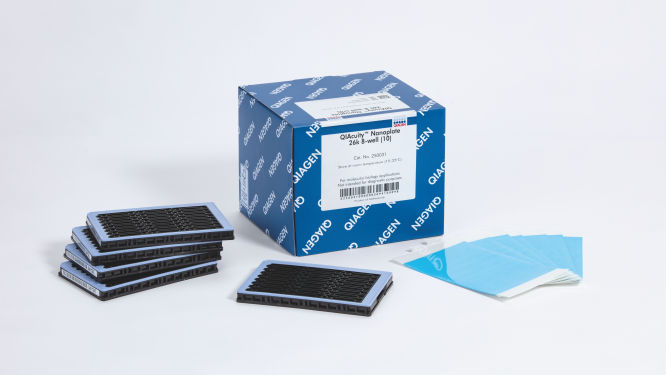
QIAcuity Nanoplate 26k 8-well (10)
N° de réf. / ID. 250031
10 QIAcuity Nanoplate 26k 8-well, 11 Nanoplate Seals
Connexion Pour ouvrir votre compte.
Type de produitAccessoires
QIAcuity Nanoplate
Nanoplate Seals
Nanoplate Tray
Nanoplate Adapter
Séparations par puits
26k
8.5k
Nombre de puits
8
24
Les Nanoplaques et accessoires QIAcuity sont destinés aux applications de biologie moléculaire. Ces produits ne sont pas conçus pour le diagnostic, la prévention ou le traitement des maladies.
✓ Traitement automatique des commandes en ligne 24 h/24 7 j/7
✓ Assistance technique et produits pertinente et professionnelle
✓ Commande (ou réapprovisionnement) rapide et fiable
Caractéristiques
- Quatre nanoplaques pour différents besoins applicatifs
- Jusqu’à 8 500 ou 26 000 partitions par puits
- Format SBS
Détails produit
Les QIAcuity Nanoplates sont des plaques de PCR numérique microfluidiques qui permettent d’analyser 8, 24 ou 96 échantillons avec jusqu’à 8 500 ou 26 000 partitions par puits. Les quatre nanoplaques sont conçues pour fonctionner sur les instruments de PCR numérique QIAcuity.
Ces nanoplaques ne peuvent être utilisées qu’avec le QIAcuity Digital PCR System. Utilisez le QIAcuity Nanoplate Adapter pour la manipulation de liquides et la configuration de la PCR automatisées dans une QIAcuity Nanoplate sur le QIAgility. Ensuite, chargez la plaque dans le QIAcuity Digital PCR System pour la réaction de dPCR.
Souhaitez-vous en savoir plus sur ce produit et être contacté par l’un de nos spécialistes de la dPCR ? Inscrivez-vous ici, et nous vous contacterons très prochainement.
Performances
Il s’agit de plaques spécialement conçues pour les réactions de PCR numérique dans les instruments QIAcuity. QIAGEN propose quatre types de nanoplaques qui sont toutes au format SBS, mais présentent différentes spécifications pour différents besoins applicatifs.
| Type | Couleur du cadre | Spécifications | Applications |
| Nanoplate 26K 8-well | Bleu clair |
8 puits × env. 26 000 partitions Réaction de dPCR de 40 µl par puits |
Détection des mutations rares, biopsie liquide, analyse de l’expression génique, détection des agents pathogènes, etc. |
| Nanoplate 26K 24-well | Bleu |
24 puits × env. 26 000 partitions Réaction de dPCR de 40 µl par puits |
Détection des mutations rares, biopsie liquide, analyse de l’expression génique, détection des agents pathogènes, etc. |
| Nanoplate 8,5K 24-well | Blanc |
24 puits × env. 8500 partitions Réaction de dPCR de 12 µl par puits |
Analyse des variations du nombre de copies, analyse de l’expression génique, quantification de banques NGS, détection des modifications du génome, etc. |
| Nanoplate 8,5K 96-well | Gris |
96 puits × env. 8500 partitions Réaction de dPCR de 12 µl par puits |
Principe
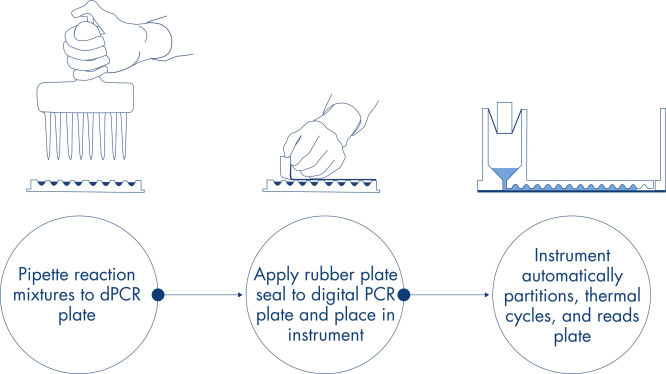
Vous pouvez obtenir, en seulement 3 étapes simples, le résultat de dPCR que vous voulez en moins de 2 heures : pipettez et chargez, effectuez l’expérience, puis analysez les résultats. Vous trouverez ici une description du principe de la réaction de dPCR sur nanoplaque.
Procédure
Comme dans les expériences de qPCR, la préparation des échantillons comprend le transfert du Master Mix, des sondes et des amorces sur une nanoplaque de 8, 24 ou 96 puits, suivi de l’ajout des échantillons. Le système intègre le partitionnement, le thermocyclage et l’imagerie dans un seul instrument entièrement automatisé qui permet aux utilisateurs de passer de l’échantillon aux résultats en moins de 2 heures. Il est possible d’effectuer l’analyse à l’aide de la suite logicielle, qui donne la concentration de la séquence cible en copies par microlitre et permet le contrôle qualité pour les échantillons positifs ou NTC. Cette analyse peut également être effectuée sur des ordinateurs à distance au sein du même réseau local (Local Area Network, LAN).
Applications
Associées avec le QIAcuity Digital PCR System et les kits de PCR QIAcuity, les QIAcuity Nanoplates facilitent les applications de PCR numérique telles que :
- La détection des mutations rares
- L’analyse des variations du nombre de copies
- L’analyse de l’expression génique
- La détection des agents pathogènes
- Le génotypage
- La recherche sur les miARN
- La thérapie génique et cellulaire
- La quantification de l’ADN résiduel
- La surveillance des eaux usées
Données et illustrations utiles
Une méthode sur plaques simple et rapide
Le partitionnement, le thermocyclage et l’imagerie sont intégrés dans un seul instrument entièrement automatisé, produisant des résultats en moins de deux heures. Les formats sur nanoplaque permettent l’automatisation frontale pour la préparation des échantillons, réduisant ainsi le temps de manipulation.
Ressources
Scientific documents (15)
A duplex assay for quantification and qualification of adeno-associated virus (AAV) using the QIAcuity® Digital PCR System Download
PDF (712.6KB)
This study tested a workflow for quantitation and qualification of AAV samples using a duplex assay on the QIAcuity dPCR instrument targeting both an insert (GFP) and the viral backbone (AAV2-ITR). With very low intra-assay and inter-assay CVs <6.5%, we demonstrate one of the main benefits of dPCR: reproducibility.
A front-end automation method for QIAcuity digital PCR plate setup using the QIAgility liquid handling instrument Download
PDF (1.2MB)
The QIAgility instrument is a liquid handler designed for automating PCR setup. For compatibility with the QIAcuity, we developed an adapter to secure up to two nanoplates onto the deck of the QIAgility. Using the QIAgility software, we have optimized a protocol that works for all nanoplate types and QIAcuity applications. Here we report the performance of a front end automated QIAgility dPCR nanoplate setup procedure for use with the QIAcuity dPCR system.
A workflow combining high-accuracy cell sorting with digital PCR for analysis of miRNAs in defined cell pools and single cells Download
PDF (2.4MB)
Here, we present a highly efficient, high-throughput workflow that combines two technologies, cellenONE and QIAcuity Digital PCR, to accurately analyze miRNAs in well-defined individual cells and populations of cells.
A workflow combining high-accuracy cell sorting with multiplex digital PCR for mitochondrial and genomic target copy number analysis Download
PDF (3MB)
Here, we present a workflow that combines two technologies, cellenONE and QIAcuity Digital PCR, which accelerate and streamline high-throughput analyses of target copy numbers in cultured cells. The workflow starts with detecting and sorting defined populations of cells as well as individual cells using cellenONE, followed by multiplexing dPCR on the QIAcuity platform. Copy number variations of target regions are then analyzed using the QIAcuity Software Suite, providing an intuitive and fast interpretation of results.
A workflow combining high-accuracy cell sorting with multiplex digital PCR for single-cell gene expression analysis Download
PDF (2.7MB)
With the cellenONE-QIAcuity workflow, we achieved high-throughput absolute quantification of low-abundance targets at the single-cell level. cellenONE’s single-cell isolation platform enabled real-time and 100% accurate single-cell isolation without compromising viability and transcript expression. This allowed us to use the exact number of intact cells for RT-dPCR reactions. Moreover, the elimination of the RNA purification step significantly reduced hands-on time, and QIAcuity’s probe-based chemistry allowed the multiplexing of up to five targets in a one-step RT-dPCR format with no or minimal optimization.
Assessment of the precision and sensitivity of QIAcuity nanoplate digital PCR vs. qPCR Download
PDF (2MB)
Here we compared the performance of qPCR and the nanoplate dPCR techniques. The digital PCR method on the QIAcuity significantly improved precision when measuring copy number states and sensitivity of mutation detection through absolute quantification and reduced standard error. This is advantageous in various applications, including copy number variation analysis, small fold-change and rare mutation detection.
Comparison of qPCR and dPCR methods for the quantification of Wolbachia densities and arthropod gene expression Download
PDF (154.2KB)
The goal of this work was to compare performance of quantitative PCR (qPCR) and digital PCR (dPCR) in the quantification of gene expression and Wolbachia abundances in Nasonia parasitoid wasps.
Impact of template addition volume and analyzed volume on digital PCR sensitivity Download
PDF (76.3KB)
Digital PCR is a superior method to qPCR for the detection and absolute quantification of low concentration target templates. There are multiple digital PCR systems on the market that differ in numerous aspects including the amount of dead volume, which is the volume that is loaded but not analyzed by the given instrument. While it has been speculated that dead volume could impact the sensitivity of dPCR applications, here we provide data to support the conclusion that the most important factors in determining the relative sensitivity of each system are template addition volume and template analyzed volume. In summary, data provided herein demonstrate that higher template addition volumes can overcome any limitations that dead volume may have on the sensitivity of a dPCR application.
Optimized in-process recombinant adeno-associated virus (rAAV) vector genome titer protocol using the QIAcuity Digital PCR System Download
PDF (143.2KB)
Here we provide an integrated rAAV genome titer method using the QIAcuity Digital PCR (dPCR) System with detailed parameters for high assay performance. Using this optimized method for pre-PCR handling of in-process rAAV samples, the results demonstrated that QIAcuity dPCR system generates the same level of accuracy and precision as the current gold standard ddPCR system but with much faster sample-to-result times (2 hours vs 7 hours) and higher overall throughput and scalability.
Here we report the use of saliva samples in combination with dPCR as a suitable alternative to screen for individuals infected with SARS-CoV-2.
Transferring and optimizing assays from quantitative PCR to digital PCR on the QIAcuity system Download
PDF (3.4MB)
Here we demonstrate how to optimize your assays on a microfluidic nanoplate-based digital PCR system, the QIAcuity, and provide recommendations for a seamless transfer. Moreover, the QIAcuity dPCR workflow is very similar to qPCR.
Vector-borne diseases identification and quantification vectored by mosquitoes using the QIAcuity Digital PCR System and qPCR Download
PDF (283.5KB)
The QIAcuity digital PCR system combined with the QIAcuity One-Step Viral RT-PCR Kit enables precise detection and quantitation of vector-borne viruses in mosquitoes. The results presented in this comparison study showed that digital PCR is a powerful tool for absolute quantitation of low abundant targets and is a more reliable detection method than qPCR. Multiplexing allows detection and quantitation of multiple targets in a single reaction more efficiently by increasing sample throughput at a reduced cost per target.
Safety Data Sheets (1)
Download Safety Data Sheets for QIAGEN product components.
Certificates of Analysis (1)
Brochures & Guides (1)
QIAcuity Digital PCR System Brochure Download
PDF (7.9MB)
Fast. Scalable. Reliable.
Operating software (27)
QIAcuity Software Suite Backup and Restore Scripts version 3.5
QIAcuity Volume Precision Factor (VPF) Download
ZIP (14.8KB)
Version 13 (July 2026)
The Volume Precision Factor (VPF) offers a unique feature to secure precision of concentration results obtained from a QIAcuity dPCR run.
In general, Nanoplates provide partitions of fixed sizes that enable a very precise way of sample concentration calculation. Potential variation of partition sizes in Nanoplate batches, caused by different microstructure molding forms, can be addressed by applying the batch specific VPF. Furthermore, the VPF includes well-specific volume information and therefore further increases precision of concentration calculation in each well of the Nanoplates.
Version 3.5
The QIAcuity Control Software is an integral part of the QIAcuity instrument. It provides a graphical user interface (GUI) for basic functions such as plate setup, changing the order of plates to be processed and monitoring run status in real time. When a run is complete, the data are stored in the instrument's memory and transferred to the connected QIAcuity Software Suite for analysis.
QIAcuity Control Software version 3.5 includes several improvements to enhance system security, troubleshooting and image acquisition reliability. The Control Software platform, underlying Ubuntu operating system and firmware have been updated. The upgrade to Ubuntu 22.04 LTS and .NET 10 provides access to current security patches and reduces cybersecurity risks. QIAGEN therefore recommends installing or updating to this software version.
Additional improvements include the automatic transfer of support packages to the QIAcuity Software Suite following a critical system error, reducing the need for manual transfer or support package generation. In addition, if a blurry reference image is detected, the system automatically retakes the image to support reliable image acquisition.
Detailed information about QIAcuity Control Software version 3.5 is available in the Release Notes, which can also be downloaded from the Technical Information section.
Note: The latest QIAcuity Control Software (CSW) version 3.5 is compatible only with QIAcuity Software Suite version 3.5. If only one software component is updated, a connection cannot be established between the QIAcuity Software Suite and the Control Software.
Both software are Long-Term Support (LTS) releases, and each offers an extended support period of 7 years from its respective release date.
Important: Follow the instructions provided in the QIAcuity User Manual. for software version 3.5 and in the Release Notes.
Note: In some cases, the CSW installation may fail with the message "Installation failed" due to excessive residual data on the instrument. Before retrying the update, select Force Clear under Tools > System Support in the installed CSW. Wait a few minutes for the Disk Space Usage display to update, perform the Force Clear process at least twice, and then run the update again.
It is strongly recommended to update the QIAcuity Software Suite first before proceeding with the QIAcuity Control Software.
Note: After you click Reboot during a Control Software upgrade or after changing the QIAcuity Software Suite connection, the login screen may briefly appear. Ignore the login screen and wait for the QIAcuity instrument to shut down and restart automatically.
If you are unsure how to proceed or require technical assistance, contact QIAGEN Technical Service.
QIAcuity Software Suite Log in to download
ZIP (949.2MB)
Version 3.5
The QIAcuity Software Suite enables users to set up plates, analyze results, and monitor run status in real time. The software is also used to configure the system and provides access to QIAcuity user management. It is designed to be installed on a Windows PC connected to one or more QIAcuity instruments. For this configuration, the QIAcuity instrument must be connected to a network via Ethernet. Alternatively, a direct cable connection can be established between the QIAcuity instrument and the notebook running the QIAcuity Software Suite. When connected to a network, up to 10 users can access the QIAcuity Software Suite through a browser installed on a client PC (Windows or Mac).
QIAcuity Software Suite version 3.5 has been expanded to include automated data analysis. This update introduces new thresholding algorithms for controls and samples, supports control-based thresholding and adds Quality Control (QC) parameters, including minimum valid partitions for controls and samples, expected concentration for positive controls, and maximum positive partitions for negative controls and non-template controls (NTCs). The application scope (channel-based or target-based) and severity level (warning or invalidation) can be customized.
Automated report creation enables users to preselect the content of Absolute Quantification reports and automatically generate a PDF when a run is complete. In addition, the software can be configured to automatically download selected CSV result files when a run is complete.
The CSV output file for Absolute Quantification analysis results now includes the applied thresholding strategy and QC metric results. The CSV plate layout file has been restructured to support automated analysis and thresholding settings.
Additional improvements include configurable password expiration, expanded dilution and conversion factors for controls (including positive controls, negative controls and non-template controls), and a copy-to-clipboard function for all analysis environments, along with other enhancements. QIAGEN therefore recommends installing or updating to this software version.
Detailed information about new features, improvements and bug fixes in QIAcuity Software Suite version 3.5 is available in the Release Notes, which can also be downloaded from the Technical Information section.
Note: The latest QIAcuity Software Suite version 3.5 is compatible only with QIAcuity Control Software (CSW) version 3.5. If only one software component is updated, a connection cannot be established between the QIAcuity Software Suite and the Control Software.
Both software are Long-Term Support (LTS) releases, and each offers an extended support period of 7 years from its respective release date.
Important: Follow the instructions provided in the QIAcuity User Manual for software version 3.5 and in the Release Notes.
It is strongly recommended to update the QIAcuity Software Suite first before proceeding with the QIAcuity Control Software.
If you are unsure how to proceed or require technical assistance, contact QIAGEN Technical Service.
QIAcuity Control Software Log in to download
ZIP (289.9MB)
Version 3.2
The QIAcuity Control Software is an integral part of the QIAcuity instrument. It offers a GUI (graphical user interface) for basic functionalities such as plate setup, changing the order of plates to be processed, and monitoring the status of runs in real time. After a run is completed, the data are stored on the instrument’s memory and are sent to the connected QIAcuity Software Suite for analysis.
The QIAcuity instrument CSW version 3.2 has been improved with enhanced error handling to prevent subsequent errors. Furthermore, a bug effecting to operate owned plates for users with the role technician or group leader has been fixed.
Detailed information about the QIAcuity Control Software 3.2 is available in the Release Note, which can also be downloaded under section Software Release Notes.
Note: The latest CSW version 3.2 is only compatible with the Software Suite version 3.2. If only one software component is updated, no connection between the Software Suite and the CSW can be established.
Important: Please follow the instructions provided in the QIAcuity User Manual for software version 3.2 and in the Release Note.
It is strongly recommended to update the QIAcuity Software Suite first before proceeding with the QIAcuity Control Software!
Note: After clicking reboot during CSW upgrade or change of Suite connection, the login screen may appear for short period. Please ignore it and wait for the QIAcuity instrument to shut down and restart itself.
Please contact QIAGEN Technical Services if you are unsure and require technical support.
QIAcuity Software Suite Log in to download
ZIP (847.2MB)
Version 3.2
The QIAcuity Software Suite enables the user to set up plates, analyze results, and monitor the status of runs in real time. This software is also used for the configuration of the system and provides access to the QIAcuity user management. The QIAcuity Software Suite is designed to be installed on a Windows PC that is connected to one or more QIAcuity instruments. For this configuration, the QIAcuity instrument needs to be connected to a network through Ethernet. Alternatively, a direct cable connection between the QIAcuity and the notebook where the QIAcuity Software Suite is running needs to be established. When connected to a network, up to 10 users may access the QIAcuity Software Suite via a browser installed on the client PC (Windows or Mac).
The QIAcuity Software Suite 3.2 now supports multiple targets of interest for Copy Number Variation as well as for Mutant Detection data analysis at once. In addition, the dilution and conversation function were improved and multiple pair (target/target or channel/channel) selections for 2D scatterplots analysis has been implemented.
The CSV output file of current results of analysis for absolute quantification now include QC parameters, such as rain, resolution and bandwidth, real cycled volume per partition, the mean RFU values for positives and negative bands, and the lambda value.
Further improvements are related to the QIAcuity Lab Automation Service, the custom cross talk matrix (CXTM), and other features.
Detailed information about new features, improvements, and bug fixes of the the QIAcuity Software Suite version 3.2 is available in the Release Note, which can also be downloaded under section Software Release Notes.
Note: The latest Software Suite version 3.2 is only compatible with the latest Control Software (CSW) version 3.2. If only one software component is updated, no connection between the Software Suite and the CSW can be established.
Important: Please follow the instructions provided in the QIAcuity User Manual for software version 3.2 and in the Release Note.
It is strongly recommended to update the QIAcuity Software Suite first before proceeding with the QIAcuity Control Software!
Please contact QIAGEN Technical Services if you are unsure and require technical support.
QIAcuity Software Suite Backup and Restore Scripts for version 3.1 or higher Log in to download
ZIP (95.6KB)
"
"
The QIAcuity backup and restore scripts are a standalone solution to backup all relevant user data of the QIAGEN Software Suite for disaster recovery and to restore the data on a new or existing QIAGEN Software Suite installation. The backup supports the QIAcuity Software Suite version 3.1 or higher and can be conducted manually or automatically by using of the Windows Task Scheduler.
Note: Windows Admin permission is needed to setup and perform an automated backup and for manual backup and restore.
For backup and restore of Software versions lower than 2.5, please refer to the QIAcuity Software Suite Backup and Restore Scripts for version 2.0, 2.1.7, 2.1.8, and 2.2.
For backup and restore of Software version 2.5, please refer to the QIAcuity Software Suite Backup and Restore Scripts for QIAcuity Software Suite 2.5 version 2.
For backup and restore of Software version 3.0, please refer to the QIAcuity Software Suite Backup and Restore Scripts for version 3.0.
Note: Windows Admin permission is needed to setup and perform an automated backup and for manual backup and restore.
Please read the QIAcuity Software Suite Backup and Restore Scripts document for more information and instructions how to use the scripts.
"
QIAcuity Control Software Log in to download
ZIP (321.6MB)
Version 3.1.3
The QIAcuity Control Software is an integral part of the QIAcuity instrument. It offers a GUI (graphical user interface) for basic functionalities such as plate setup, changing the order of plates to be processed, and monitoring the status of runs in real time. After a run is completed, the data are stored on the instrument’s memory and are sent to the connected QIAcuity Software Suite for analysis.
Version 3.1 supports dPCR assays up to a 12-plex by using amplitude multiplexing. In addition to the six optical channels available, this option enables two amplicons to be detected in the same channel. The option to use two channel combinations for LSS (Long Stokes Shift) dyes introduced with version 3.0 remains.
In addition, as introduced with QIAcuity Control Software 3.0, the run time for all instrument types (QIAcuity One, Four, and Eight) was optimized with introducing a new auto focus algorithm.
Moreover, a new functionality for the integration of a QIAcuity Lab Automation Service was implemented. It allows third-party lab automation software to control robotic devices to interact with the QIAcuity system, run dPCR experiments, and analyze results without any human interaction.
Detailed information about the QIAcuity Control Software 3.1.3 is available in the Release Note, which can also be downloaded under section Software Release Notes.
Note: The latest CSW version 3.1.3 is only compatible with the Software Suite version 3.1.1. If only one software component is updated, no connection between the Software Suite and the CSW can be established.
Important: Please follow the instructions provided in the QIAcuity User Manual for software version 3.1 and in the Release Note.
It is strongly recommended to update the QIAcuity Software Suite first before proceeding with the QIAcuity Control Software!
Note: After clicking reboot during CSW upgrade or change of Suite connection, the login screen may appear for short period. Please ignore it and wait for the QIAcuity instrument to shut down and restart itself.
Please contact QIAGEN Technical Services if you are unsure and require technical support.
QIAcuity Software Suite Log in to download
ZIP (663.1MB)
Version 3.1.1
The QIAcuity Software Suite enables the user to set up plates, analyze results, and monitor the status of runs in real time. This software is also used for the configuration of the system and provides access to the QIAcuity user management. The QIAcuity Software Suite is designed to be installed on a Windows PC that is connected to one or more QIAcuity instruments. For this configuration, the QIAcuity instrument needs to be connected to a network through Ethernet. Alternatively, a direct cable connection between the QIAcuity and the notebook where the QIAcuity Software Suite is running needs to be established. When connected to a network, up to 10 users may access the QIAcuity Software Suite via a browser installed on the client PC (Windows or Mac).
The new version 3.1.1 supports dPCR assays up to a 12-plex by using amplitude multiplexing. In addition to the six optical channels available, this option enables two amplicons to be detected in the same channel. The option to use two channel combinations for LSS (Long Stokes Shift) dyes introduced with version 3.0 remains.
This software version also offers an updated feature to create a custom cross talk matrix to address cross talk between neighboring channels for all multiplex assays.
In addition, a new functionality for the integration of a QIAcuity Lab Automation Service was implemented. It allows third-party lab automation software to control robotic devices to interact with the QIAcuity system, run dPCR experiments, and analyze results without any human interaction.
Detailed information about new features, improvements, and bug fixes of the the QIAcuity Software Suite version 3.1.1 is available in the Release Note, which can also be downloaded under section Software Release Notes.
Note: The latest Software Suite version 3.1 is only compatible with the latest Control Software (CSW) version 3.1.1. If only one software component is updated, no connection between the Software Suite and the CSW can be established.
Important: Please follow the instructions provided in the QIAcuity User Manual for software version 3.1.1 and in the Release Note.
It is strongly recommended to update the QIAcuity Software Suite first before proceeding with the QIAcuity Control Software!
Please contact QIAGEN Technical Services if you are unsure and require technical support.
Volume Precision Factor (VPF) Download
ZIP (11.2KB)
"
Version 11
The Volume Precision Factor (VPF) offers a unique feature to secure precision of concentration results obtained from a QIAcuity dPCR run.
In general, Nanoplates provide partitions of fixed sizes that enable a very precise way of sample concentration calculation. Potential variation of partition sizes in Nanoplate batches, caused by different microstructure molding forms, can be addressed by applying the batch specific VPF. Furthermore, the VPF includes well-specific volume information and therefore further increases precision of concentration calculation in each well of the Nanoplates.
"
The QIAcuity backup and restore scripts are a standalone solution to backup all relevant user data of the QIAGEN Software Suite for disaster recovery and to restore the data on a new or existing QIAGEN Software Suite installation. The backup supports the QIAcuity Software Suite version 3.0 and can be conducted manually or automatically by using of the Windows Task Scheduler.
Note: Windows Admin permission is needed to setup and perform an automated backup and for manual backup and restore.
For backup and restore of Software versions lower than 2.5, please refer to the QIAcuity Software Suite Backup and Restore Scripts for version 2.0, 2.1.7, 2.1.8, and 2.2.
For backup and restore of Software version 2.5, please refer to the QIAcuity Software Suite Backup and Restore Scripts for QIAcuity Software Suite 2.5 version 2
Note: Windows Admin permission is needed to setup and perform an automated backup and for manual backup and restore.
Please read the QIAcuity Software Suite Backup and Restore Scripts document for more information and instructions how to use the scripts.
QIAcuity Control Software Log in to download
ZIP (321.2MB)
Version 3.0
The QIAcuity Control Software is an integral part of the QIAcuity instrument. It offers a GUI (graphical user interface) for basic functionalities such as plate setup, changing the order of plates to be processed, and monitoring the status of runs in real time. After a run is completed, the data are stored on the instrument’s memory and are sent to the connected QIAcuity Software Suite for analysis.
The new version 3.0 of the QIAcuity CSW supports dPCR assays up to a 8-plex by using six optical channels for six standard dyes and the additional use of two channel combinations for LSS (Long Stokes Shift) dyes, which can be selected from five different dye channel combinations. In addition, the new version has optimized the run time for all instrument types (QIAcuity One, Four, and Eight) with introducing a new auto focus algorithm.
Detailed information about the QIAcuity Control Software 3.0 is available in the Release Note, which can also be downloaded under section Software Release Notes.
Note: The latest CSW version 3.0 is only compatible with the Software Suite version 3.0. If only one software component is updated, no connection between the Software Suite and the CSW can be established.
Important: Please follow the instructions provided in the QIAcuity User Manual for software version 3.0 and in the Release Note.
It is strongly recommended to update the QIAcuity Software Suite first before proceeding with the QIAcuity Control Software!
Note: After clicking reboot during CSW upgrade or change of Suite connection, the login screen may appear for short period. Please ignore it and wait for the QIAcuity instrument to shut down and restart itself.
Please contact QIAGEN Technical Services if you are unsure and require technical support.
QIAcuity Software Suite Log in to download
ZIP (663.9MB)
Version 3.0
The QIAcuity Software Suite enables the user to set up plates, analyze results, and monitor the status of runs in real time. This software is also used for the configuration of the system and provides access to the QIAcuity user management. The QIAcuity Software Suite is designed to be installed on a Windows PC that is connected to one or more QIAcuity instruments. For this configuration, the QIAcuity instrument needs to be connected to a network through Ethernet. Alternatively, a direct cable connection between the QIAcuity and the notebook where the QIAcuity Software Suite is running needs to be established. When connected to a network, up to 10 users may access the QIAcuity Software Suite via a browser installed on the client PC (Windows or Mac).
The new version 3.0 supports dPCR assays up to a 8-plex by using six optical channels for six standard dyes and the additional use of two channel combinations for LSS (Long Stokes Shift) dyes, which can be selected from five different dye channel combinations. It also offers a new feature to create a custom cross talk matrix to address cross talk between neighboring channels for all multiplex assays.
In this new version, an overview presenting individual 2D scatterplots of all selected wells is introduced. In addition, a sample-based 2D scatterplot analysis of individual replicates is provided. The new software also provides a reaction mix template functionality for the creation of a master mix including a custom cross talk matrix.
Detailed information about the QIAcuity Software Suite version 3.0 is available in the Release Note, which can also be downloaded under section Software Release Notes.
Note: The latest Software Suite version 3.0 is only compatible with the latest Control Software (CSW) version 3.0. If only one software component is updated, no connection between the Software Suite and the CSW can be established.
Important: Please follow the instructions provided in the QIAcuity User Manual for software version 3.0 and in the Release Note.
It is strongly recommended to update the QIAcuity Software Suite first before proceeding with the QIAcuity Control Software!
Please contact QIAGEN Technical Services if you are unsure and require technical support.
QIAcuity Software Suite Backup and Restore Scripts For QIAcuity Software Suite 2.5 version 2 Log in to download
ZIP (52.1KB)
The QIAcuity backup and restore scripts are a standalone solution to backup all relevant user data of the QIAGEN Software Suite for disaster recovery and to restore the data on a new or existing QIAGEN Software Suite installation. The backup supports the QIAcuity Software Suite version 2.5 and can be conducted manually or automatically by using of the Windows Task Scheduler.
Note: Windows Admin permission is needed to setup and perform an automated backup and for manual backup and restore.
For backup and restore of Software versions lower than 2.5, please refer to the QIAcuity Software Suite Backup and Restore Scripts for version 2.0, 2.1.7, 2.1.8, and 2.2.
Note: Windows Admin permission is needed to setup and perform an automated backup and for manual backup and restore.
Please read the QIAcuity Software Suite Backup and Restore Scripts document for more information and instructions how to use the scripts.
Volume Precision Factor (VPF) Download
ZIP (9.9KB)
Version 10.1
The Volume Precision Factor (VPF) offers a unique feature to secure precision of concentration results obtained from a QIAcuity dPCR run.
In general, Nanoplates provide partitions of fixed sizes that enable a very precise way of sample concentration calculation. Potential variation of partition sizes in Nanoplate batches, caused by different microstructure molding forms, can be addressed by applying the batch specific VPF. Furthermore, the VPF includes well-specific volume information and therefore further increases precision of concentration calculation in each well of the Nanoplates.
Important note:
The Volume Precision Factor file version 10.1 is compatible with the QIAcuity Software Suite version 2.1.8.23 or higher. All lower versions, namely 1.2.18, 2.0.20, 2.1.7.182, and 2.1.8.20, require a QIAcuity Software Suite patch to be installed prior the upload of VPF version 10.1. Please read the Release Note for QIAcuity Software Suite Volume Precision Factor (VPF) Patches for more information.
If you are using QIAcuity Software Suite versions older than 2.1.8.23, please consider updating your Software Suite and the Instrument Control Software (CSW) to the most recent version prior the upload of VPF version 10.1. After updating to the latest QIAcuity Software Suite software version, no patching is needed. If you are not able to update your QIAcuity Software Suite, please run the patch for your Software Suite version following the instructions provided in the Release Note for QIAcuity Software Suite Volume Precision Factor (VPF) Patches.
After downloading and updating the VPF file within the QIAcuity Software Suite, the VPF is applied automatically to the analysis of a corresponding Nanoplate batch. The VPF file includes information from all available microstructure molding forms and connected Nanoplate batches. It will be stored on the PC where the QIAcuity Software Suite is installed.
QIAcuity Software Suite Log in to download
ZIP (646.9MB)
Version 2.5.0.1
The QIAcuity Software Suite enables the user to set up plates, analyze results, and monitor the status of runs in real time. This software is also used for the configuration of the system and provides access to the QIAcuity user management. The QIAcuity Software Suite is designed to be installed on a Windows PC that is connected to one or more QIAcuity instruments. For this configuration, the QIAcuity instrument needs to be connected to a network through Ethernet. Alternatively, a direct cable connection between the QIAcuity and the notebook where the QIAcuity Software Suite is running needs to be established. When connected to a network, up to 10 users may access the QIAcuity Software Suite via a browser installed on the client PC (Windows or Mac).
The new version 2.5 of the QIAcuity Software Suite supports assay development by providing an essential temperature gradient functionality. It also offers a new feature that provides calculation of initial concentration of samples by using various dilution factors. In addition, concentration units may be converted into various pre-defined or user-defined units. The new software also offers an integrity value and concentration value per group for up to 5-plex added to the multiple occupancy CSV file export, for example, for the evaluation of AAV (adeno-associated virus) assays and for drop-off assays.
In this new version the initial loading time and the time for recalculation of 1D/2D scatterplot and for signal map image has been reduced, leading to a much faster performance.
Detailed information about the QIAcuity Software Suite version 2.5 is available in the Release Note, which can also be downloaded under section “Software Release Notes”.
Note: The latest Software Suite version 2.5 is only compatible with the latest Control Software (CSW) version 2.5. If only one software component is updated, no connection between the Software Suite and the CSW can be established.
Important: Please follow the instructions provided in the QIAcuity User Manual for software version 2.5 and in the Release Note.
It is strongly recommended to update the QIAcuity Software Suite first before proceeding with the QIAcuity Control Software!
Please contact QIAGEN Technical Services if you are unsure and require technical support.
QIAcuity Control Software Log in to download
ZIP (322.2MB)
Version 2.5
The QIAcuity Control Software is an integral part of the QIAcuity instrument. It offers a GUI (graphical user interface) for basic functionalities such as plate setup, changing the order of plates to be processed, and monitoring the status of runs in real time. After a run is completed, the data are stored on the instrument’s memory and are sent to the connected QIAcuity Software Suite for analysis.
The new version 2.5 of the QIAcuity CSW offers a configurable auto logoff times which enables users to turn off or define logoff times per instrument. In addition the new version supports assay development by providing an essential temperature gradient functionality.
Furthermore improvements were implemented, for example, for the accuracy of time estimation for various software steps.
Detailed information about the QIAcuity Control Software version 2.5 is available in the Release Note, which can also be downloaded under section Software Release Notes.
Note: The latest CSW version 2.5 is only compatible with the Software Suite version 2.5. If only one software component is updated, no connection between the Software Suite and the CSW can be established.
Important: Please follow the instructions provided in the QIAcuity User Manual for software version 2.5 and in the Release Note.
It is strongly recommended to update the QIAcuity Software Suite first before proceeding with the QIAcuity Control Software!
Note: After clicking reboot during CSW upgrade or change of Suite connection, the login screen may appear for short period. Please ignore it and wait for the QIAcuity instrument to shut down and restart itself.
Please contact QIAGEN Technical Services if you are unsure and require technical support.
QIAcuity Software Suite Backup and Restore Scripts for QIAcuity Software Suite version 2.2 or lower Log in to download
ZIP (5.3KB)
The QIAcuity backup and restore scripts are a standalone solution to backup all relevant user data of the QIAGEN Software Suite for disaster recovery and restore the data on a new or existing QIAGEN Software Suite installation. The following QIAcuity Software Suite versions are supported: 2.0, 2.1.7, 2.1.8, and 2.2. The backup can be conducted manually or automated by using of the Windows task scheduler.
Note: Windows Admin permission is needed to setup and perform an automated backup and for manual backup and restore.
Please read the QIAcuity Software Suite Backup and Restore Scripts document for more information and instructions how to use the scripts.
QIAcuity Software Suite Volume Precision Factor (VPF) Patch for Version 1.2.18 (SOW-974) Log in to download
ZIP (159.6MB)
The following QIAcuity Software Suite Volume Precision Factor (VPF) patches have been released to enable compatibility with VPF file version 6.0 or higher for QIAcuity Software Suite version 1.2.18. As the abovementioned QIAcuity Software Suite versions do not allow loading a VPF zip file including more than 20 different individual VPF files, a patch is needed to allow the software for loading VPF zip files version 6.0 or higher. This technical limitation is solved from QIAcuity Software Suite version 2.1.8.23 onwards.
If you are using the QIAcuity Software Suite version 1.2.18, please consider updating your Software Suite and the Instrument Control Software (CSW) to the most recent version. After updating to the latest software version, no patching is needed.
If you are not able to update your QIAcuity Software Suite, please install the QIAcuity Software Suite VPF patch for QIAcuity Software Suite version 1.2.18 before loading VPF file version 6 or higher. Additional information and instructions may be found on the Release Note: QIAcuity Software Suite Volume Precision Factor (VPF) Patches.
QIAcuity Software Suite Volume Precision Factor (VPF) Patch for Version 2.0.20 (SOW-975) Log in to download
ZIP (236.2MB)
The following QIAcuity Software Suite Volume Precision Factor (VPF) patches have been released to enable compatibility with VPF file version 6.0 or higher for QIAcuity Software Suite versions 2.0.20. As the abovementioned QIAcuity Software Suite versions do not allow loading a VPF zip file including more than 20 different individual VPF files, a patch is needed to allow the software for loading VPF zip files version 6.0 or higher. This technical limitation is solved from QIAcuity Software Suite version 2.1.8.23 onwards.
If you are using the QIAcuity Software Suite version 2.0.20, please consider updating your Software Suite and the Instrument Control Software (CSW) to the most recent version. After updating to the latest software version, no patching is needed.
If you are not able to update your QIAcuity Software Suite, please install the QIAcuity Software Suite VPF patch for QIAcuity Software Suite version 2.0.20 before loading VPF file version 6 or higher. Additional information and instructions may be found on the Release Note: QIAcuity Software Suite Volume Precision Factor (VPF) Patches.
QIAcuity Software Suite Volume Precision Factor (VPF) Patch for Version 2.1.7.182 (SOW-976) Log in to download
ZIP (237.8MB)
The following QIAcuity Software Suite Volume Precision Factor (VPF) patches have been released to enable compatibility with VPF file version 6.0 or higher for QIAcuity Software Suite version 2.1.7.182. As the abovementioned QIAcuity Software Suite versions do not allow loading a VPF zip file including more than 20 different individual VPF files, a patch is needed to allow the software for loading VPF zip files version 6.0 or higher. This technical limitation is solved from QIAcuity Software Suite version 2.1.8.23 onwards.
If you are using the QIAcuity Software Suite version 2.1.7.182, please consider updating your Software Suite and the Instrument Control Software (CSW) to the most recent version. After updating to the latest software version, no patching is needed.
If you are not able to update your QIAcuity Software Suite, please install the QIAcuity Software Suite VPF patch for QIAcuity Software Suite version 2.1.7.182 before loading VPF file version 6 or higher. Additional information and instructions may be found on the Release Note: QIAcuity Software Suite Volume Precision Factor (VPF) Patches.
QIAcuity Software Suite Volume Precision Factor (VPF) Patch for Version 2.1.8.20 (SOW-977) Log in to download
ZIP (238.4MB)
The following QIAcuity Software Suite Volume Precision Factor (VPF) patches have been released to enable compatibility with VPF file version 6.0 or higher for QIAcuity Software Suite version 2.1.8.20. As the abovementioned QIAcuity Software Suite versions do not allow loading a VPF zip file including more than 20 different individual VPF files, a patch is needed to allow the software for loading VPF zip files version 6.0 or higher. This technical limitation is solved from QIAcuity Software Suite version 2.1.8.23 onwards.
If you are using the QIAcuity Software Suite version 2.1.8.20, please consider updating your Software Suite and the Instrument Control Software (CSW) to the most recent version. After updating to the latest software version, no patching is needed.
If you are not able to update your QIAcuity Software Suite, please install the QIAcuity Software Suite VPF patch for QIAcuity Software Suite version 2.1.8.20 before loading VPF file version 6 or higher. Additional information and instructions may be found on the Release Note: QIAcuity Software Suite Volume Precision Factor (VPF) Patches.
QIAcuity Control Software Log in to download
ZIP (411.8MB)
Version 2.2
The QIAcuity Control Software is an integral part of the QIAcuity instrument. It offers a GUI (graphical user interface) for basic functionalities such as plate setup, changing the order of plates to be processed, and monitoring the status of runs in real time. After a run is completed, the data are stored on the instrument’s memory and are sent to the connected QIAcuity Software Suite for analysis.
The new Version 2.2 of the QIAcuity software (QIAcuity Software Suite v 2.2 and QIAcuity CSW v 2.2.) offers improvements for users working under GMP by adding a user ID validation during the report signing and the addition of timezone offset stamp for audit trail entries and for result report data. Furthermore, the addition of a standard deviation and coefficient of variance calculation in percentage of mean concentration calculation for replicates where implemented. In addition, the instrument camera stability was improved and an internal validation method was implemented.
Detailed information about the QIAcuity Control Software version 2.2 is available in the Release Note, which can also be downloaded under section “Software Release Notes”.
Note: The latest CSW version 2.2 is only compatible with the Software Suite version 2.2. If only one software component is updated, no connection between the Software Suite and the CSW can be established.
Important: Please follow the instructions provided in the QIAcuity User Manual for software version 2.2 and in the Release Note.
It is strongly recommended to update the QIAcuity Software Suite first before proceeding with the QIAcuity Control Software.
Note: After clicking reboot during CSW upgrade or change of Suite connection, login screen may appear for short period. Please ignore it and wait for the QIAcuity instrument to shut down and restart itself.
Please contact QIAGEN Technical Services if you are unsure and require technical support.
QIAcuity Software Suite Log in to download
ZIP (558.8MB)
Version 2.2
The QIAcuity Software Suite enables the user to set up plates, analyze results, and monitor the status of runs in real time. This software is also used for the configuration of the system and provides access to the QIAcuity user management. The QIAcuity Software Suite is designed to be installed on a Windows PC that is connected to one or more QIAcuity instruments. For this configuration, the QIAcuity instrument needs to be connected to a network through Ethernet. Alternatively, a direct cable connection between the QIAcuity and the notebook where the QIAcuity Software Suite is running needs to be established. When connected to a network, up to 10 users may access the QIAcuity Software Suite via a browser installed on the client PC (Windows or Mac).
The new version 2.2 of the QIAcuity software (QIAcuity Software Suite v 2.2 and QIAcuity CSW v 2.2.) offers improvements for users working under GMP by adding a user ID validation during the report signing and the addition of timezone offset stamp for audit trail entries and for result report data. Furthermore, the addition of a standard deviation and coefficient of variance calculation in percentage of mean concentration calculation for replicates where implemented. In addition, the instrument camera stability was improved and an internal validation method was implemented.
Detailed information about the QIAcuity Software Suite version 2.2 is available in the Release Note, which can also be downloaded under section “Software Release Notes”.
Note: The latest Software Suite version 2.2 is only compatible with the latest Control Software (CSW) version 2.2. If only one software component is updated, no connection between the Software Suite and the CSW can be established.
Important: Please follow the instructions provided in the QIAcuity User Manual for software version 2.2 and in the Release Note.
It is strongly recommended to update the QIAcuity Software Suite first before proceeding with the QIAcuity Control Software.
Please contact QIAGEN Technical Services if you are unsure and require technical support.
QIAcuity Control Software Log in to download
ZIP (408.2MB)
Version 2.1.8
The QIAcuity Control Software (CSW) is an integral part of the QIAcuity instrument. It offers a GUI (graphical user interface) for basic functionalities such as plate setup, changing the order of plates to be processed, and monitoring the status of runs in real time. After a run is completed, the data are stored on the instrument’s memory and are sent to the connected QIAcuity Software Suite for analysis.
The new version 2.1.8 of the QIAcuity software (QIAcuity Software Suite version 2.1.8 and QIAcuity CSW version 2.1.8) offers bug fixes for repeated network connection issues and improved error handling. In addition, it fixes issues seen with latest versions of Microsoft Edge and Google Chrome browsers as well as issues seen with read-only plates after a software update.
Detailed information about the QIAcuity Control Software version 2.1.8 is available in the Release Note, which can also be downloaded under section “Software Release Notes”.
Note: The latest CSW version 2.1.8 is only compatible with the latest Software Suite version 2.1.8. If only one software component is updated, no connection between the Software Suite and the CSW can be established.
Important: Please follow the instructions provided in the QIAcuity User Manual for software version 2.1 and in the Release Note. It is strongly recommended to update the QIAcuity Software Suite first before proceeding with the QIAcuity Control Software!
Please contact QIAGEN Technical Services if you are unsure and require technical support.
QIAcuity Software Suite Log in to download
ZIP (556.9MB)
Version 2.1.8
The QIAcuity Software Suite enables the user to set up plates, analyze results, and monitor the status of runs in real time. This software is also used for the configuration of the system and provides access to the QIAcuity user management. The QIAcuity Software Suite is designed to be installed on a Windows PC that is connected to one or more QIAcuity instruments. For this configuration, the QIAcuity instrument needs to be connected to a network through Ethernet. Alternatively, a direct cable connection between the QIAcuity and the notebook where the QIAcuity Software Suite is running needs to be established. When connected to a network, up to 10 users may access the QIAcuity Software Suite via a browser installed on the client PC (Windows or Mac).
The new version 2.1.8 of the QIAcuity software (QIAcuity Software Suite version 2.1.8 and QIAcuity CSW version 2.1.8.) offers bug fixes for repeated network connection issues and improved error handling. In addition, it fixes issues seen with latest versions of Microsoft Edge and Google Chrome browsers as well as issues seen with read-only plates after a software update.
Detailed information about the QIAcuity Software Suite version 2.1.8 is available in the Release Note, which can also be downloaded under section “Software Release Notes”.
Important: Please ensure that updating to QIAcuity Software Suite version 2.1.8 is performed by the same Windows admin user using the same Windows login name that installed the previous QIAcuity Software Suite version. In case you cannot use the same Windows login name or the software update resulted in the browser error message "Can't reach this page" please contact our Technical Services for additional instructions.
Note: The latest Software Suite version 2.1.8 is only compatible with the latest Control Software (CSW) version 2.1.8. If only one software component is updated, no connection between the Software Suite and the CSW can be established.
Important: Please follow the instructions provided in the QIAcuity User Manual for software version 2.1 and in the Release Note. It is strongly recommended to update the QIAcuity Software Suite first before proceeding with the QIAcuity Control Software!
Please contact QIAGEN Technical Services if you are unsure and require technical support.
QIAcuity Software Suite Log in to download
ZIP (389.5MB)
Version 1.2
A newer version of the Software Suite is available. Please use this version for the update of older plates if required.
The QIAcuity Software Suite 1.2 is designed to be installed on a Windows PC that is connected to one or more QIAcuity instruments. The QIAcuity Software Suite enables the user to set up plates, analyze results, and monitor the status of runs in real time. For this configuration, the QIAcuity instrument needs to be connected to a network through Ethernet. Alternatively, a direct cable connection between the QIAcuity and the notebook where the QIAcuity Software Suite is running needs to be established. When connected to a network, up to 10 users may access the QIAcuity Software Suite via a browser installed on the client PC (Windows or Mac).
The following browsers are supported in the QIAcuity Software Suite:
-Mozilla Firefox (version 64.0.2 or higher)
-Microsoft Edge (version 44.17763.1.0 or higher)
-Google Chrome (version 71.0.3578.98 or higher)
The new QIAcuity Software Suite 1.2 offers a functionality that enables users of the QIAcuity Software 1.1.3 to upgrade to the new version while keeping the library of previously stored plate runs.
Note: If you have exported plates from QIAcuity Software Suite 1.1.3 that you would like to import and use in QIAcuity Software Suite 1.2, you will need to import the plates before upgrading from version 1.1.3 to version 1.2. You may then export the plates again. Future software version starting from QIAcuity Software Suite 2.0 will facilitate import of plates from previous QIAcuity Software Suite versions.
The new improvements are as follows:
-Support for the Nanoplate 8.5k 24-well
-Hyperwell functionality to combine several wells to one combined well for analysis
-Automated plate archiving functionality
-Functionality to show the number of single/double positives in 2D scatterplots
-VPF (Volume Precision Factor) to further improve concentration calculation (see related resources)
-Additional improvements for stabilization and troubleshooting
Software-related downloads (24)
Release Note: QIAcuity Software Suite (v.3.5) Download
PDF (139.4KB)
Version 3.5
Release Note: QIAcuity Instrument CSW (v.3.5) Download
PDF (124.9KB)
Version 3.5
Release Note: QIAcuity Control Software Download
PDF (886.3KB)
Version 2.1
Release Note: QIAcuity Control Software (v3.0) Download
PDF (137.3KB)
Version 3.0
Release Note: QIAcuity Control Software (v3.1) Download
PDF (164.8KB)
Version 3.1
For Version 1.0
For Version 2.0
Release Note: QIAcuity Instrument CSW (v.2.1.8) Download
PDF (913.7KB)
Version 2.1.8
Release Note: QIAcuity Instrument CSW (v.2.2) Download
PDF (509.2KB)
Version 2.2
Release Note: QIAcuity Instrument CSW (v.2.5) Download
PDF (113.1KB)
Version 2.5
Release Note: QIAcuity Instrument CSW (v.3.1.3) Download
PDF (139.3KB)
Version 3.1.3
Release Note: QIAcuity Instrument CSW (v.3.2) Download
PDF (111.4KB)
Version 3.2
Release Note: QIAcuity Software Suite Download
PDF (85.8KB)
For Version 2
Release Note: QIAcuity Software Suite Download
PDF (934.8KB)
Version 2.1
Release Note: QIAcuity Software Suite Download
PDF (69.6KB)
For Version 1.2
Release Note: QIAcuity Software Suite (v.2.1.8) Download
PDF (935.3KB)
Version 2.1.8
Release Note: QIAcuity Software Suite (v.2.2) Download
PDF (932.3KB)
Version 2.2
Version 2.5.0.0
Version 2.5.0.1
Release Note: QIAcuity Software Suite (v.3.2) Download
PDF (158.3KB)
Version 3.2
Release Note: QIAcuity Software Suite (v3.0) Download
PDF (131.9KB)
Version 3.0
Release Note: QIAcuity Software Suite (v3.1) Download
PDF (156.4KB)
Version 3.1
Release Note: QIAcuity Software Suite (v3.1.1) Download
PDF (204.3KB)
Version 3.1.1
User Manuals (4)
For QIAcuity Software Suite version 3.5
For QIAcuity Software Suite versions 3.1 and 3.2
QIAcuity Application Guide Download
PDF (4.9MB)
May 2025
FAQ
Is it possible to change voltage set-up from 110V to 230V on the QIAcuity instruments?
This is not needed. The QIAcuity is equipped with a flexible power supply technology and operates within a range of 100–240V AC, 50/60 Hz, 1500 VA (max).
FAQ-3761
Can I see error codes on the instrument touchscreen?
The instrument software GUI shows error codes including a description and information how to resolve the error. The instrument touchscreen shows an alarm icon in the upper right corner that turns red in case of an instrument failure. Accessing the System Status in the Tool tab allows users to clear errors. Rebooting of the instrument is required to complete the removal of the error. Please do not skip this step. You may always contact QIAGEN Technical Services in case of any question.
FAQ-3763
What is the scope of a regular maintenance of the QIAcuity?
The user manual contains instructions on how to perform a regular cleaning and decontamination, and how to replace air filters on the QIAcuity instruments. A regular maintenance reduces the dust in the instrument and therefore minimizes the presence of dust particles on the nanoplate, which might interfere with the plate analysis.
FAQ-3765
What is the impact of not applying the latest VPF? Can I reanalyze previously obtained results after installing the latest VPF?
If you had run a nanoplate for which the installed VPF misses the specific factor, the software will notify you. If you then analyze without the specific VPF, the impact depends on the variation of the partition volume of the new Nanoplate batch compared to the latest. Typically this variation is ±6–7% (approx. 5% CV over the entire plate). The analysis may be repeated after updating the VPF file. After installing the latest VPF and re-analysis of the run, a copy of the plate is generated in the QIAcuity Software Suite including the new results.
FAQ-3769
Can I see on the QIAcuity Software Suite report file if the VPF (Volume Precision Factor) has been used or not?
Yes, the report includes a notification if the matching VPF was missing and, therefore, not applied to the analysis. If the matching VPF was applied there is no notification on the report.
FAQ-3770
Is it necessary to reanalyze a plate with VPF (Volume Precision Factor) that was already processed using a QIAcuity instrument that was purchased in 2020?
If you had analyzed your nanoplates without VFP, the impact depends on the variation of the partition volume of the new nanoplate batch compared to the latest. The VPF reduces the CV from approximately 5% to 2%. We recommend to reanalyze results in case the data originated from different wells (e.g., copy number variations or gene expression data sets for which the reference sample was measured in a different well). Results obtained across different plates should also be r-analyzed. A reanalysis is not required for assay data that were analyzed within the same well (e.g., mutation rate determination using two channels within the same well).
FAQ-3771
Can I prepare a dPCR reaction directly in QIAcuity Nanoplate?
A standard PCR plate is required to set up dPCR reaction before transferring it to the nanoplate to ensure a proper mixing of the reaction mix before partitioning.
FAQ-3774
Can I use a custom master mix instead of a QIAGEN master mix?
QIAGEN master mixes are optimized for nanoplate microfluidics and are recommended to be used with our dPCR system. They also include an optimized reference dye required for proper analysis.
FAQ-3777
How to prepare DNA prior to dPCR?
All DNA samples used in reaction mixes should show similar quality and quantity, which can easily be assessed using UV spectrophotometry. DNA samples with an average length of ≥20 kb (e.g., genomic DNA purified via spin column with silica membrane) should be fragmented by restriction digestion before partitioning. Enzymatic fragmentation of larger DNA ensures an even distribution of template throughout the QIAcuity Nanoplate, which in turn leads to an accurate and precise quantification.
FAQ-3778
What are the storage conditions and expiry date of QIAcuity consumables?
The QIAcuity Probe PCR Kit should be stored immediately upon receipt at –30 to –15°C in a constant-temperature freezer and protected from light. The QIAcuity Probe PCR master mix can also be stored protected from light at 2–8°C. Components are stable for 12 months, unless otherwise indicated on the label.
The QIAcuity EG PCR Kit should be stored immediately upon receipt at –30 to –15°C in a constant-temperature freezer and protected from light. The QIAcuity EG PCR master mix can also be stored protected from light at 2–8°C. Components are stable for 6 months, unless otherwise indicated on the label.
The QIAcuity Nanoplates does not have expiry date and are stable for at least 1 year when stored at RT.
FAQ-3780
Can I use the QIAcuity Nanoplate in more than one runs?
The plate is designed for a single use run. For example, even if only 30 samples are loaded into the 96-well plate, a whole plate will be sealed by the roller. It can't be unsealed and used for another run. The QIAcuity Software won’t allow to set up a separate experiment for the same nanoplate to avoid that previously processed plates being not partitioned a second time.
FAQ-3781
Can I optimize a dPCR assay on the QIAcuity using gradient temperature?
An essential temperature gradient functionality was introduced with software version 2.5. When updating older software versions to 2.5, each QIAcuity instrument will offer the temperature gradient and may be used to find the best cycling temperature for new dPCR assays. When running a QIAcuity Four or a QIAcuity Eight, all plates may have their own temperature profile, including the option for a temperature gradient.
FAQ-3783
What is the VPF (Volume Precision Factor)?
The VPF provides a set of well-specific and molding form-specific factors used to specify the exact reaction volume of a nanoplate, thus increasing the concentration calculation of each well.
FAQ-3784
When and how often do I need a new VPF (Volume Precision Factor)?
In general, nanoplates provide partitions of fixed sizes that enable a very precise way of sample concentration calculation. If a new molding form is used for nanoplate manufacturing, potential variation of partition sizes can be addressed by applying the molding form-specific VPF. Thus, each time a new molding form is used, a new VPF is created and made available. Currently, the VPF is updated once every 3–6 months.
FAQ-3785
Is a standard curve needed in dPCR?
In dPCR we measure the absolute concentration of targets at endpoint reaction. Concentrations of unknowns can be determined based on dPCR results observed (number of negatives, number of positives, and partition volume analyzed).
FAQ-3786
Country and Language
Follow Us
Contact Us
This site is protected by reCAPTCHA and the Google Privacy Policy and Terms of Service apply.
Sample to Insight
© QIAGEN 2013–26. All rights reserved