- Product Finder
- Experiment Configurator
- Discovery & Translational Research
- Diagnostics & Clinical Research
- Human ID & Forensics
- Next-Generation Sequencing
- Instruments & Automation
- Informatics & Data
- Services
- Strategic partnerships
- Top Sellers
- New Solutions
- Shop
- Applications & Insights Overview
- Research & Technology
- Diagnostic & Clinical
- Applied & Industrial
- Digital Tools & Platforms
- Plan your experiment
- Strategic partnerships
- Knowledge & Support Overview
- Service Solutions
- Events & Webinars
- Knowledge Hub
- Quality, Environmental, Health & Safety
- Product & Technical Support
- Ordering Support
- Resources
- Safety Data Sheets
- Product FAQ

✓ 24/7 automatic processing of online orders
✓ Knowledgeable and professional Product & Technical Support
✓ Fast and reliable (re)-ordering
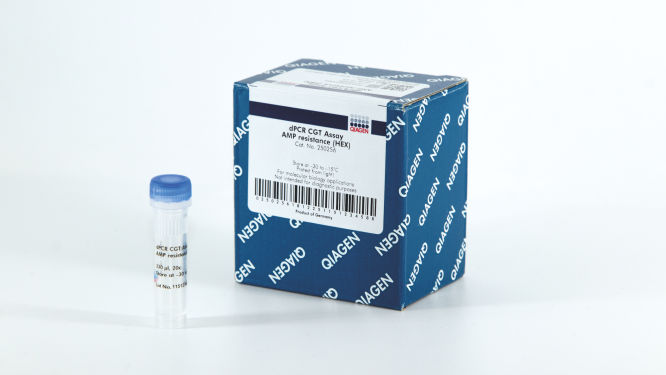
dPCR CGT Assay 5' LTR (FAM)
Cat no. / ID. 250319
For 500x12 µL reactions (20x): QIAGEN Cell and Gene Therapy assay for 5' LTR to be used with the QIAcuity dPCR system.
Log in To see your account pricing.
Kit componentKit
LV-specific targets
Reporter/Resistance
Reference genes
AAV-specific target
Regulatory elements
Promoters/Enhancer
QIAcuity Probe PCR Kit
QIAcuity MasterMix (2x1mL)
Detection of
5’ LTR
RRE
Psi
Dye
FAM
HEX
Cy5
✓ 24/7 automatic processing of online orders
✓ Knowledgeable and professional Product & Technical Support
✓ Fast and reliable (re)-ordering
Features
- A broad offering of 18 different wet-lab validated dPCR CGT assays
- Assays with different fluorophore choices allow multiplexing to sustain more information from one sample
- An easy and fast workflow comparable to qPCR
Product Details
Adeno-associated virus (AAV) and lentivirus (LV) are widely used viral vectors in cell and gene therapy applications. However, the generation and purification of the viral vectors require rigorous quality control to enable safe and reliable dosing during clinical studies or patient care. The ability to accurately quantify vector titers, detect contamination and determine vector copy number (VCN) is critical for safe and effective AAV-based and LV-based cell and gene therapies.
The kit works in conjunction with the QIAcuity Digital PCR System and the QIAcuity Nanoplates.
Would you like to find out more about the product from one of our dPCR specialists? Sign in here, and we will get in touch with you.
Performance
The QIAcuity Cell and Gene Therapy dPCR Assays are a broad offering of 18 different wet-lab validated dPCR CGT assays that come in multiple fluorophores, enabling superior accuracy, reproducibility and a dynamic range of at least four orders of magnitude with speed in measuring viral titers in a multiplex setup. The assays work in conjunction with the QIAcuity Digital PCR System, dedicated QIAcuity MasterMixes and QIAcuity Nanoplates, offering an end-to-end dPCR workflow comparable to qPCR but delivering an absolute quantification of vector genome copies or vector copy numbers in your sample. The assays have been designed with the requirements of biopharma manufacturing and QC in mind.
Principle
The principle of the dPCR reaction in the nanoplates is described here.
Dedicated CGT assays enable viral vector quantification, such as AAV and LV, on the QIAcuity. These assays are validated and can be used in singleplex and multiplex reactions and can be additionally combined with gene-of-interest assays, delivering:
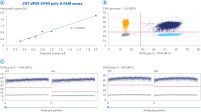
- Accurate quantification down to 0.3 copies/µL
- High precision over a broad dynamic range
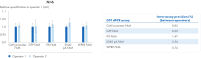
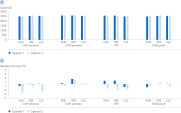
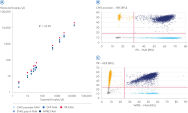
- High accuracy across assays (independent of fluorophores) and operators
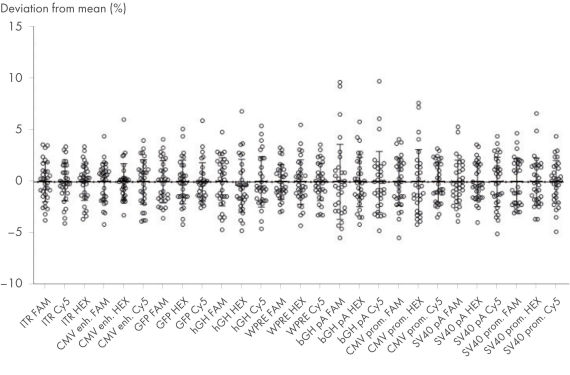
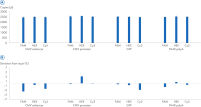
- High precision (<10% deviation from the mean) independent of fluorophores and operators
- Compatibility with both dPCR and qPCR readout
Procedure
The QIAcuity Cell and Gene Therapy dPCR Assays are provided in a 20x ready-to-use primer-probe mix, available in multiple fluorophore choices, and optimized for use with dedicated QIAcuity MasterMixes. These assays enable both singleplex and multiplex CGT applications, including absolute quantification of vector titer and assay robustness.
Applications
The QIAcuity Cell and Gene Therapy (CGT) dPCR Assays, together with the QIAcuity Nanoplates and the QIAcuity PCR kits, enable digital PCR applications, including:
- Viral vector titer
- Viral vector genome integrity
- Vector copy number (VCN)
- Residual plasmid (if using Amp plasmids for the production of AAVs)
Incorporating these CGT dPCR Assays into the quality control process of cell and gene therapy development means greater certainty in producing safe and potent treatments.
Supporting data and figures
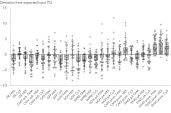
High inter-assay precision
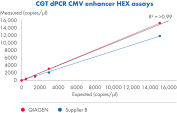
The CGT dPCR Assays were run using AAV DNA. 2500 copies/µL was used as input in a Nanoplate 8.5k. Deviations from the mean of measured copies of at least 27 replicates per assay are shown. Experiments were performed by two operators, each with at least 13 replicates.
Resources
Brochures & Guides (5)
This fact sheet explains the inclusion of PCR, qPCR and dPCR Kits in our Go Greener program.
Fast. Scalable. Reliable.
Software Release Notes (22)
For Version 2.0
Version 2.1.8
For Version 2
Version 3.0
Version 3.1
Version 2.1
Version 3.1.3
Version 3.1.1
Version 2.5.0.0
Version 2.5.0.1
Version 2.1.8
Version 2.1
For Version 1.2
For Version 1.0
Validation Reports (18)
Previous Software Versions (13)
The following QIAcuity Software Suite Volume Precision Factor (VPF) patches have been released to enable compatibility with VPF file version 6.0 or higher for QIAcuity Software Suite versions 2.0.20. As the abovementioned QIAcuity Software Suite versions do not allow loading a VPF zip file including more than 20 different individual VPF files, a patch is needed to allow the software for loading VPF zip files version 6.0 or higher. This technical limitation is solved from QIAcuity Software Suite version 2.1.8.23 onwards.
If you are using the QIAcuity Software Suite version 2.0.20, please consider updating your Software Suite and the Instrument Control Software (CSW) to the most recent version. After updating to the latest software version, no patching is needed.
If you are not able to update your QIAcuity Software Suite, please install the QIAcuity Software Suite VPF patch for QIAcuity Software Suite version 2.0.20 before loading VPF file version 6 or higher. Additional information and instructions may be found on the Release Note: QIAcuity Software Suite Volume Precision Factor (VPF) Patches.
Version 10.1
The Volume Precision Factor (VPF) offers a unique feature to secure precision of concentration results obtained from a QIAcuity dPCR run.
In general, Nanoplates provide partitions of fixed sizes that enable a very precise way of sample concentration calculation. Potential variation of partition sizes in Nanoplate batches, caused by different microstructure molding forms, can be addressed by applying the batch specific VPF. Furthermore, the VPF includes well-specific volume information and therefore further increases precision of concentration calculation in each well of the Nanoplates.
Important note:
The Volume Precision Factor file version 10.1 is compatible with the QIAcuity Software Suite version 2.1.8.23 or higher. All lower versions, namely 1.2.18, 2.0.20, 2.1.7.182, and 2.1.8.20, require a QIAcuity Software Suite patch to be installed prior the upload of VPF version 10.1. Please read the Release Note for QIAcuity Software Suite Volume Precision Factor (VPF) Patches for more information.
If you are using QIAcuity Software Suite versions older than 2.1.8.23, please consider updating your Software Suite and the Instrument Control Software (CSW) to the most recent version prior the upload of VPF version 10.1. After updating to the latest QIAcuity Software Suite software version, no patching is needed. If you are not able to update your QIAcuity Software Suite, please run the patch for your Software Suite version following the instructions provided in the Release Note for QIAcuity Software Suite Volume Precision Factor (VPF) Patches.
After downloading and updating the VPF file within the QIAcuity Software Suite, the VPF is applied automatically to the analysis of a corresponding Nanoplate batch. The VPF file includes information from all available microstructure molding forms and connected Nanoplate batches. It will be stored on the PC where the QIAcuity Software Suite is installed.
Version 2.1.8
The QIAcuity Control Software (CSW) is an integral part of the QIAcuity instrument. It offers a GUI (graphical user interface) for basic functionalities such as plate setup, changing the order of plates to be processed, and monitoring the status of runs in real time. After a run is completed, the data are stored on the instrument’s memory and are sent to the connected QIAcuity Software Suite for analysis.
The new version 2.1.8 of the QIAcuity software (QIAcuity Software Suite version 2.1.8 and QIAcuity CSW version 2.1.8) offers bug fixes for repeated network connection issues and improved error handling. In addition, it fixes issues seen with latest versions of Microsoft Edge and Google Chrome browsers as well as issues seen with read-only plates after a software update.
Detailed information about the QIAcuity Control Software version 2.1.8 is available in the Release Note, which can also be downloaded under section “Software Release Notes”.
Note: The latest CSW version 2.1.8 is only compatible with the latest Software Suite version 2.1.8. If only one software component is updated, no connection between the Software Suite and the CSW can be established.
Important: Please follow the instructions provided in the QIAcuity User Manual for software version 2.1 and in the Release Note. It is strongly recommended to update the QIAcuity Software Suite first before proceeding with the QIAcuity Control Software!
Please contact QIAGEN Technical Services if you are unsure and require technical support.
SHA1 checksum: D3982B419D7C4CF39FBDDDAA4C0D351B39398278
Version 2.2
The QIAcuity Control Software is an integral part of the QIAcuity instrument. It offers a GUI (graphical user interface) for basic functionalities such as plate setup, changing the order of plates to be processed, and monitoring the status of runs in real time. After a run is completed, the data are stored on the instrument’s memory and are sent to the connected QIAcuity Software Suite for analysis.
The new Version 2.2 of the QIAcuity software (QIAcuity Software Suite v 2.2 and QIAcuity CSW v 2.2.) offers improvements for users working under GMP by adding a user ID validation during the report signing and the addition of timezone offset stamp for audit trail entries and for result report data. Furthermore, the addition of a standard deviation and coefficient of variance calculation in percentage of mean concentration calculation for replicates where implemented. In addition, the instrument camera stability was improved and an internal validation method was implemented.
Detailed information about the QIAcuity Control Software version 2.2 is available in the Release Note, which can also be downloaded under section “Software Release Notes”.
Note: The latest CSW version 2.2 is only compatible with the Software Suite version 2.2. If only one software component is updated, no connection between the Software Suite and the CSW can be established.
Important: Please follow the instructions provided in the QIAcuity User Manual for software version 2.2 and in the Release Note.
It is strongly recommended to update the QIAcuity Software Suite first before proceeding with the QIAcuity Control Software.
Note: After clicking reboot during CSW upgrade or change of Suite connection, login screen may appear for short period. Please ignore it and wait for the QIAcuity instrument to shut down and restart itself.
Please contact QIAGEN Technical Services if you are unsure and require technical support.
SHA1 checksum: 3892D7A434A8F072A15008C76EB088BB78F1C255
The following QIAcuity Software Suite Volume Precision Factor (VPF) patches have been released to enable compatibility with VPF file version 6.0 or higher for QIAcuity Software Suite version 1.2.18. As the abovementioned QIAcuity Software Suite versions do not allow loading a VPF zip file including more than 20 different individual VPF files, a patch is needed to allow the software for loading VPF zip files version 6.0 or higher. This technical limitation is solved from QIAcuity Software Suite version 2.1.8.23 onwards.
If you are using the QIAcuity Software Suite version 1.2.18, please consider updating your Software Suite and the Instrument Control Software (CSW) to the most recent version. After updating to the latest software version, no patching is needed.
If you are not able to update your QIAcuity Software Suite, please install the QIAcuity Software Suite VPF patch for QIAcuity Software Suite version 1.2.18 before loading VPF file version 6 or higher. Additional information and instructions may be found on the Release Note: QIAcuity Software Suite Volume Precision Factor (VPF) Patches.
Version 2.5
The QIAcuity Control Software is an integral part of the QIAcuity instrument. It offers a GUI (graphical user interface) for basic functionalities such as plate setup, changing the order of plates to be processed, and monitoring the status of runs in real time. After a run is completed, the data are stored on the instrument’s memory and are sent to the connected QIAcuity Software Suite for analysis.
The new version 2.5 of the QIAcuity CSW offers a configurable auto logoff times which enables users to turn off or define logoff times per instrument. In addition the new version supports assay development by providing an essential temperature gradient functionality.
Furthermore improvements were implemented, for example, for the accuracy of time estimation for various software steps.
Detailed information about the QIAcuity Control Software version 2.5 is available in the Release Note, which can also be downloaded under section Software Release Notes.
Note: The latest CSW version 2.5 is only compatible with the Software Suite version 2.5. If only one software component is updated, no connection between the Software Suite and the CSW can be established.
Important: Please follow the instructions provided in the QIAcuity User Manual for software version 2.5 and in the Release Note.
It is strongly recommended to update the QIAcuity Software Suite first before proceeding with the QIAcuity Control Software!
Note: After clicking reboot during CSW upgrade or change of Suite connection, the login screen may appear for short period. Please ignore it and wait for the QIAcuity instrument to shut down and restart itself.
Please contact QIAGEN Technical Services if you are unsure and require technical support.
The QIAcuity backup and restore scripts are a standalone solution to backup all relevant user data of the QIAGEN Software Suite for disaster recovery and restore the data on a new or existing QIAGEN Software Suite installation. The following QIAcuity Software Suite versions are supported: 2.0, 2.1.7, 2.1.8, and 2.2. The backup can be conducted manually or automated by using of the Windows task scheduler.
Note: Windows Admin permission is needed to setup and perform an automated backup and for manual backup and restore.
Please read the QIAcuity Software Suite Backup and Restore Scripts document for more information and instructions how to use the scripts.
Version 2.2
The QIAcuity Software Suite enables the user to set up plates, analyze results, and monitor the status of runs in real time. This software is also used for the configuration of the system and provides access to the QIAcuity user management. The QIAcuity Software Suite is designed to be installed on a Windows PC that is connected to one or more QIAcuity instruments. For this configuration, the QIAcuity instrument needs to be connected to a network through Ethernet. Alternatively, a direct cable connection between the QIAcuity and the notebook where the QIAcuity Software Suite is running needs to be established. When connected to a network, up to 10 users may access the QIAcuity Software Suite via a browser installed on the client PC (Windows or Mac).
The new version 2.2 of the QIAcuity software (QIAcuity Software Suite v 2.2 and QIAcuity CSW v 2.2.) offers improvements for users working under GMP by adding a user ID validation during the report signing and the addition of timezone offset stamp for audit trail entries and for result report data. Furthermore, the addition of a standard deviation and coefficient of variance calculation in percentage of mean concentration calculation for replicates where implemented. In addition, the instrument camera stability was improved and an internal validation method was implemented.
Detailed information about the QIAcuity Software Suite version 2.2 is available in the Release Note, which can also be downloaded under section “Software Release Notes”.
Note: The latest Software Suite version 2.2 is only compatible with the latest Control Software (CSW) version 2.2. If only one software component is updated, no connection between the Software Suite and the CSW can be established.
Important: Please follow the instructions provided in the QIAcuity User Manual for software version 2.2 and in the Release Note.
It is strongly recommended to update the QIAcuity Software Suite first before proceeding with the QIAcuity Control Software.
Please contact QIAGEN Technical Services if you are unsure and require technical support.
SHA1 checksum: 63A1689F2EB557809F418D159DA438FDC8B327A3
The following QIAcuity Software Suite Volume Precision Factor (VPF) patches have been released to enable compatibility with VPF file version 6.0 or higher for QIAcuity Software Suite version 2.1.7.182. As the abovementioned QIAcuity Software Suite versions do not allow loading a VPF zip file including more than 20 different individual VPF files, a patch is needed to allow the software for loading VPF zip files version 6.0 or higher. This technical limitation is solved from QIAcuity Software Suite version 2.1.8.23 onwards.
If you are using the QIAcuity Software Suite version 2.1.7.182, please consider updating your Software Suite and the Instrument Control Software (CSW) to the most recent version. After updating to the latest software version, no patching is needed.
If you are not able to update your QIAcuity Software Suite, please install the QIAcuity Software Suite VPF patch for QIAcuity Software Suite version 2.1.7.182 before loading VPF file version 6 or higher. Additional information and instructions may be found on the Release Note: QIAcuity Software Suite Volume Precision Factor (VPF) Patches.
Version 1.2
A newer version of the Software Suite is available. Please use this version for the update of older plates if required.
The QIAcuity Software Suite 1.2 is designed to be installed on a Windows PC that is connected to one or more QIAcuity instruments. The QIAcuity Software Suite enables the user to set up plates, analyze results, and monitor the status of runs in real time. For this configuration, the QIAcuity instrument needs to be connected to a network through Ethernet. Alternatively, a direct cable connection between the QIAcuity and the notebook where the QIAcuity Software Suite is running needs to be established. When connected to a network, up to 10 users may access the QIAcuity Software Suite via a browser installed on the client PC (Windows or Mac).
The following browsers are supported in the QIAcuity Software Suite:
-Mozilla Firefox (version 64.0.2 or higher)
-Microsoft Edge (version 44.17763.1.0 or higher)
-Google Chrome (version 71.0.3578.98 or higher)
The new QIAcuity Software Suite 1.2 offers a functionality that enables users of the QIAcuity Software 1.1.3 to upgrade to the new version while keeping the library of previously stored plate runs.
Note: If you have exported plates from QIAcuity Software Suite 1.1.3 that you would like to import and use in QIAcuity Software Suite 1.2, you will need to import the plates before upgrading from version 1.1.3 to version 1.2. You may then export the plates again. Future software version starting from QIAcuity Software Suite 2.0 will facilitate import of plates from previous QIAcuity Software Suite versions.
The new improvements are as follows:
-Support for the Nanoplate 8.5k 24-well
-Hyperwell functionality to combine several wells to one combined well for analysis
-Automated plate archiving functionality
-Functionality to show the number of single/double positives in 2D scatterplots
-VPF (Volume Precision Factor) to further improve concentration calculation (see related resources)
-Additional improvements for stabilization and troubleshooting
Version 2.1.8
The QIAcuity Software Suite enables the user to set up plates, analyze results, and monitor the status of runs in real time. This software is also used for the configuration of the system and provides access to the QIAcuity user management. The QIAcuity Software Suite is designed to be installed on a Windows PC that is connected to one or more QIAcuity instruments. For this configuration, the QIAcuity instrument needs to be connected to a network through Ethernet. Alternatively, a direct cable connection between the QIAcuity and the notebook where the QIAcuity Software Suite is running needs to be established. When connected to a network, up to 10 users may access the QIAcuity Software Suite via a browser installed on the client PC (Windows or Mac).
The new version 2.1.8 of the QIAcuity software (QIAcuity Software Suite version 2.1.8 and QIAcuity CSW version 2.1.8.) offers bug fixes for repeated network connection issues and improved error handling. In addition, it fixes issues seen with latest versions of Microsoft Edge and Google Chrome browsers as well as issues seen with read-only plates after a software update.
Detailed information about the QIAcuity Software Suite version 2.1.8 is available in the Release Note, which can also be downloaded under section “Software Release Notes”.
Important: Please ensure that updating to QIAcuity Software Suite version 2.1.8 is performed by the same Windows admin user using the same Windows login name that installed the previous QIAcuity Software Suite version. In case you cannot use the same Windows login name or the software update resulted in the browser error message "Can't reach this page" please contact our Technical Services for additional instructions.
Note: The latest Software Suite version 2.1.8 is only compatible with the latest Control Software (CSW) version 2.1.8. If only one software component is updated, no connection between the Software Suite and the CSW can be established.
Important: Please follow the instructions provided in the QIAcuity User Manual for software version 2.1 and in the Release Note. It is strongly recommended to update the QIAcuity Software Suite first before proceeding with the QIAcuity Control Software!
Please contact QIAGEN Technical Services if you are unsure and require technical support.
SHA1 checksum: DE2416D926BB98D82A332E7B25EF66728F120DDA
The following QIAcuity Software Suite Volume Precision Factor (VPF) patches have been released to enable compatibility with VPF file version 6.0 or higher for QIAcuity Software Suite version 2.1.8.20. As the abovementioned QIAcuity Software Suite versions do not allow loading a VPF zip file including more than 20 different individual VPF files, a patch is needed to allow the software for loading VPF zip files version 6.0 or higher. This technical limitation is solved from QIAcuity Software Suite version 2.1.8.23 onwards.
If you are using the QIAcuity Software Suite version 2.1.8.20, please consider updating your Software Suite and the Instrument Control Software (CSW) to the most recent version. After updating to the latest software version, no patching is needed.
If you are not able to update your QIAcuity Software Suite, please install the QIAcuity Software Suite VPF patch for QIAcuity Software Suite version 2.1.8.20 before loading VPF file version 6 or higher. Additional information and instructions may be found on the Release Note: QIAcuity Software Suite Volume Precision Factor (VPF) Patches.
The QIAcuity backup and restore scripts are a standalone solution to backup all relevant user data of the QIAGEN Software Suite for disaster recovery and to restore the data on a new or existing QIAGEN Software Suite installation. The backup supports the QIAcuity Software Suite version 2.5 and can be conducted manually or automatically by using of the Windows Task Scheduler.
Note: Windows Admin permission is needed to setup and perform an automated backup and for manual backup and restore.
For backup and restore of Software versions lower than 2.5, please refer to the QIAcuity Software Suite Backup and Restore Scripts for version 2.0, 2.1.7, 2.1.8, and 2.2.
Note: Windows Admin permission is needed to setup and perform an automated backup and for manual backup and restore.
Please read the QIAcuity Software Suite Backup and Restore Scripts document for more information and instructions how to use the scripts.
Latest Software Version (8)
Version 3.0
The QIAcuity Software Suite enables the user to set up plates, analyze results, and monitor the status of runs in real time. This software is also used for the configuration of the system and provides access to the QIAcuity user management. The QIAcuity Software Suite is designed to be installed on a Windows PC that is connected to one or more QIAcuity instruments. For this configuration, the QIAcuity instrument needs to be connected to a network through Ethernet. Alternatively, a direct cable connection between the QIAcuity and the notebook where the QIAcuity Software Suite is running needs to be established. When connected to a network, up to 10 users may access the QIAcuity Software Suite via a browser installed on the client PC (Windows or Mac).
The new version 3.0 supports dPCR assays up to a 8-plex by using six optical channels for six standard dyes and the additional use of two channel combinations for LSS (Long Stokes Shift) dyes, which can be selected from five different dye channel combinations. It also offers a new feature to create a custom cross talk matrix to address cross talk between neighboring channels for all multiplex assays.
In this new version, an overview presenting individual 2D scatterplots of all selected wells is introduced. In addition, a sample-based 2D scatterplot analysis of individual replicates is provided. The new software also provides a reaction mix template functionality for the creation of a master mix including a custom cross talk matrix.
Detailed information about the QIAcuity Software Suite version 3.0 is available in the Release Note, which can also be downloaded under section Software Release Notes.
Note: The latest Software Suite version 3.0 is only compatible with the latest Control Software (CSW) version 3.0. If only one software component is updated, no connection between the Software Suite and the CSW can be established.
Important: Please follow the instructions provided in the QIAcuity User Manual for software version 3.0 and in the Release Note.
It is strongly recommended to update the QIAcuity Software Suite first before proceeding with the QIAcuity Control Software!
Please contact QIAGEN Technical Services if you are unsure and require technical support.
SHA1 checksum: C01F7BEA7D20DA3E22D95916A7046D06F03C523A
Version 3.1.1
The QIAcuity Software Suite enables the user to set up plates, analyze results, and monitor the status of runs in real time. This software is also used for the configuration of the system and provides access to the QIAcuity user management. The QIAcuity Software Suite is designed to be installed on a Windows PC that is connected to one or more QIAcuity instruments. For this configuration, the QIAcuity instrument needs to be connected to a network through Ethernet. Alternatively, a direct cable connection between the QIAcuity and the notebook where the QIAcuity Software Suite is running needs to be established. When connected to a network, up to 10 users may access the QIAcuity Software Suite via a browser installed on the client PC (Windows or Mac).
The new version 3.1.1 supports dPCR assays up to a 12-plex by using amplitude multiplexing. In addition to the six optical channels available, this option enables two amplicons to be detected in the same channel. The option to use two channel combinations for LSS (Long Stokes Shift) dyes introduced with version 3.0 remains.
This software version also offers an updated feature to create a custom cross talk matrix to address cross talk between neighboring channels for all multiplex assays.
In addition, a new functionality for the integration of a QIAcuity Lab Automation Service was implemented. It allows third-party lab automation software to control robotic devices to interact with the QIAcuity system, run dPCR experiments, and analyze results without any human interaction.
Detailed information about new features, improvements, and bug fixes of the the QIAcuity Software Suite version 3.1.1 is available in the Release Note, which can also be downloaded under section Software Release Notes.
Note: The latest Software Suite version 3.1 is only compatible with the latest Control Software (CSW) version 3.1.1. If only one software component is updated, no connection between the Software Suite and the CSW can be established.
Important: Please follow the instructions provided in the QIAcuity User Manual for software version 3.1.1 and in the Release Note.
It is strongly recommended to update the QIAcuity Software Suite first before proceeding with the QIAcuity Control Software!
Please contact QIAGEN Technical Services if you are unsure and require technical support.
SHA256 checksum: 03A0897A5F8842834DF4B767AD3119A1C1005B723C879D8A91C1A946D1CC0EFC
Version 3.1.3
The QIAcuity Control Software is an integral part of the QIAcuity instrument. It offers a GUI (graphical user interface) for basic functionalities such as plate setup, changing the order of plates to be processed, and monitoring the status of runs in real time. After a run is completed, the data are stored on the instrument’s memory and are sent to the connected QIAcuity Software Suite for analysis.
Version 3.1 supports dPCR assays up to a 12-plex by using amplitude multiplexing. In addition to the six optical channels available, this option enables two amplicons to be detected in the same channel. The option to use two channel combinations for LSS (Long Stokes Shift) dyes introduced with version 3.0 remains.
In addition, as introduced with QIAcuity Control Software 3.0, the run time for all instrument types (QIAcuity One, Four, and Eight) was optimized with introducing a new auto focus algorithm.
Moreover, a new functionality for the integration of a QIAcuity Lab Automation Service was implemented. It allows third-party lab automation software to control robotic devices to interact with the QIAcuity system, run dPCR experiments, and analyze results without any human interaction.
Detailed information about the QIAcuity Control Software 3.1.3 is available in the Release Note, which can also be downloaded under section Software Release Notes.
Note: The latest CSW version 3.1.3 is only compatible with the Software Suite version 3.1.1. If only one software component is updated, no connection between the Software Suite and the CSW can be established.
Important: Please follow the instructions provided in the QIAcuity User Manual for software version 3.1 and in the Release Note.
It is strongly recommended to update the QIAcuity Software Suite first before proceeding with the QIAcuity Control Software!
Note: After clicking reboot during CSW upgrade or change of Suite connection, the login screen may appear for short period. Please ignore it and wait for the QIAcuity instrument to shut down and restart itself.
Please contact QIAGEN Technical Services if you are unsure and require technical support.
SHA256 checksum: 7C6BBCCC89620DA205A545A6DF5CBEA8F2A985B66DD6A7AD020F8522A269101C
Version 3.2
The QIAcuity Control Software is an integral part of the QIAcuity instrument. It offers a GUI (graphical user interface) for basic functionalities such as plate setup, changing the order of plates to be processed, and monitoring the status of runs in real time. After a run is completed, the data are stored on the instrument’s memory and are sent to the connected QIAcuity Software Suite for analysis.
The QIAcuity instrument CSW version 3.2 has been improved with enhanced error handling to prevent subsequent errors. Furthermore, a bug effecting to operate owned plates for users with the role technician or group leader has been fixed.
Detailed information about the QIAcuity Control Software 3.2 is available in the Release Note, which can also be downloaded under section Software Release Notes.
Note: The latest CSW version 3.2 is only compatible with the Software Suite version 3.2. If only one software component is updated, no connection between the Software Suite and the CSW can be established.
Important: Please follow the instructions provided in the QIAcuity User Manual for software version 3.2 and in the Release Note.
It is strongly recommended to update the QIAcuity Software Suite first before proceeding with the QIAcuity Control Software!
Note: After clicking reboot during CSW upgrade or change of Suite connection, the login screen may appear for short period. Please ignore it and wait for the QIAcuity instrument to shut down and restart itself.
Please contact QIAGEN Technical Services if you are unsure and require technical support.
SHA256 checksum: D23713C8F1C0D6D67048A465FECF8825DBB3D4D1C6CB8C1E0B6753EE053E6B81
Version 3.2
The QIAcuity Software Suite enables the user to set up plates, analyze results, and monitor the status of runs in real time. This software is also used for the configuration of the system and provides access to the QIAcuity user management. The QIAcuity Software Suite is designed to be installed on a Windows PC that is connected to one or more QIAcuity instruments. For this configuration, the QIAcuity instrument needs to be connected to a network through Ethernet. Alternatively, a direct cable connection between the QIAcuity and the notebook where the QIAcuity Software Suite is running needs to be established. When connected to a network, up to 10 users may access the QIAcuity Software Suite via a browser installed on the client PC (Windows or Mac).
The QIAcuity Software Suite 3.2 now supports multiple targets of interest for Copy Number Variation as well as for Mutant Detection data analysis at once. In addition, the dilution and conversation function were improved and multiple pair (target/target or channel/channel) selections for 2D scatterplots analysis has been implemented.
The CSV output file of current results of analysis for absolute quantification now include QC parameters, such as rain, resolution and bandwidth, real cycled volume per partition, the mean RFU values for positives and negative bands, and the lambda value.
Further improvements are related to the QIAcuity Lab Automation Service, the custom cross talk matrix (CXTM), and other features.
Detailed information about new features, improvements, and bug fixes of the the QIAcuity Software Suite version 3.2 is available in the Release Note, which can also be downloaded under section Software Release Notes.
Note: The latest Software Suite version 3.2 is only compatible with the latest Control Software (CSW) version 3.2. If only one software component is updated, no connection between the Software Suite and the CSW can be established.
Important: Please follow the instructions provided in the QIAcuity User Manual for software version 3.2 and in the Release Note.
It is strongly recommended to update the QIAcuity Software Suite first before proceeding with the QIAcuity Control Software!
Please contact QIAGEN Technical Services if you are unsure and require technical support.
SHA256 checksum: BBFBE03F6F90559EBE7A76E37341A32293A4A3689F51C74CA1D3725A43376FA3
Version 11
The Volume Precision Factor (VPF) offers a unique feature to secure precision of concentration results obtained from a QIAcuity dPCR run.
In general, Nanoplates provide partitions of fixed sizes that enable a very precise way of sample concentration calculation. Potential variation of partition sizes in Nanoplate batches, caused by different microstructure molding forms, can be addressed by applying the batch specific VPF. Furthermore, the VPF includes well-specific volume information and therefore further increases precision of concentration calculation in each well of the Nanoplates.
Version 3.0
The QIAcuity Control Software is an integral part of the QIAcuity instrument. It offers a GUI (graphical user interface) for basic functionalities such as plate setup, changing the order of plates to be processed, and monitoring the status of runs in real time. After a run is completed, the data are stored on the instrument’s memory and are sent to the connected QIAcuity Software Suite for analysis.
The new version 3.0 of the QIAcuity CSW supports dPCR assays up to a 8-plex by using six optical channels for six standard dyes and the additional use of two channel combinations for LSS (Long Stokes Shift) dyes, which can be selected from five different dye channel combinations. In addition, the new version has optimized the run time for all instrument types (QIAcuity One, Four, and Eight) with introducing a new auto focus algorithm.
Detailed information about the QIAcuity Control Software 3.0 is available in the Release Note, which can also be downloaded under section Software Release Notes.
Note: The latest CSW version 3.0 is only compatible with the Software Suite version 3.0. If only one software component is updated, no connection between the Software Suite and the CSW can be established.
Important: Please follow the instructions provided in the QIAcuity User Manual for software version 3.0 and in the Release Note.
It is strongly recommended to update the QIAcuity Software Suite first before proceeding with the QIAcuity Control Software!
Note: After clicking reboot during CSW upgrade or change of Suite connection, the login screen may appear for short period. Please ignore it and wait for the QIAcuity instrument to shut down and restart itself.
Please contact QIAGEN Technical Services if you are unsure and require technical support.
SHA1 checksum: E58C84A95E892EF2F3DAFF4C6927279645A17FBF
Version 2.5.0.1
The QIAcuity Software Suite enables the user to set up plates, analyze results, and monitor the status of runs in real time. This software is also used for the configuration of the system and provides access to the QIAcuity user management. The QIAcuity Software Suite is designed to be installed on a Windows PC that is connected to one or more QIAcuity instruments. For this configuration, the QIAcuity instrument needs to be connected to a network through Ethernet. Alternatively, a direct cable connection between the QIAcuity and the notebook where the QIAcuity Software Suite is running needs to be established. When connected to a network, up to 10 users may access the QIAcuity Software Suite via a browser installed on the client PC (Windows or Mac).
The new version 2.5 of the QIAcuity Software Suite supports assay development by providing an essential temperature gradient functionality. It also offers a new feature that provides calculation of initial concentration of samples by using various dilution factors. In addition, concentration units may be converted into various pre-defined or user-defined units. The new software also offers an integrity value and concentration value per group for up to 5-plex added to the multiple occupancy CSV file export, for example, for the evaluation of AAV (adeno-associated virus) assays and for drop-off assays.
In this new version the initial loading time and the time for recalculation of 1D/2D scatterplot and for signal map image has been reduced, leading to a much faster performance.
Detailed information about the QIAcuity Software Suite version 2.5 is available in the Release Note, which can also be downloaded under section “Software Release Notes”.
Note: The latest Software Suite version 2.5 is only compatible with the latest Control Software (CSW) version 2.5. If only one software component is updated, no connection between the Software Suite and the CSW can be established.
Important: Please follow the instructions provided in the QIAcuity User Manual for software version 2.5 and in the Release Note.
It is strongly recommended to update the QIAcuity Software Suite first before proceeding with the QIAcuity Control Software!
Please contact QIAGEN Technical Services if you are unsure and require technical support.
SHA1 checksum: D1690226299A75E077FA37C420A970FC71D56CBF
Application Notes (7)
Here, we present a workflow that combines two technologies, cellenONE and QIAcuity Digital PCR, which accelerate and streamline high-throughput analyses of target copy numbers in cultured cells. The workflow starts with detecting and sorting defined populations of cells as well as individual cells using cellenONE, followed by multiplexing dPCR on the QIAcuity platform. Copy number variations of target regions are then analyzed using the QIAcuity Software Suite, providing an intuitive and fast interpretation of results.
The goal of this work was to compare performance of quantitative PCR (qPCR) and digital PCR (dPCR) in the quantification of gene expression and Wolbachia abundances in Nasonia parasitoid wasps.
This study tested a workflow for quantitation and qualification of AAV samples using a duplex assay on the QIAcuity dPCR instrument targeting both an insert (GFP) and the viral backbone (AAV2-ITR). With very low intra-assay and inter-assay CVs <6.5%, we demonstrate one of the main benefits of dPCR: reproducibility.
The QIAcuity dPCR System, complemented by the QIAcuity Software Suite version 2.5 and higher, offers a powerful solution for determining DNA integrity and stability. Analyzing up to 5 targets simultaneously enables accurate and precise integrity assessment. The importance of determining genome integrity becomes particularly evident in analyzing viral vectors such as AAVs, which are known for their susceptibility to packaging errors. Moreover, dPCR is a valuable tool for assessing DNA stability, providing valuable insights into storage and processing impacts.
Here we provide an integrated rAAV genome titer method using the QIAcuity Digital PCR (dPCR) System with detailed parameters for high assay performance. Using this optimized method for pre-PCR handling of in-process rAAV samples, the results demonstrated that QIAcuity dPCR system generates the same level of accuracy and precision as the current gold standard ddPCR system but with much faster sample-to-result times (2 hours vs 7 hours) and higher overall throughput and scalability.
The QIAcuity dPCR System, complemented by the QIAcuity Software Suite version 2.5 and higher, offers a powerful solution for determining DNA integrity and stability. Analyzing up to 5 targets simultaneously enables accurate and precise integrity assessment. The importance of determining genome integrity becomes particularly evident in analyzing viral vectors such as AAVs, which are known for their susceptibility to packaging errors. Moreover, dPCR is a valuable tool for assessing DNA stability, providing valuable insights into storage and processing impacts.
Scientific Posters (6)
Instrument User Manuals (2)
May 2025
Package Insert (1)
Webinars (5)
Limitations of conventional PCR and qPCR when dealing with difficult, low-volume samples and complex mixtures with high background of competitive molecules and inhibitors have posed frequent challenges for researchers and clinicians in their routine work. With the new generation of PCR technologies, digital PCR has opened doors for diverse applications, and researchers are learning to ask questions only digital PCR can answer. Join QIAGEN's webinar on how digital PCR can help take your research applications through and beyond those challenges.
This presentation will introduce dPCR, discuss its advantages, and outline how the approach might be used to improve measurement in areas like clinical diagnosis, alone or in conjunction with other methods.
In this expert webinar, Dr. Kubista will share with you the experience he and his team have gathered at the TATAA Biocenter, developing applications and providing services using digital PCR for nearly 12 years. They have experienced all the problems common to dPCR analytical workflows and developed robust standard operating procedures to minimize the risk of error and maximize robustness and repeatability, and developed various controls to test the performance and validate the methods. He will also discuss dPCR assay design and validation and then focus on strategies for copy number determination and rare mutation detection.
The QIAGEN digital PCR technology and its expanded capability will not only transform the portfolio of conventional qPCR applications but also provide a more rapid, accurate, and sensitive method for finding answers to difficult biological questions.
As the digital PCR technology evolves and becomes more accessible and affordable, the transition from qPCR and adoption of dPCR will hopefully no longer remain a challenge. Experts share insights in an upcoming webinar about the fully integrated, rapid, and highly flexible digital PCR portfolio from QIAGEN.
Safety Data Sheets (1)
Certificates of Analysis (1)
FAQ
Do you have any recommendations on how to process my AAV samples?
To ensure consistent and reproducible measurements of viral titers, we recommend the CGT Viral Vector Lysis Kit (cat. no. 250272/250273). It has been optimized to work in conjuction with the QIAcuity Cell and Gene Therapy dPCR Assays and the QIAcuity Probe PCR Kit on the QIAcuity instruments as part of a standardized and complete viral vector titer workflow.
FAQ-3860
Can I combine your CGT dPCR assays with custom designed assays?
Yes, the CGT dPCR assays can be used in singleplex and multiplex reactions. Custom designed assays can be added into a multiplex reaction according to customer needs.
FAQ-3861
How many assays can be multiplexed?
Two to five assays can be combined into a multiplex reaction depending on the QIAcuity Digital PCR platform, hence the 2-plex or 5-plex instruments.
FAQ-3862
In which channels can you detect the CGT dPCR assays?
Most of the assays are offered with a FAM, HEX, or Cy5 fluorophore, and can be detected in the Green, Yellow, or Crimson channel, respectively. SV40 poly A, hGH poly A, Amp resistance, KanR/NeoR, and PuroR assays are only available with a FAM or HEX fluorophore.
FAQ-3863
How can I resuspend the lyophilized assay?
Please resuspend the lyophilized assays in 330 µl TE buffer to obtain a 20× stock. Additional information can be found in the QSP and the data sheets.
FAQ-3864
What quenchers are used?
The probes are double quenched with ZEN/TAO and IOWA black quenchers.
FAQ-3865
Do I need to use restriction enzymes when quantifying AAV and LVV genomes?
In some cases, it is recommended to perform a digest with compatible restriction enzymes. For example, when quantifying ITRs, the strong secondary structure of the terminal repeats might affect titration. Compatible restriction enzymes are indicated in the corresponding data sheets of the CGT dPCR assays.
FAQ-3866
Can the CGT dPCR assays also be used for the quantification of non-AAV or non-LVV samples?
Yes. They can be used as long as the assays match the region of interest.
FAQ-3868
How do I know if the assays are compatible with the sample DNA of interest?
An extended sequence context for each assay is provided in the corresponding data sheet.
FAQ-3870
Are the assays also compatible with qPCR?
Yes. The assays can also be used for vector genome titration in a qPCR.
FAQ-3871
Which kit is recommended to isolate DNA for vector copy number (VCN) analysis?
We recommend the QIAamp DNA Mini Kit for DNA extraction.
FAQ-4083
What is the optimal input range for VCN analysis?
Template gDNA amounts for VCN should ideally lie within 30–50 ng per reaction.
FAQ-4084
How is the VCN calculated? Is there a formula for VCN determination?
VCN = 2 × (vector target copies ÷ human reference target copies)
FAQ-4085
Is it possible to use the VCN assays (CGT dPCR Assays) for multiplex reactions?
Yes, multiplexing is possible.
FAQ-4086
Country and Language
Follow Us
Contact Us
This site is protected by reCAPTCHA and the Google Privacy Policy and Terms of Service apply.
Sample to Insight
© QIAGEN 2013–25. All rights reserved