QIAcuity Cell and Gene Therapy (CGT) dPCR Assays

用于在 QIAcuity数字PCR系统上以卓越的准确性、重复性和速度进行载体基因组滴定和载体拷贝数测定

S_1234_8_LS_QF_dPCR_CGT_Assay_AMP_restistance_HEX

✓ 全天候自动处理在线订单

✓ 博学专业的产品和技术支持

✓ 快速可靠的(再)订购

dPCR CGT Assay 5' LTR (FAM)

目录编号 / ID.   250319

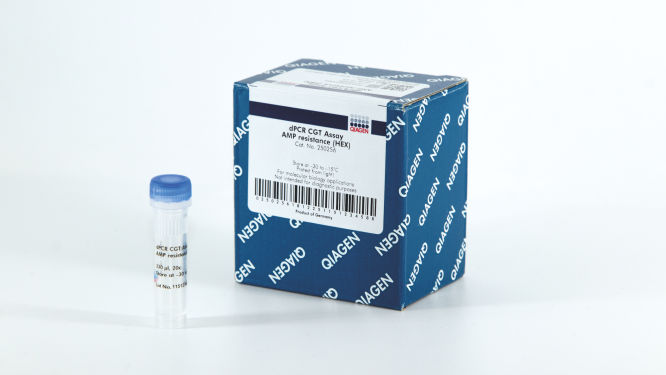
适用于 500x12 µL 反应 (20x):QIAGEN 细胞和基因治疗 5' LTR 检测,与 QIAcuity dPCR 系统配套使用。
试剂盒组成Kit
LV-specific targets
Reporter/Resistance
Reference genes
AAV-specific target
Regulatory elements
Promoters/Enhancer
QIAcuity Probe PCR Kit
QIAcuity MasterMix (2x1mL)
检测
5’ LTR
RRE
Psi
染料
FAM
HEX
Cy5

✓ 全天候自动处理在线订单

✓ 博学专业的产品和技术支持

✓ 快速可靠的(再)订购

特点

  • 广泛提供经过湿实验室验证的 18 种不同 dPCR CGT 检测
  • 凭借具有不同荧光基团选择的检测,可进行多重检测以证实来自同一样本的更多信息
  • 与 qPCR 类似的简单快捷工作流

产品详情

腺相关病毒 (adeno-associated virus, AAV) 是在细胞和基因治疗应用中广泛使用的病毒载体。然而,病毒载体的生产和纯化需要严格的质量控制,以确保临床研究或患者治疗期间给药的安全性和可靠性。为确保基于 AAV 和 LV 的细胞和基因治疗安全且有效,准确定量载体滴度、检测污染和测定载体拷贝数 (vector copy number, VCN) 的能力至关重要。 
 
该试剂盒应与 QIAcuity数字PCR系统QIAcuity Nanoplate 结合使用。 
 
您想向我们的某位 dPCR 专家了解有关该产品的更多信息吗?请在这里登记,我们将很快与您联系。 

绩效

QIAcuity Cell and Gene Therapy dPCR Assays 可广泛提供经过湿实验室验证的 18 种不同 dPCR CGT 检测,具备多种荧光基团,能够以卓越的准确性、重复性和至少四个数量级的动态范围在多重体系构建中快速测量病毒滴度。这些检测与 QIAcuity 数字 PCR 系统、专用 QIAcuity MasterMixes 和 QIAcuity Nanoplate 配套使用时,不仅可提供与 qPCR 类似的端到端 dPCR 工作流程,还能够对样本中的载体基因组拷贝或载体拷贝数进行绝对定量。检测的设计考虑到了生物制药生产和质量控制 (Quality Control, QC) 的要求。 

原理

有关纳米微孔板中 dPCR 反应的原理说明,请参见此处

专用 CGT 检测可在 QIAcuity 上实现病毒载体定量,如 AAV 和 LV 定量。这些检测经过验证,并且可用于单一和多重反应,还可与关注的基因检测结合使用,提供: 

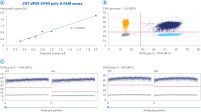
  • 低至 0.3 拷贝/µL 的精确定量
  • 宽动态范围内的高精度
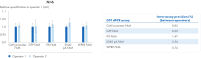
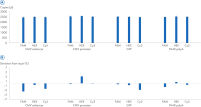
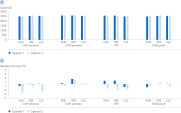
  • 在不同检测(独立于荧光基团)和操作员之间的高准确度
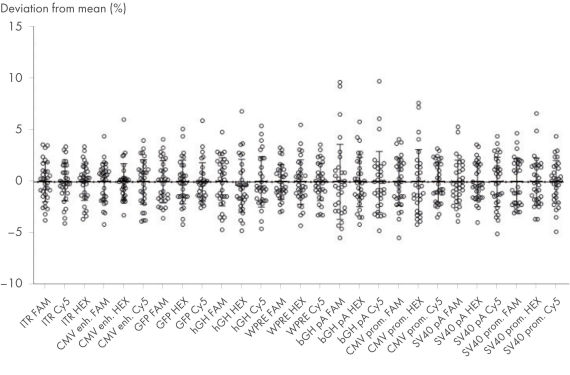
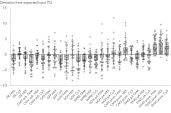
  • 不依赖于荧光基团和操作员的高精度(与平均值的偏差 <10%)
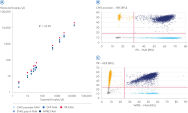
  • dPCR 和 qPCR 读数的兼容性

程序

QIAcuity Cell and Gene Therapy dPCR Assays 以 20 倍即用型引物-探针混合物形式提供,具有多种荧光基团可供选择,并经过优化,供与专用 QIAcuity MasterMixes 配套使用。这些检测可实现单一和多重 CGT 应用,包括对载体滴度和检测稳健性进行绝对定量。 

应用

QIAcuity Cell and Gene Therapy (CGT) dPCR Assays 与 QIAcuity Nanoplates 和 QIAcuity PCR 试剂盒的联合使用可让您执行各种数字 PCR 应用,包括: 

  • 病毒载体滴度 
  • 病毒载体基因组完整性 
  • 载体拷贝数 (Vector copy number, VCN) 
  • 残留质粒(如果使用 Amp 质粒生产 AAV) 

将这些 CGT dPCR Assays 纳入细胞和基因治疗开发的质量控制过程意味着可为生产出安全高效的治疗方法带来更大的确定性。 

辅助数据和图表

资源

Brochures and Guides (6)
JA-QIAcuity
PDF (2.1MB)
Download
This fact sheet explains the inclusion of PCR, qPCR and dPCR Kits in our Go Greener program.
Fast. Scalable. Reliable.
Protocols (11)
This study tested a workflow for quantitation and qualification of AAV samples using a duplex assay on the QIAcuity dPCR instrument targeting both an insert (GFP) and the viral backbone (AAV2-ITR). With very low intra-assay and inter-assay CVs <6.5%, we demonstrate one of the main benefits of dPCR: reproducibility.
Here, we present a workflow that combines two technologies, cellenONE and QIAcuity Digital PCR, which accelerate and streamline high-throughput analyses of target copy numbers in cultured cells. The workflow starts with detecting and sorting defined populations of cells as well as individual cells using cellenONE, followed by multiplexing dPCR on the QIAcuity platform. Copy number variations of target regions are then analyzed using the QIAcuity Software Suite, providing an intuitive and fast interpretation of results.
The QIAcuity dPCR System, complemented by the QIAcuity Software Suite version 2.5 and higher, offers a powerful solution for determining DNA integrity and stability. Analyzing up to 5 targets simultaneously enables accurate and precise integrity assessment. The importance of determining genome integrity becomes particularly evident in analyzing viral vectors such as AAVs, which are known for their susceptibility to packaging errors. Moreover, dPCR is a valuable tool for assessing DNA stability, providing valuable insights into storage and processing impacts.
The goal of this work was to compare performance of quantitative PCR (qPCR) and digital PCR (dPCR) in the quantification of gene expression and Wolbachia abundances in Nasonia parasitoid wasps.
Here we provide an integrated rAAV genome titer method using the QIAcuity Digital PCR (dPCR) System with detailed parameters for high assay performance. Using this optimized method for pre-PCR handling of in-process rAAV samples, the results demonstrated that QIAcuity dPCR system generates the same level of accuracy and precision as the current gold standard ddPCR system but with much faster sample-to-result times (2 hours vs 7 hours) and higher overall throughput and scalability.
Safety Data Sheets (1)
Download Safety Data Sheets for QIAGEN product components.
Certificates of Analysis (1)
Operating Software (22)

Version 12 (May 2026)

The Volume Precision Factor (VPF) offers a unique feature to secure precision of concentration results obtained from a QIAcuity dPCR run.

In general, Nanoplates provide partitions of fixed sizes that enable a very precise way of sample concentration calculation. Potential variation of partition sizes in Nanoplate batches, caused by different microstructure molding forms, can be addressed by applying the batch specific VPF. Furthermore, the VPF includes well-specific volume information and therefore further increases precision of concentration calculation in each well of the Nanoplates.

Version 3.2

The QIAcuity Control Software is an integral part of the QIAcuity instrument. It offers a GUI (graphical user interface) for basic functionalities such as plate setup, changing the order of plates to be processed, and monitoring the status of runs in real time. After a run is completed, the data are stored on the instrument’s memory and are sent to the connected QIAcuity Software Suite for analysis.

The QIAcuity instrument CSW version 3.2 has been improved with enhanced error handling to prevent subsequent errors. Furthermore, a bug effecting to operate owned plates for users with the role technician or group leader has been fixed.


Detailed information about the QIAcuity Control Software 3.2 is available in the Release Note, which can also be downloaded under section Software Release Notes.

Note: The latest CSW version 3.2 is only compatible with the Software Suite version 3.2. If only one software component is updated, no connection between the Software Suite and the CSW can be established.

Important: Please follow the instructions provided in the QIAcuity User Manual for software version 3.2 and in the Release Note.

It is strongly recommended to update the QIAcuity Software Suite first before proceeding with the QIAcuity Control Software!

Note: After clicking reboot during CSW upgrade or change of Suite connection, the login screen may appear for short period. Please ignore it and wait for the QIAcuity instrument to shut down and restart itself.

Please contact QIAGEN Technical Services if you are unsure and require technical support.


Version 3.2


The QIAcuity Software Suite enables the user to set up plates, analyze results, and monitor the status of runs in real time. This software is also used for the configuration of the system and provides access to the QIAcuity user management. The QIAcuity Software Suite is designed to be installed on a Windows PC that is connected to one or more QIAcuity instruments. For this configuration, the QIAcuity instrument needs to be connected to a network through Ethernet. Alternatively, a direct cable connection between the QIAcuity and the notebook where the QIAcuity Software Suite is running needs to be established. When connected to a network, up to 10 users may access the QIAcuity Software Suite via a browser installed on the client PC (Windows or Mac).

The QIAcuity Software Suite 3.2 now supports multiple targets of interest for Copy Number Variation as well as for Mutant Detection data analysis at once. In addition, the dilution and conversation function were improved and multiple pair (target/target or channel/channel) selections for 2D scatterplots analysis has been implemented. 

The CSV output file of current results of analysis for absolute quantification now include QC parameters, such as rain, resolution and bandwidth, real cycled volume per partition, the mean RFU values for positives and negative bands, and the lambda value.

Further improvements are related to the QIAcuity Lab Automation Service, the custom cross talk matrix (CXTM), and other features.

Detailed information about new features, improvements, and bug fixes of the the QIAcuity Software Suite version 3.2 is available in the Release Note, which can also be downloaded under section Software Release Notes.

Note: The latest Software Suite version 3.2 is only compatible with the latest Control Software (CSW) version 3.2. If only one software component is updated, no connection between the Software Suite and the CSW can be established.

Important: Please follow the instructions provided in the QIAcuity User Manual for software version 3.2 and in the Release Note.

It is strongly recommended to update the QIAcuity Software Suite first before proceeding with the QIAcuity Control Software!

Please contact QIAGEN Technical Services if you are unsure and require technical support.


Version 3.1.3

The QIAcuity Control Software is an integral part of the QIAcuity instrument. It offers a GUI (graphical user interface) for basic functionalities such as plate setup, changing the order of plates to be processed, and monitoring the status of runs in real time. After a run is completed, the data are stored on the instrument’s memory and are sent to the connected QIAcuity Software Suite for analysis.

Version 3.1 supports dPCR assays up to a 12-plex by using amplitude multiplexing. In addition to the six optical channels available, this option enables two amplicons to be detected in the same channel. The option to use two channel combinations for LSS (Long Stokes Shift) dyes introduced with version 3.0 remains.


In addition, as introduced with QIAcuity Control Software 3.0, the run time for all instrument types (QIAcuity One, Four, and Eight) was optimized with introducing a new auto focus algorithm.


Moreover, a new functionality for the integration of a QIAcuity Lab Automation Service was implemented. It allows third-party lab automation software to control robotic devices to interact with the QIAcuity system, run dPCR experiments, and analyze results without any human interaction.

Detailed information about the QIAcuity Control Software 3.1.3 is available in the Release Note, which can also be downloaded under section Software Release Notes.

Note: The latest CSW version 3.1.3 is only compatible with the Software Suite version 3.1.1. If only one software component is updated, no connection between the Software Suite and the CSW can be established.

Important: Please follow the instructions provided in the QIAcuity User Manual for software version 3.1 and in the Release Note.

It is strongly recommended to update the QIAcuity Software Suite first before proceeding with the QIAcuity Control Software!

Note: After clicking reboot during CSW upgrade or change of Suite connection, the login screen may appear for short period. Please ignore it and wait for the QIAcuity instrument to shut down and restart itself.

Please contact QIAGEN Technical Services if you are unsure and require technical support.


Version 3.1.1


The QIAcuity Software Suite enables the user to set up plates, analyze results, and monitor the status of runs in real time. This software is also used for the configuration of the system and provides access to the QIAcuity user management. The QIAcuity Software Suite is designed to be installed on a Windows PC that is connected to one or more QIAcuity instruments. For this configuration, the QIAcuity instrument needs to be connected to a network through Ethernet. Alternatively, a direct cable connection between the QIAcuity and the notebook where the QIAcuity Software Suite is running needs to be established. When connected to a network, up to 10 users may access the QIAcuity Software Suite via a browser installed on the client PC (Windows or Mac).

The new version 3.1.1 supports dPCR assays up to a 12-plex by using amplitude multiplexing. In addition to the six optical channels available, this option enables two amplicons to be detected in the same channel. The option to use two channel combinations for LSS (Long Stokes Shift) dyes introduced with version 3.0 remains. 

This software version also offers an updated feature to create a custom cross talk matrix to address cross talk between neighboring channels for all multiplex assays.

In addition, a new functionality for the integration of a QIAcuity Lab Automation Service was implemented. It allows third-party lab automation software to control robotic devices to interact with the QIAcuity system, run dPCR experiments, and analyze results without any human interaction.

Detailed information about new features, improvements, and bug fixes of the the QIAcuity Software Suite version 3.1.1 is available in the Release Note, which can also be downloaded under section Software Release Notes.

Note: The latest Software Suite version 3.1 is only compatible with the latest Control Software (CSW) version 3.1.1. If only one software component is updated, no connection between the Software Suite and the CSW can be established.

Important: Please follow the instructions provided in the QIAcuity User Manual for software version 3.1.1 and in the Release Note.

It is strongly recommended to update the QIAcuity Software Suite first before proceeding with the QIAcuity Control Software!

Please contact QIAGEN Technical Services if you are unsure and require technical support.


"

Version 11

The Volume Precision Factor (VPF) offers a unique feature to secure precision of concentration results obtained from a QIAcuity dPCR run. 

In general, Nanoplates provide partitions of fixed sizes that enable a very precise way of sample concentration calculation. Potential variation of partition sizes in Nanoplate batches, caused by different microstructure molding forms, can be addressed by applying the batch specific VPF. Furthermore, the VPF includes well-specific volume information and therefore further increases precision of concentration calculation in each well of the Nanoplates.

"

Version 3.0

The QIAcuity Control Software is an integral part of the QIAcuity instrument. It offers a GUI (graphical user interface) for basic functionalities such as plate setup, changing the order of plates to be processed, and monitoring the status of runs in real time. After a run is completed, the data are stored on the instrument’s memory and are sent to the connected QIAcuity Software Suite for analysis.

The new version 3.0 of the QIAcuity CSW supports dPCR assays up to a 8-plex by using six optical channels for six standard dyes and the additional use of two channel combinations for LSS (Long Stokes Shift) dyes, which can be selected from five different dye channel combinations. In addition, the new version has optimized the run time for all instrument types (QIAcuity One, Four, and Eight) with introducing a new auto focus algorithm.

Detailed information about the QIAcuity Control Software 3.0 is available in the Release Note, which can also be downloaded under section Software Release Notes.

Note: The latest CSW version 3.0 is only compatible with the Software Suite version 3.0. If only one software component is updated, no connection between the Software Suite and the CSW can be established.

Important: Please follow the instructions provided in the QIAcuity User Manual for software version 3.0 and in the Release Note.

It is strongly recommended to update the QIAcuity Software Suite first before proceeding with the QIAcuity Control Software!

Note: After clicking reboot during CSW upgrade or change of Suite connection, the login screen may appear for short period. Please ignore it and wait for the QIAcuity instrument to shut down and restart itself.

Please contact QIAGEN Technical Services if you are unsure and require technical support.


Version 3.0


The QIAcuity Software Suite enables the user to set up plates, analyze results, and monitor the status of runs in real time. This software is also used for the configuration of the system and provides access to the QIAcuity user management. The QIAcuity Software Suite is designed to be installed on a Windows PC that is connected to one or more QIAcuity instruments. For this configuration, the QIAcuity instrument needs to be connected to a network through Ethernet. Alternatively, a direct cable connection between the QIAcuity and the notebook where the QIAcuity Software Suite is running needs to be established. When connected to a network, up to 10 users may access the QIAcuity Software Suite via a browser installed on the client PC (Windows or Mac).

The new version 3.0 supports dPCR assays up to a 8-plex by using six optical channels for six standard dyes and the additional use of two channel combinations for LSS (Long Stokes Shift) dyes, which can be selected from five different dye channel combinations. It also offers a new feature to create a custom cross talk matrix to address cross talk between neighboring channels for all multiplex assays. 

In this new version, an overview presenting individual 2D scatterplots of all selected wells is introduced. In addition, a sample-based 2D scatterplot analysis of individual replicates is provided. The new software also provides a reaction mix template functionality for the creation of a master mix including a custom cross talk matrix.

Detailed information about the QIAcuity Software Suite version 3.0 is available in the Release Note, which can also be downloaded under section Software Release Notes.

Note: The latest Software Suite version 3.0 is only compatible with the latest Control Software (CSW) version 3.0. If only one software component is updated, no connection between the Software Suite and the CSW can be established.

Important: Please follow the instructions provided in the QIAcuity User Manual for software version 3.0 and in the Release Note.

It is strongly recommended to update the QIAcuity Software Suite first before proceeding with the QIAcuity Control Software!

Please contact QIAGEN Technical Services if you are unsure and require technical support.


The QIAcuity backup and restore scripts are a standalone solution to backup all relevant user data of the QIAGEN Software Suite for disaster recovery and to restore the data on a new or existing QIAGEN Software Suite installation. The backup supports the QIAcuity Software Suite version 2.5 and can be conducted manually or automatically by using of the Windows Task Scheduler.

Note: Windows Admin permission is needed to setup and perform an automated backup and for manual backup and restore.

For backup and restore of Software versions lower than 2.5, please refer to the QIAcuity Software Suite Backup and Restore Scripts for version 2.0, 2.1.7, 2.1.8, and 2.2. 

Note: Windows Admin permission is needed to setup and perform an automated backup and for manual backup and restore.

Please read the QIAcuity Software Suite Backup and Restore Scripts document for more information and instructions how to use the scripts.


Version 10.1

The Volume Precision Factor (VPF) offers a unique feature to secure precision of concentration results obtained from a QIAcuity dPCR run. 

In general, Nanoplates provide partitions of fixed sizes that enable a very precise way of sample concentration calculation. Potential variation of partition sizes in Nanoplate batches, caused by different microstructure molding forms, can be addressed by applying the batch specific VPF. Furthermore, the VPF includes well-specific volume information and therefore further increases precision of concentration calculation in each well of the Nanoplates.


Important note:

The Volume Precision Factor file version 10.1 is compatible with the QIAcuity Software Suite version 2.1.8.23 or higher. All lower versions, namely 1.2.18, 2.0.20, 2.1.7.182, and 2.1.8.20, require a QIAcuity Software Suite patch to be installed prior the upload of VPF version 10.1. Please read the Release Note for QIAcuity Software Suite Volume Precision Factor (VPF) Patches for more information.

If you are using QIAcuity Software Suite versions older than 2.1.8.23, please consider updating your Software Suite and the Instrument Control Software (CSW) to the most recent version prior the upload of VPF version 10.1. After updating to the latest QIAcuity Software Suite software version, no patching is needed. If you are not able to update your QIAcuity Software Suite, please run the patch for your Software Suite version following the instructions provided in the Release Note for QIAcuity Software Suite Volume Precision Factor (VPF) Patches.

After downloading and updating the VPF file within the QIAcuity Software Suite, the VPF is applied automatically to the analysis of a corresponding Nanoplate batch. The VPF file includes information from all available microstructure molding forms and connected Nanoplate batches. It will be stored on the PC where the QIAcuity Software Suite is installed.


Version 2.5.0.1


The QIAcuity Software Suite enables the user to set up plates, analyze results, and monitor the status of runs in real time. This software is also used for the configuration of the system and provides access to the QIAcuity user management. The QIAcuity Software Suite is designed to be installed on a Windows PC that is connected to one or more QIAcuity instruments.  For this configuration, the QIAcuity instrument needs to be connected to a network through Ethernet. Alternatively, a direct cable connection between the QIAcuity and the notebook where the QIAcuity Software Suite is running needs to be established. When connected to a network, up to 10 users may access the QIAcuity Software Suite via a browser installed on the client PC (Windows or Mac).

The new version 2.5 of the QIAcuity Software Suite supports assay development by providing an essential temperature gradient functionality. It also offers a new feature that provides calculation of initial concentration of samples by using various dilution factors. In addition, concentration units may be converted into various pre-defined or user-defined units. The new software also offers an integrity value and concentration value per group for up to 5-plex added to the multiple occupancy CSV file export, for example, for the evaluation of AAV (adeno-associated virus) assays and for drop-off assays.

In this new version the initial loading time and the time for recalculation of 1D/2D scatterplot and for signal map image has been reduced, leading to a much faster performance.

Detailed information about the QIAcuity Software Suite version 2.5 is available in the Release Note, which can also be downloaded under section “Software Release Notes”.


Note: The latest Software Suite version 2.5 is only compatible with the latest Control Software (CSW) version 2.5. If only one software component is updated, no connection between the Software Suite and the CSW can be established.

Important: Please follow the instructions provided in the QIAcuity User Manual for software version 2.5 and in the Release Note.

It is strongly recommended to update the QIAcuity Software Suite first before proceeding with the QIAcuity Control Software!

Please contact QIAGEN Technical Services if you are unsure and require technical support.


Version 2.5


The QIAcuity Control Software is an integral part of the QIAcuity instrument. It offers a GUI (graphical user interface) for basic functionalities such as plate setup, changing the order of plates to be processed, and monitoring the status of runs in real time. After a run is completed, the data are stored on the instrument’s memory and are sent to the connected QIAcuity Software Suite for analysis.

The new version 2.5 of the QIAcuity CSW offers a configurable auto logoff times which enables users to turn off or define logoff times per instrument. In addition the new version supports assay development by providing an essential temperature gradient functionality.

Furthermore improvements were implemented, for example, for the accuracy of time estimation for various software steps.

Detailed information about the QIAcuity Control Software version 2.5 is available in the Release Note, which can also be downloaded under section Software Release Notes.


Note: The latest CSW version 2.5 is only compatible with the Software Suite version 2.5. If only one software component is updated, no connection between the Software Suite and the CSW can be established.

Important: Please follow the instructions provided in the QIAcuity User Manual for software version 2.5 and in the Release Note.

It is strongly recommended to update the QIAcuity Software Suite first before proceeding with the QIAcuity Control Software!

Note: After clicking reboot during CSW upgrade or change of Suite connection, the login screen may appear for short period. Please ignore it and wait for the QIAcuity instrument to shut down and restart itself.


Please contact QIAGEN Technical Services if you are unsure and require technical support.


The QIAcuity backup and restore scripts are a standalone solution to backup all relevant user data of the QIAGEN Software Suite for disaster recovery and restore the data on a new or existing QIAGEN Software Suite installation. The following QIAcuity Software Suite versions are supported: 2.0, 2.1.7, 2.1.8, and 2.2. The backup can be conducted manually or automated by using of the Windows task scheduler.

Note: Windows Admin permission is needed to setup and perform an automated backup and for manual backup and restore.

Please read the QIAcuity Software Suite Backup and Restore Scripts document for more information and instructions how to use the scripts.


The following QIAcuity Software Suite Volume Precision Factor (VPF) patches have been released to enable compatibility with VPF file version 6.0 or higher for QIAcuity Software Suite version 1.2.18. As the abovementioned QIAcuity Software Suite versions do not allow loading a VPF zip file including more than 20 different individual VPF files, a patch is needed to allow the software for loading VPF zip files version 6.0 or higher. This technical limitation is solved from QIAcuity Software Suite version 2.1.8.23 onwards.

 If you are using the QIAcuity Software Suite version 1.2.18, please consider updating your Software Suite and the Instrument Control Software (CSW) to the most recent version. After updating to the latest software version, no patching is needed.

 If you are not able to update your QIAcuity Software Suite, please install the QIAcuity Software Suite VPF patch for QIAcuity Software Suite version 1.2.18 before loading VPF file version 6 or higher. Additional information and instructions may be found on the Release Note: QIAcuity Software Suite Volume Precision Factor (VPF) Patches.

The following QIAcuity Software Suite Volume Precision Factor (VPF) patches have been released to enable compatibility with VPF file version 6.0 or higher for QIAcuity Software Suite versions 2.0.20. As the abovementioned QIAcuity Software Suite versions do not allow loading a VPF zip file including more than 20 different individual VPF files, a patch is needed to allow the software for loading VPF zip files version 6.0 or higher. This technical limitation is solved from QIAcuity Software Suite version 2.1.8.23 onwards.

 If you are using the QIAcuity Software Suite version 2.0.20, please consider updating your Software Suite and the Instrument Control Software (CSW) to the most recent version. After updating to the latest software version, no patching is needed.

 If you are not able to update your QIAcuity Software Suite, please install the QIAcuity Software Suite VPF patch for QIAcuity Software Suite version 2.0.20 before loading VPF file version 6 or higher. Additional information and instructions may be found on the Release Note: QIAcuity Software Suite Volume Precision Factor (VPF) Patches.

The following QIAcuity Software Suite Volume Precision Factor (VPF) patches have been released to enable compatibility with VPF file version 6.0 or higher for QIAcuity Software Suite version 2.1.7.182. As the abovementioned QIAcuity Software Suite versions do not allow loading a VPF zip file including more than 20 different individual VPF files, a patch is needed to allow the software for loading VPF zip files version 6.0 or higher. This technical limitation is solved from QIAcuity Software Suite version 2.1.8.23 onwards.

 If you are using the QIAcuity Software Suite version 2.1.7.182, please consider updating your Software Suite and the Instrument Control Software (CSW) to the most recent version. After updating to the latest software version, no patching is needed.

 If you are not able to update your QIAcuity Software Suite, please install the QIAcuity Software Suite VPF patch for QIAcuity Software Suite version 2.1.7.182 before loading VPF file version 6 or higher. Additional information and instructions may be found on the Release Note: QIAcuity Software Suite Volume Precision Factor (VPF) Patches.

The following QIAcuity Software Suite Volume Precision Factor (VPF) patches have been released to enable compatibility with VPF file version 6.0 or higher for QIAcuity Software Suite version 2.1.8.20. As the abovementioned QIAcuity Software Suite versions do not allow loading a VPF zip file including more than 20 different individual VPF files, a patch is needed to allow the software for loading VPF zip files version 6.0 or higher. This technical limitation is solved from QIAcuity Software Suite version 2.1.8.23 onwards.

 If you are using the QIAcuity Software Suite version 2.1.8.20, please consider updating your Software Suite and the Instrument Control Software (CSW) to the most recent version. After updating to the latest software version, no patching is needed.

 If you are not able to update your QIAcuity Software Suite, please install the QIAcuity Software Suite VPF patch for QIAcuity Software Suite version 2.1.8.20 before loading VPF file version 6 or higher. Additional information and instructions may be found on the Release Note: QIAcuity Software Suite Volume Precision Factor (VPF) Patches.

Version 2.2


The QIAcuity Control Software is an integral part of the QIAcuity instrument. It offers a GUI (graphical user interface) for basic functionalities such as plate setup, changing the order of plates to be processed, and monitoring the status of runs in real time. After a run is completed, the data are stored on the instrument’s memory and are sent to the connected QIAcuity Software Suite for analysis.


The new Version 2.2 of the QIAcuity software (QIAcuity Software Suite v 2.2 and QIAcuity CSW v 2.2.) offers improvements for users working under GMP by adding a user ID validation during the report signing and the addition of timezone offset stamp for audit trail entries and for result report data. Furthermore, the addition of a standard deviation and coefficient of variance calculation in percentage of mean concentration calculation for replicates where implemented. In addition, the instrument camera stability was improved and an internal validation method was implemented.


Detailed information about the QIAcuity Control Software version 2.2 is available in the Release Note, which can also be downloaded under section “Software Release Notes”.


Note: The latest CSW version 2.2 is only compatible with the Software Suite version 2.2. If only one software component is updated, no connection between the Software Suite and the CSW can be established.


Important: Please follow the instructions provided in the QIAcuity User Manual for software version 2.2 and in the Release Note.

 It is strongly recommended to update the QIAcuity Software Suite first before proceeding with the QIAcuity Control Software.


Note: After clicking reboot during CSW upgrade or change of Suite connection, login screen may appear for short period. Please ignore it and wait for the QIAcuity instrument to shut down and restart itself.


Please contact QIAGEN Technical Services if you are unsure and require technical support.


Version 2.2


The QIAcuity Software Suite enables the user to set up plates, analyze results, and monitor the status of runs in real time. This software is also used for the configuration of the system and provides access to the QIAcuity user management. The QIAcuity Software Suite is designed to be installed on a Windows PC that is connected to one or more QIAcuity instruments. For this configuration, the QIAcuity instrument needs to be connected to a network through Ethernet. Alternatively, a direct cable connection between the QIAcuity and the notebook where the QIAcuity Software Suite is running needs to be established. When connected to a network, up to 10 users may access the QIAcuity Software Suite via a browser installed on the client PC (Windows or Mac).


The new version 2.2 of the QIAcuity software (QIAcuity Software Suite v 2.2 and QIAcuity CSW v 2.2.) offers improvements for users working under GMP by adding a user ID validation during the report signing and the addition of timezone offset stamp for audit trail entries and for result report data. Furthermore, the addition of a standard deviation and coefficient of variance calculation in percentage of mean concentration calculation for replicates where implemented. In addition, the instrument camera stability was improved and an internal validation method was implemented.


Detailed information about the QIAcuity Software Suite version 2.2 is available in the Release Note, which can also be downloaded under section “Software Release Notes”.

Note: The latest Software Suite version 2.2 is only compatible with the latest Control Software (CSW) version 2.2. If only one software component is updated, no connection between the Software Suite and the CSW can be established.


Important: Please follow the instructions provided in the QIAcuity User Manual for software version 2.2 and in the Release Note.


It is strongly recommended to update the QIAcuity Software Suite first before proceeding with the QIAcuity Control Software. 


Please contact QIAGEN Technical Services if you are unsure and require technical support.


Version 2.1.8


The QIAcuity Control Software (CSW) is an integral part of the QIAcuity instrument. It offers a GUI (graphical user interface) for basic functionalities such as plate setup, changing the order of plates to be processed, and monitoring the status of runs in real time. After a run is completed, the data are stored on the instrument’s memory and are sent to the connected QIAcuity Software Suite for analysis.

The new version 2.1.8 of the QIAcuity software (QIAcuity Software Suite version 2.1.8 and QIAcuity CSW version 2.1.8) offers bug fixes for repeated network connection issues and improved error handling. In addition, it fixes issues seen with latest versions of Microsoft Edge and Google Chrome browsers as well as issues seen with read-only plates after a software update.

Detailed information about the QIAcuity Control Software version 2.1.8 is available in the Release Note, which can also be downloaded under section “Software Release Notes”.


Note: The latest CSW version 2.1.8 is only compatible with the latest Software Suite version 2.1.8. If only one software component is updated, no connection between the Software Suite and the CSW can be established.

Important: Please follow the instructions provided in the QIAcuity User Manual for software version 2.1 and in the Release Note. It is strongly recommended to update the QIAcuity Software Suite first before proceeding with the QIAcuity Control Software!


Please contact QIAGEN Technical Services if you are unsure and require technical support.


Version 2.1.8


The QIAcuity Software Suite enables the user to set up plates, analyze results, and monitor the status of runs in real time. This software is also used for the configuration of the system and provides access to the QIAcuity user management. The QIAcuity Software Suite is designed to be installed on a Windows PC that is connected to one or more QIAcuity instruments.  For this configuration, the QIAcuity instrument needs to be connected to a network through Ethernet. Alternatively, a direct cable connection between the QIAcuity and the notebook where the QIAcuity Software Suite is running needs to be established. When connected to a network, up to 10 users may access the QIAcuity Software Suite via a browser installed on the client PC (Windows or Mac).

The new version 2.1.8 of the QIAcuity software (QIAcuity Software Suite version 2.1.8 and QIAcuity CSW version 2.1.8.) offers bug fixes for repeated network connection issues and improved error handling. In addition, it fixes issues seen with latest versions of Microsoft Edge and Google Chrome browsers as well as issues seen with read-only plates after a software update.

Detailed information about the QIAcuity Software Suite version 2.1.8 is available in the Release Note, which can also be downloaded under section “Software Release Notes”.

Important: Please ensure that updating to QIAcuity Software Suite version 2.1.8 is performed by the same Windows admin user using the same Windows login name that installed the previous QIAcuity Software Suite version. In case you cannot use the same Windows login name or the software update resulted in the browser error message "Can't reach this page" please contact our Technical Services for additional instructions.

Note: The latest Software Suite version 2.1.8 is only compatible with the latest Control Software (CSW) version 2.1.8. If only one software component is updated, no connection between the Software Suite and the CSW can be established.

Important: Please follow the instructions provided in the QIAcuity User Manual for software version 2.1 and in the Release Note. It is strongly recommended to update the QIAcuity Software Suite first before proceeding with the QIAcuity Control Software!

Please contact QIAGEN Technical Services if you are unsure and require technical support.


Version 1.2

A newer version of the Software Suite is available. Please use this version for the update of older plates if required.


The QIAcuity Software Suite 1.2 is designed to be installed on a Windows PC that is connected to one or more QIAcuity instruments. The QIAcuity Software Suite enables the user to set up plates, analyze results, and monitor the status of runs in real time. For this configuration, the QIAcuity instrument needs to be connected to a network through Ethernet. Alternatively, a direct cable connection between the QIAcuity and the notebook where the QIAcuity Software Suite is running needs to be established. When connected to a network, up to 10 users may access the QIAcuity Software Suite via a browser installed on the client PC (Windows or Mac).

The following browsers are supported in the QIAcuity Software Suite:

-Mozilla Firefox (version 64.0.2 or higher)
-Microsoft Edge (version 44.17763.1.0 or higher)
-Google Chrome (version 71.0.3578.98 or higher)

The new QIAcuity Software Suite 1.2 offers a functionality that enables users of the QIAcuity Software 1.1.3 to upgrade to the new version while keeping the library of previously stored plate runs.

Note: If you have exported plates from QIAcuity Software Suite 1.1.3 that you would like to import and use in QIAcuity Software Suite 1.2, you will need to import the plates before upgrading from version 1.1.3 to version 1.2. You may then export the plates again. Future software version starting from QIAcuity Software Suite 2.0 will facilitate import of plates from previous QIAcuity Software Suite versions.

The new improvements are as follows:

-Support for the Nanoplate 8.5k 24-well
-Hyperwell functionality to combine several wells to one combined well for analysis
-Automated plate archiving functionality
-Functionality to show the number of single/double positives in 2D scatterplots
-VPF (Volume Precision Factor) to further improve concentration calculation (see related resources)
-Additional improvements for stabilization and troubleshooting

Technical Information (22)
For Version 1.2
User Manuals (2)
QIAcuity Safety Instructions and Quick-Start Guide
PDF (6.4MB)
Download
May 2025

常见问答

Is it possible to change voltage set-up from 110V to 230V on the QIAcuity instruments?

This is not needed. The QIAcuity is equipped with a flexible power supply technology and operates within a range of 100–240V AC, 50/60 Hz, 1500 VA (max). 

FAQ-3761
Can I see error codes on the instrument touchscreen?

The instrument software GUI shows error codes including a description and information how to resolve the error. The instrument touchscreen shows an alarm icon in the upper right corner that turns red in case of an instrument failure. Accessing the System Status in the Tool tab allows users to clear errors. Rebooting of the instrument is required to complete the removal of the error.  Please do not skip this step. You may always contact QIAGEN Technical Services in case of any question. 

FAQ-3763
What is the scope of a regular maintenance of the QIAcuity?

The user manual contains instructions on how to perform a regular cleaning and decontamination, and how to replace air filters on the QIAcuity instruments. A regular maintenance reduces the dust in the instrument and therefore minimizes the presence of dust particles on the nanoplate, which might interfere with the plate analysis.

FAQ-3765
What is the impact of not applying the latest VPF? Can I reanalyze previously obtained results after installing the latest VPF?

If you had run a nanoplate for which the installed VPF misses the specific factor, the software will notify you. If you then analyze without the specific VPF, the impact depends on the variation of the partition volume of the new Nanoplate batch compared to the latest. Typically this variation is ±6–7% (approx. 5% CV over the entire plate). The analysis may be repeated after updating the VPF file. After installing the latest VPF and re-analysis of the run, a copy of the plate is generated in the QIAcuity Software Suite including the new results. 

FAQ-3769
Can I see on the QIAcuity Software Suite report file if the VPF (Volume Precision Factor) has been used or not?

Yes, the report includes a notification if the matching VPF was missing and, therefore, not applied to the analysis. If the matching VPF was applied there is no notification on the report. 

FAQ-3770
Is it necessary to reanalyze a plate with VPF (Volume Precision Factor) that was already processed using a QIAcuity instrument that was purchased in 2020?

If you had analyzed your nanoplates without VFP, the impact depends on the variation of the partition volume of the new nanoplate batch compared to the latest. The VPF reduces the CV from approximately 5% to 2%. We recommend to reanalyze results in case the data originated from different wells (e.g., copy number variations or gene expression data sets for which the reference sample was measured in a different well). Results obtained across different plates should also be r-analyzed. A reanalysis is not required for assay data that were analyzed within the same well (e.g., mutation rate determination using two channels within the same well).

FAQ-3771
Can I prepare a dPCR reaction directly in QIAcuity Nanoplate?

A standard PCR plate is required to set up dPCR reaction before transferring it to the nanoplate to ensure a proper mixing of the reaction mix before partitioning. 

FAQ-3774
Can I use a custom master mix instead of a QIAGEN master mix?

QIAGEN master mixes are optimized for nanoplate microfluidics and are recommended to be used with our dPCR system. They also include an optimized reference dye required for proper analysis.

FAQ-3777
How to prepare DNA prior to dPCR?

All DNA samples used in reaction mixes should show similar quality and quantity, which can easily be assessed using UV spectrophotometry. DNA samples with an average length of ≥20 kb (e.g., genomic DNA purified via spin column with silica membrane) should be fragmented by restriction digestion before partitioning. Enzymatic fragmentation of larger DNA ensures an even distribution of template throughout the QIAcuity Nanoplate, which in turn leads to an accurate and precise quantification.

FAQ-3778
What are the storage conditions and expiry date of QIAcuity consumables?

The QIAcuity Probe PCR Kit should be stored immediately upon receipt at –30 to –15°C in a constant-temperature freezer and protected from light. The QIAcuity Probe PCR master mix can also be stored protected from light at 2–8°C. Components are stable for 12 months, unless otherwise indicated on the label. 
The QIAcuity EG PCR Kit should be stored immediately upon receipt at –30 to –15°C in a constant-temperature freezer and protected from light. The QIAcuity EG PCR master mix can also be stored protected from light at 2–8°C. Components are stable for 6 months, unless otherwise indicated on the label. 
The QIAcuity Nanoplates does not have expiry date and are stable for at least 1 year when stored at RT. 

FAQ-3780
Can I use the QIAcuity Nanoplate in more than one runs?

The plate is designed for a single use run. For example, even if only 30 samples are loaded into the 96-well plate, a whole plate will be sealed by the roller. It can't be unsealed and used for another run. The QIAcuity Software won’t allow to set up a separate experiment for the same nanoplate to avoid that previously processed plates being not partitioned a second time.

FAQ-3781
Can I optimize a dPCR assay on the QIAcuity using gradient temperature?

An essential temperature gradient functionality was introduced with software version 2.5. When updating older software versions to 2.5, each QIAcuity instrument will offer the temperature gradient and may be used to find the best cycling temperature for new dPCR assays. When running a QIAcuity Four or a QIAcuity Eight, all plates may have their own temperature profile, including the option for a temperature gradient.

FAQ-3783
What is the VPF (Volume Precision Factor)?

The VPF provides a set of well-specific and molding form-specific factors used to specify the exact reaction volume of a nanoplate, thus increasing the concentration calculation of each well. 

FAQ-3784
When and how often do I need a new VPF (Volume Precision Factor)?

 In general, nanoplates provide partitions of fixed sizes that enable a very precise way of sample concentration calculation. If a new molding form is used for nanoplate manufacturing, potential variation of partition sizes can be addressed by applying the molding form-specific VPF. Thus, each time a new molding form is used, a new VPF is created and made available. Currently, the VPF is updated once every 3–6 months.

FAQ-3785
Is a standard curve needed in dPCR?

In dPCR we measure the absolute concentration of targets at endpoint reaction. Concentrations of unknowns can be determined based on dPCR results observed (number of negatives, number of positives, and partition volume analyzed).

FAQ-3786
Do you have any recommendations on how to process my AAV samples?

To ensure consistent and reproducible measurements of viral titers, we recommend the CGT Viral Vector Lysis Kit (cat. no. 250272/250273). It has been optimized to work in conjuction with the QIAcuity Cell and Gene Therapy dPCR Assays and the QIAcuity Probe PCR Kit on the QIAcuity instruments as part of a standardized and complete viral vector titer workflow.

FAQ-3860
Can I combine your CGT dPCR assays with custom designed assays?

Yes, the CGT dPCR assays can be used in singleplex and multiplex reactions. Custom designed assays can be added into a multiplex reaction according to customer needs.

FAQ-3861
How many assays can be multiplexed?

Two to five assays can be combined into a multiplex reaction depending on the QIAcuity Digital PCR platform, hence the 2-plex or 5-plex instruments.

FAQ-3862
In which channels can you detect the CGT dPCR assays?
Most of the assays are offered with a FAM, HEX, or Cy5 fluorophore, and can be detected in the Green, Yellow, or Crimson channel, respectively. SV40 poly A, hGH poly A, Amp resistance, KanR/NeoR, and PuroR assays are only available with a FAM or HEX fluorophore.
FAQ-3863
How can I resuspend the lyophilized assay?

Please resuspend the lyophilized assays in 330 µl TE buffer to obtain a 20× stock. Additional information can be found in the QSP and the data sheets.

FAQ-3864
What quenchers are used?

The probes are double quenched with ZEN/TAO and IOWA black quenchers.

FAQ-3865
Do I need to use restriction enzymes when quantifying AAV and LVV genomes?

In some cases, it is recommended to perform a digest with compatible restriction enzymes. For example, when quantifying ITRs, the strong secondary structure of the terminal repeats might affect titration. Compatible restriction enzymes are indicated in the corresponding data sheets of the CGT dPCR assays.

FAQ-3866
Can the CGT dPCR assays also be used for the quantification of non-AAV or non-LVV samples?

Yes. They can be used as long as the assays match the region of interest.

FAQ-3868
How do I know if the assays are compatible with the sample DNA of interest?

An extended sequence context for each assay is provided in the corresponding data sheet. 

FAQ-3870
Are the assays also compatible with qPCR?

Yes. The assays can also be used for vector genome titration in a qPCR.

FAQ-3871
Which kit is recommended to isolate DNA for vector copy number (VCN) analysis?
We recommend the QIAamp DNA Mini Kit for DNA extraction.
FAQ-4083
What is the optimal input range for VCN analysis?
Template gDNA amounts for VCN should ideally lie within 30–50 ng per reaction.
FAQ-4084
How is the VCN calculated? Is there a formula for VCN determination?
VCN = 2 × (vector target copies ÷ human reference target copies)
FAQ-4085
Is it possible to use the VCN assays (CGT dPCR Assays) for multiplex reactions?
Yes, multiplexing is possible.
FAQ-4086