QIAcuity Nanoplates 및 액세서리

QIAcuity 디지털 PCR 기기와 함께 사용

S_1220_3_LS_dPCR_Nanoplate_26k_8well

✓ 연중무휴 하루 24시간 자동 온라인 주문 처리

✓ 풍부한 지식과 전문성을 갖춘 제품 및 기술 지원

✓ 신속하고 안정적인 (재)주문

QIAcuity Nanoplate 26k 8-well (10)

카탈로그 번호 / ID.   250031

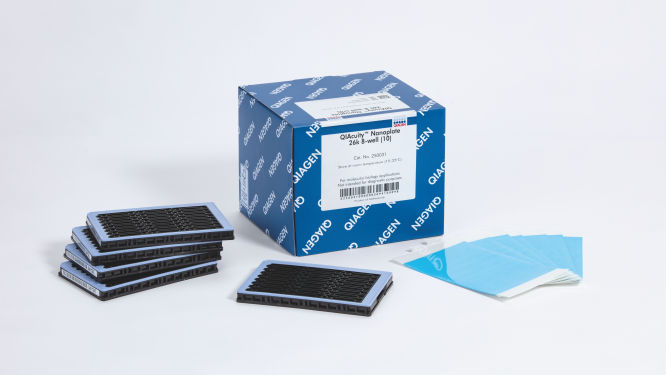
10 QIAcuity Nanoplate 26k 8-well, 11 Nanoplate Seals
제품 유형액세서리
QIAcuity Nanoplate
Nanoplate Seals
Nanoplate Tray
Nanoplate Adapter
웰당 분획
26k
8.5k
웰 수
8
24
QIAcuity Nanoplates 및 액세서리은/는 분자생물학 분야에 사용하기 위한 것입니다. 이 제품들은 질병의 진단, 예방, 또는 치료 목적으로 사용할 수 없습니다.

✓ 연중무휴 하루 24시간 자동 온라인 주문 처리

✓ 풍부한 지식과 전문성을 갖춘 제품 및 기술 지원

✓ 신속하고 안정적인 (재)주문

특징

  • 다양한 애플리케이션 요구 사항을 위한 네 개의 나노플레이트
  • 웰당 최대 8,500개 또는 26,000개 분획
  • SBS 형식

제품 세부 정보

QIAcuity Nanoplates는 웰당 최대 8,500개 또는 26,000개 분획으로 8개, 24개 또는 96개의 검체를 분석할 수 있는 미세 유체 디지털 PCR 플레이트입니다. 네 가지 나노플레이트 모두 QIAcuity 디지털 PCR 기기에서 실행하도록 설계되었습니다.

나노플레이트는 QIAcuity Digital PCR System에서만 사용할 수 있습니다. QIAgility를 사용하여 QIAcuity Nanoplate에서 자동 액체 취급 및 PCR 설정을 수행할 때는 QIAcuity Nanoplate 전용Adapter를 사용하십시오. 그런 다음, dPCR 반응을 위해 QIAcuity Digital PCR System에 플레이트를 로딩합니다.

제품에 대해 자세히 알아보고 당사의 dPCR 전문가에게 문의하시겠습니까? 여기에 정보를 기입하시면 곧 연락드리겠습니다.

성능

이 플레이트는 QIAcuity 기기의 디지털 PCR 반응에 사용하기 위해 특별히 설계된 플레이트입니다. QIAGEN은 네 가지 나노플레이트 유형을 제공하며 모두 염기서열분석(Sequencing by Synthesis, SBS) 형식이지만 다양한 애플리케이션 요구 사항에 따라 사양이 다릅니다.


나노플레이트 – 기능 및 사양
유형 프레임 색상 사양 애플리케이션
Nanoplate 26K 8-well 연한 파란색

8-well x 대략 26,000개 분획 

웰당 40µl dPCR 반응

희귀 돌연변이 검출, 
액체 생검, 유전자 
발현 분석, 
병원체 검출 등. 
Nanoplate 26K 24-well 파란색

24-well x 대략 26,000개 분획

웰당 40µl dPCR 반응

희귀 돌연변이 검출,
액체 생검, 유전자
발현 분석,
병원체 검출 등
Nanoplate 8.5K 24-well 흰색

24-well x 대략 8500개 분획

웰당 12µl dPCR 반응

복제 수 변이
분석, 유전자 발현
분석, NGS 라이브러리
정량화, 유전체 편집
검출 등
Nanoplate 8.5K 96-well 회색

96-well x 대략 8500개 분획

웰당 12µl dPCR 반응

원리

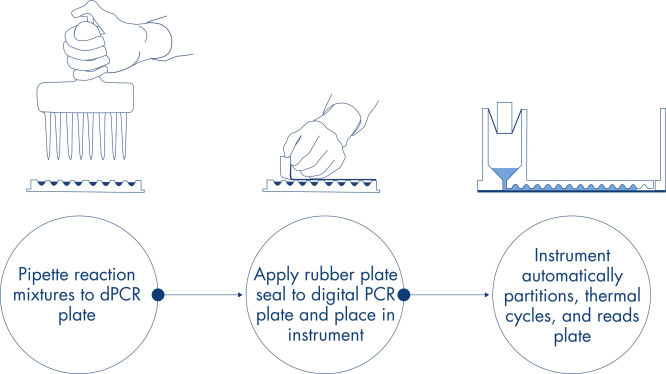
피펫팅 및 로딩, 실험 실행, 결과 분석의 간단한 3단계로 2시간 이내에 원하는 dPCR 결과를 얻을 수 있습니다. 나노플레이트에서의 dPCR 반응 원리는 여기에 설명되어 있습니다.

절차

qPCR 실험과 마찬가지로 검체 준비에는 마스터 혼합물, 프로브 및 프라이머를 8웰, 24웰 또는 96웰 나노플레이트로 옮긴 다음 검체를 추가하는 작업이 포함됩니다. 이 시스템은 분획, 열순환 및 이미징을 하나의 완전 자동화 기기로 통합하여 사용자가 2시간 이내에 검체에서부터 결과를 얻을 수 있습니다. Suite 소프트웨어에서 분석을 수행할 수 있으며, 표적 서열의 마이크로리터당 복제 농도뿐만 아니라 양성 검체나 NTC와 같은 품질 관리도 제공됩니다. 이 분석은 또한 동일한 LAN(근거리 통신망) 내의 원격 컴퓨터로 확장될 수 있습니다.

응용 분야

QIAcuity Nanoplates는 QIAcuity Digital PCR System 및 QIAcuity PCR 키트와 함께 다음을 포함한 디지털 PCR 애플리케이션을 지원합니다.

  • 희귀 돌연변이 검출
  • 복제 수 변이 분석
  • 유전자 발현 분석
  • 병원체 검출
  • 유전형 분석 (genotyping)
  • miRNA 연구
  • 세포 및 유전자 치료
  • 잔류 DNA 정량화
  • 폐수 모니터링

지원되는 데이터 및 수치

리소스

소프트웨어 릴리스 노트 (22)
For Version 2

Version 2.1

For Version 1.2
이전 소프트웨어 버전 (13)

The following QIAcuity Software Suite Volume Precision Factor (VPF) patches have been released to enable compatibility with VPF file version 6.0 or higher for QIAcuity Software Suite versions 2.0.20. As the abovementioned QIAcuity Software Suite versions do not allow loading a VPF zip file including more than 20 different individual VPF files, a patch is needed to allow the software for loading VPF zip files version 6.0 or higher. This technical limitation is solved from QIAcuity Software Suite version 2.1.8.23 onwards.

 If you are using the QIAcuity Software Suite version 2.0.20, please consider updating your Software Suite and the Instrument Control Software (CSW) to the most recent version. After updating to the latest software version, no patching is needed.

 If you are not able to update your QIAcuity Software Suite, please install the QIAcuity Software Suite VPF patch for QIAcuity Software Suite version 2.0.20 before loading VPF file version 6 or higher. Additional information and instructions may be found on the Release Note: QIAcuity Software Suite Volume Precision Factor (VPF) Patches.

Version 10.1

The Volume Precision Factor (VPF) offers a unique feature to secure precision of concentration results obtained from a QIAcuity dPCR run. 

In general, Nanoplates provide partitions of fixed sizes that enable a very precise way of sample concentration calculation. Potential variation of partition sizes in Nanoplate batches, caused by different microstructure molding forms, can be addressed by applying the batch specific VPF. Furthermore, the VPF includes well-specific volume information and therefore further increases precision of concentration calculation in each well of the Nanoplates.


Important note:

The Volume Precision Factor file version 10.1 is compatible with the QIAcuity Software Suite version 2.1.8.23 or higher. All lower versions, namely 1.2.18, 2.0.20, 2.1.7.182, and 2.1.8.20, require a QIAcuity Software Suite patch to be installed prior the upload of VPF version 10.1. Please read the Release Note for QIAcuity Software Suite Volume Precision Factor (VPF) Patches for more information.

If you are using QIAcuity Software Suite versions older than 2.1.8.23, please consider updating your Software Suite and the Instrument Control Software (CSW) to the most recent version prior the upload of VPF version 10.1. After updating to the latest QIAcuity Software Suite software version, no patching is needed. If you are not able to update your QIAcuity Software Suite, please run the patch for your Software Suite version following the instructions provided in the Release Note for QIAcuity Software Suite Volume Precision Factor (VPF) Patches.

After downloading and updating the VPF file within the QIAcuity Software Suite, the VPF is applied automatically to the analysis of a corresponding Nanoplate batch. The VPF file includes information from all available microstructure molding forms and connected Nanoplate batches. It will be stored on the PC where the QIAcuity Software Suite is installed.


Version 2.1.8


The QIAcuity Control Software (CSW) is an integral part of the QIAcuity instrument. It offers a GUI (graphical user interface) for basic functionalities such as plate setup, changing the order of plates to be processed, and monitoring the status of runs in real time. After a run is completed, the data are stored on the instrument’s memory and are sent to the connected QIAcuity Software Suite for analysis.

The new version 2.1.8 of the QIAcuity software (QIAcuity Software Suite version 2.1.8 and QIAcuity CSW version 2.1.8) offers bug fixes for repeated network connection issues and improved error handling. In addition, it fixes issues seen with latest versions of Microsoft Edge and Google Chrome browsers as well as issues seen with read-only plates after a software update.

Detailed information about the QIAcuity Control Software version 2.1.8 is available in the Release Note, which can also be downloaded under section “Software Release Notes”.


Note: The latest CSW version 2.1.8 is only compatible with the latest Software Suite version 2.1.8. If only one software component is updated, no connection between the Software Suite and the CSW can be established.

Important: Please follow the instructions provided in the QIAcuity User Manual for software version 2.1 and in the Release Note. It is strongly recommended to update the QIAcuity Software Suite first before proceeding with the QIAcuity Control Software!


Please contact QIAGEN Technical Services if you are unsure and require technical support.


SHA1 checksum: D3982B419D7C4CF39FBDDDAA4C0D351B39398278

Version 2.2


The QIAcuity Control Software is an integral part of the QIAcuity instrument. It offers a GUI (graphical user interface) for basic functionalities such as plate setup, changing the order of plates to be processed, and monitoring the status of runs in real time. After a run is completed, the data are stored on the instrument’s memory and are sent to the connected QIAcuity Software Suite for analysis.


The new Version 2.2 of the QIAcuity software (QIAcuity Software Suite v 2.2 and QIAcuity CSW v 2.2.) offers improvements for users working under GMP by adding a user ID validation during the report signing and the addition of timezone offset stamp for audit trail entries and for result report data. Furthermore, the addition of a standard deviation and coefficient of variance calculation in percentage of mean concentration calculation for replicates where implemented. In addition, the instrument camera stability was improved and an internal validation method was implemented.


Detailed information about the QIAcuity Control Software version 2.2 is available in the Release Note, which can also be downloaded under section “Software Release Notes”.


Note: The latest CSW version 2.2 is only compatible with the Software Suite version 2.2. If only one software component is updated, no connection between the Software Suite and the CSW can be established.


Important: Please follow the instructions provided in the QIAcuity User Manual for software version 2.2 and in the Release Note.

 It is strongly recommended to update the QIAcuity Software Suite first before proceeding with the QIAcuity Control Software.


Note: After clicking reboot during CSW upgrade or change of Suite connection, login screen may appear for short period. Please ignore it and wait for the QIAcuity instrument to shut down and restart itself.


Please contact QIAGEN Technical Services if you are unsure and require technical support.


SHA1 checksum: 3892D7A434A8F072A15008C76EB088BB78F1C255

The following QIAcuity Software Suite Volume Precision Factor (VPF) patches have been released to enable compatibility with VPF file version 6.0 or higher for QIAcuity Software Suite version 1.2.18. As the abovementioned QIAcuity Software Suite versions do not allow loading a VPF zip file including more than 20 different individual VPF files, a patch is needed to allow the software for loading VPF zip files version 6.0 or higher. This technical limitation is solved from QIAcuity Software Suite version 2.1.8.23 onwards.

 If you are using the QIAcuity Software Suite version 1.2.18, please consider updating your Software Suite and the Instrument Control Software (CSW) to the most recent version. After updating to the latest software version, no patching is needed.

 If you are not able to update your QIAcuity Software Suite, please install the QIAcuity Software Suite VPF patch for QIAcuity Software Suite version 1.2.18 before loading VPF file version 6 or higher. Additional information and instructions may be found on the Release Note: QIAcuity Software Suite Volume Precision Factor (VPF) Patches.

QIAcuity Control Software
SOFTWARE (322MB)

Version 2.5


The QIAcuity Control Software is an integral part of the QIAcuity instrument. It offers a GUI (graphical user interface) for basic functionalities such as plate setup, changing the order of plates to be processed, and monitoring the status of runs in real time. After a run is completed, the data are stored on the instrument’s memory and are sent to the connected QIAcuity Software Suite for analysis.

The new version 2.5 of the QIAcuity CSW offers a configurable auto logoff times which enables users to turn off or define logoff times per instrument. In addition the new version supports assay development by providing an essential temperature gradient functionality.

Furthermore improvements were implemented, for example, for the accuracy of time estimation for various software steps.

Detailed information about the QIAcuity Control Software version 2.5 is available in the Release Note, which can also be downloaded under section Software Release Notes.


Note: The latest CSW version 2.5 is only compatible with the Software Suite version 2.5. If only one software component is updated, no connection between the Software Suite and the CSW can be established.

Important: Please follow the instructions provided in the QIAcuity User Manual for software version 2.5 and in the Release Note.

It is strongly recommended to update the QIAcuity Software Suite first before proceeding with the QIAcuity Control Software!

Note: After clicking reboot during CSW upgrade or change of Suite connection, the login screen may appear for short period. Please ignore it and wait for the QIAcuity instrument to shut down and restart itself.


Please contact QIAGEN Technical Services if you are unsure and require technical support.


The QIAcuity backup and restore scripts are a standalone solution to backup all relevant user data of the QIAGEN Software Suite for disaster recovery and restore the data on a new or existing QIAGEN Software Suite installation. The following QIAcuity Software Suite versions are supported: 2.0, 2.1.7, 2.1.8, and 2.2. The backup can be conducted manually or automated by using of the Windows task scheduler.

Note: Windows Admin permission is needed to setup and perform an automated backup and for manual backup and restore.

Please read the QIAcuity Software Suite Backup and Restore Scripts document for more information and instructions how to use the scripts.


Version 2.2


The QIAcuity Software Suite enables the user to set up plates, analyze results, and monitor the status of runs in real time. This software is also used for the configuration of the system and provides access to the QIAcuity user management. The QIAcuity Software Suite is designed to be installed on a Windows PC that is connected to one or more QIAcuity instruments. For this configuration, the QIAcuity instrument needs to be connected to a network through Ethernet. Alternatively, a direct cable connection between the QIAcuity and the notebook where the QIAcuity Software Suite is running needs to be established. When connected to a network, up to 10 users may access the QIAcuity Software Suite via a browser installed on the client PC (Windows or Mac).


The new version 2.2 of the QIAcuity software (QIAcuity Software Suite v 2.2 and QIAcuity CSW v 2.2.) offers improvements for users working under GMP by adding a user ID validation during the report signing and the addition of timezone offset stamp for audit trail entries and for result report data. Furthermore, the addition of a standard deviation and coefficient of variance calculation in percentage of mean concentration calculation for replicates where implemented. In addition, the instrument camera stability was improved and an internal validation method was implemented.


Detailed information about the QIAcuity Software Suite version 2.2 is available in the Release Note, which can also be downloaded under section “Software Release Notes”.

Note: The latest Software Suite version 2.2 is only compatible with the latest Control Software (CSW) version 2.2. If only one software component is updated, no connection between the Software Suite and the CSW can be established.


Important: Please follow the instructions provided in the QIAcuity User Manual for software version 2.2 and in the Release Note.


It is strongly recommended to update the QIAcuity Software Suite first before proceeding with the QIAcuity Control Software. 


Please contact QIAGEN Technical Services if you are unsure and require technical support.


SHA1 checksum: 63A1689F2EB557809F418D159DA438FDC8B327A3


The following QIAcuity Software Suite Volume Precision Factor (VPF) patches have been released to enable compatibility with VPF file version 6.0 or higher for QIAcuity Software Suite version 2.1.7.182. As the abovementioned QIAcuity Software Suite versions do not allow loading a VPF zip file including more than 20 different individual VPF files, a patch is needed to allow the software for loading VPF zip files version 6.0 or higher. This technical limitation is solved from QIAcuity Software Suite version 2.1.8.23 onwards.

 If you are using the QIAcuity Software Suite version 2.1.7.182, please consider updating your Software Suite and the Instrument Control Software (CSW) to the most recent version. After updating to the latest software version, no patching is needed.

 If you are not able to update your QIAcuity Software Suite, please install the QIAcuity Software Suite VPF patch for QIAcuity Software Suite version 2.1.7.182 before loading VPF file version 6 or higher. Additional information and instructions may be found on the Release Note: QIAcuity Software Suite Volume Precision Factor (VPF) Patches.

QIAcuity Software Suite
SOFTWARE (389MB)

Version 1.2

A newer version of the Software Suite is available. Please use this version for the update of older plates if required.


The QIAcuity Software Suite 1.2 is designed to be installed on a Windows PC that is connected to one or more QIAcuity instruments. The QIAcuity Software Suite enables the user to set up plates, analyze results, and monitor the status of runs in real time. For this configuration, the QIAcuity instrument needs to be connected to a network through Ethernet. Alternatively, a direct cable connection between the QIAcuity and the notebook where the QIAcuity Software Suite is running needs to be established. When connected to a network, up to 10 users may access the QIAcuity Software Suite via a browser installed on the client PC (Windows or Mac).

The following browsers are supported in the QIAcuity Software Suite:

-Mozilla Firefox (version 64.0.2 or higher)
-Microsoft Edge (version 44.17763.1.0 or higher)
-Google Chrome (version 71.0.3578.98 or higher)

The new QIAcuity Software Suite 1.2 offers a functionality that enables users of the QIAcuity Software 1.1.3 to upgrade to the new version while keeping the library of previously stored plate runs.

Note: If you have exported plates from QIAcuity Software Suite 1.1.3 that you would like to import and use in QIAcuity Software Suite 1.2, you will need to import the plates before upgrading from version 1.1.3 to version 1.2. You may then export the plates again. Future software version starting from QIAcuity Software Suite 2.0 will facilitate import of plates from previous QIAcuity Software Suite versions.

The new improvements are as follows:

-Support for the Nanoplate 8.5k 24-well
-Hyperwell functionality to combine several wells to one combined well for analysis
-Automated plate archiving functionality
-Functionality to show the number of single/double positives in 2D scatterplots
-VPF (Volume Precision Factor) to further improve concentration calculation (see related resources)
-Additional improvements for stabilization and troubleshooting

Version 2.1.8


The QIAcuity Software Suite enables the user to set up plates, analyze results, and monitor the status of runs in real time. This software is also used for the configuration of the system and provides access to the QIAcuity user management. The QIAcuity Software Suite is designed to be installed on a Windows PC that is connected to one or more QIAcuity instruments.  For this configuration, the QIAcuity instrument needs to be connected to a network through Ethernet. Alternatively, a direct cable connection between the QIAcuity and the notebook where the QIAcuity Software Suite is running needs to be established. When connected to a network, up to 10 users may access the QIAcuity Software Suite via a browser installed on the client PC (Windows or Mac).

The new version 2.1.8 of the QIAcuity software (QIAcuity Software Suite version 2.1.8 and QIAcuity CSW version 2.1.8.) offers bug fixes for repeated network connection issues and improved error handling. In addition, it fixes issues seen with latest versions of Microsoft Edge and Google Chrome browsers as well as issues seen with read-only plates after a software update.

Detailed information about the QIAcuity Software Suite version 2.1.8 is available in the Release Note, which can also be downloaded under section “Software Release Notes”.

Important: Please ensure that updating to QIAcuity Software Suite version 2.1.8 is performed by the same Windows admin user using the same Windows login name that installed the previous QIAcuity Software Suite version. In case you cannot use the same Windows login name or the software update resulted in the browser error message "Can't reach this page" please contact our Technical Services for additional instructions.

Note: The latest Software Suite version 2.1.8 is only compatible with the latest Control Software (CSW) version 2.1.8. If only one software component is updated, no connection between the Software Suite and the CSW can be established.

Important: Please follow the instructions provided in the QIAcuity User Manual for software version 2.1 and in the Release Note. It is strongly recommended to update the QIAcuity Software Suite first before proceeding with the QIAcuity Control Software!

Please contact QIAGEN Technical Services if you are unsure and require technical support.


 SHA1 checksum: DE2416D926BB98D82A332E7B25EF66728F120DDA


The following QIAcuity Software Suite Volume Precision Factor (VPF) patches have been released to enable compatibility with VPF file version 6.0 or higher for QIAcuity Software Suite version 2.1.8.20. As the abovementioned QIAcuity Software Suite versions do not allow loading a VPF zip file including more than 20 different individual VPF files, a patch is needed to allow the software for loading VPF zip files version 6.0 or higher. This technical limitation is solved from QIAcuity Software Suite version 2.1.8.23 onwards.

 If you are using the QIAcuity Software Suite version 2.1.8.20, please consider updating your Software Suite and the Instrument Control Software (CSW) to the most recent version. After updating to the latest software version, no patching is needed.

 If you are not able to update your QIAcuity Software Suite, please install the QIAcuity Software Suite VPF patch for QIAcuity Software Suite version 2.1.8.20 before loading VPF file version 6 or higher. Additional information and instructions may be found on the Release Note: QIAcuity Software Suite Volume Precision Factor (VPF) Patches.

The QIAcuity backup and restore scripts are a standalone solution to backup all relevant user data of the QIAGEN Software Suite for disaster recovery and to restore the data on a new or existing QIAGEN Software Suite installation. The backup supports the QIAcuity Software Suite version 2.5 and can be conducted manually or automatically by using of the Windows Task Scheduler.

Note: Windows Admin permission is needed to setup and perform an automated backup and for manual backup and restore.

For backup and restore of Software versions lower than 2.5, please refer to the QIAcuity Software Suite Backup and Restore Scripts for version 2.0, 2.1.7, 2.1.8, and 2.2. 

Note: Windows Admin permission is needed to setup and perform an automated backup and for manual backup and restore.

Please read the QIAcuity Software Suite Backup and Restore Scripts document for more information and instructions how to use the scripts.


최신 소프트웨어 버전 (8)

Version 3.0


The QIAcuity Software Suite enables the user to set up plates, analyze results, and monitor the status of runs in real time. This software is also used for the configuration of the system and provides access to the QIAcuity user management. The QIAcuity Software Suite is designed to be installed on a Windows PC that is connected to one or more QIAcuity instruments. For this configuration, the QIAcuity instrument needs to be connected to a network through Ethernet. Alternatively, a direct cable connection between the QIAcuity and the notebook where the QIAcuity Software Suite is running needs to be established. When connected to a network, up to 10 users may access the QIAcuity Software Suite via a browser installed on the client PC (Windows or Mac).

The new version 3.0 supports dPCR assays up to a 8-plex by using six optical channels for six standard dyes and the additional use of two channel combinations for LSS (Long Stokes Shift) dyes, which can be selected from five different dye channel combinations. It also offers a new feature to create a custom cross talk matrix to address cross talk between neighboring channels for all multiplex assays. 

In this new version, an overview presenting individual 2D scatterplots of all selected wells is introduced. In addition, a sample-based 2D scatterplot analysis of individual replicates is provided. The new software also provides a reaction mix template functionality for the creation of a master mix including a custom cross talk matrix.

Detailed information about the QIAcuity Software Suite version 3.0 is available in the Release Note, which can also be downloaded under section Software Release Notes.

Note: The latest Software Suite version 3.0 is only compatible with the latest Control Software (CSW) version 3.0. If only one software component is updated, no connection between the Software Suite and the CSW can be established.

Important: Please follow the instructions provided in the QIAcuity User Manual for software version 3.0 and in the Release Note.

It is strongly recommended to update the QIAcuity Software Suite first before proceeding with the QIAcuity Control Software!

Please contact QIAGEN Technical Services if you are unsure and require technical support.

SHA1 checksum: C01F7BEA7D20DA3E22D95916A7046D06F03C523A


Version 3.1.1


The QIAcuity Software Suite enables the user to set up plates, analyze results, and monitor the status of runs in real time. This software is also used for the configuration of the system and provides access to the QIAcuity user management. The QIAcuity Software Suite is designed to be installed on a Windows PC that is connected to one or more QIAcuity instruments. For this configuration, the QIAcuity instrument needs to be connected to a network through Ethernet. Alternatively, a direct cable connection between the QIAcuity and the notebook where the QIAcuity Software Suite is running needs to be established. When connected to a network, up to 10 users may access the QIAcuity Software Suite via a browser installed on the client PC (Windows or Mac).

The new version 3.1.1 supports dPCR assays up to a 12-plex by using amplitude multiplexing. In addition to the six optical channels available, this option enables two amplicons to be detected in the same channel. The option to use two channel combinations for LSS (Long Stokes Shift) dyes introduced with version 3.0 remains. 

This software version also offers an updated feature to create a custom cross talk matrix to address cross talk between neighboring channels for all multiplex assays.

In addition, a new functionality for the integration of a QIAcuity Lab Automation Service was implemented. It allows third-party lab automation software to control robotic devices to interact with the QIAcuity system, run dPCR experiments, and analyze results without any human interaction.

Detailed information about new features, improvements, and bug fixes of the the QIAcuity Software Suite version 3.1.1 is available in the Release Note, which can also be downloaded under section Software Release Notes.

Note: The latest Software Suite version 3.1 is only compatible with the latest Control Software (CSW) version 3.1.1. If only one software component is updated, no connection between the Software Suite and the CSW can be established.

Important: Please follow the instructions provided in the QIAcuity User Manual for software version 3.1.1 and in the Release Note.

It is strongly recommended to update the QIAcuity Software Suite first before proceeding with the QIAcuity Control Software!

Please contact QIAGEN Technical Services if you are unsure and require technical support.

SHA256 checksum: 03A0897A5F8842834DF4B767AD3119A1C1005B723C879D8A91C1A946D1CC0EFC


QIAcuity Control Software
SOFTWARE (321MB)

Version 3.1.3

The QIAcuity Control Software is an integral part of the QIAcuity instrument. It offers a GUI (graphical user interface) for basic functionalities such as plate setup, changing the order of plates to be processed, and monitoring the status of runs in real time. After a run is completed, the data are stored on the instrument’s memory and are sent to the connected QIAcuity Software Suite for analysis.

Version 3.1 supports dPCR assays up to a 12-plex by using amplitude multiplexing. In addition to the six optical channels available, this option enables two amplicons to be detected in the same channel. The option to use two channel combinations for LSS (Long Stokes Shift) dyes introduced with version 3.0 remains.


In addition, as introduced with QIAcuity Control Software 3.0, the run time for all instrument types (QIAcuity One, Four, and Eight) was optimized with introducing a new auto focus algorithm.


Moreover, a new functionality for the integration of a QIAcuity Lab Automation Service was implemented. It allows third-party lab automation software to control robotic devices to interact with the QIAcuity system, run dPCR experiments, and analyze results without any human interaction.

Detailed information about the QIAcuity Control Software 3.1.3 is available in the Release Note, which can also be downloaded under section Software Release Notes.

Note: The latest CSW version 3.1.3 is only compatible with the Software Suite version 3.1.1. If only one software component is updated, no connection between the Software Suite and the CSW can be established.

Important: Please follow the instructions provided in the QIAcuity User Manual for software version 3.1 and in the Release Note.

It is strongly recommended to update the QIAcuity Software Suite first before proceeding with the QIAcuity Control Software!

Note: After clicking reboot during CSW upgrade or change of Suite connection, the login screen may appear for short period. Please ignore it and wait for the QIAcuity instrument to shut down and restart itself.

Please contact QIAGEN Technical Services if you are unsure and require technical support.

SHA256 checksum: 7C6BBCCC89620DA205A545A6DF5CBEA8F2A985B66DD6A7AD020F8522A269101C


Version 3.2

The QIAcuity Control Software is an integral part of the QIAcuity instrument. It offers a GUI (graphical user interface) for basic functionalities such as plate setup, changing the order of plates to be processed, and monitoring the status of runs in real time. After a run is completed, the data are stored on the instrument’s memory and are sent to the connected QIAcuity Software Suite for analysis.

The QIAcuity instrument CSW version 3.2 has been improved with enhanced error handling to prevent subsequent errors. Furthermore, a bug effecting to operate owned plates for users with the role technician or group leader has been fixed.


Detailed information about the QIAcuity Control Software 3.2 is available in the Release Note, which can also be downloaded under section Software Release Notes.

Note: The latest CSW version 3.2 is only compatible with the Software Suite version 3.2. If only one software component is updated, no connection between the Software Suite and the CSW can be established.

Important: Please follow the instructions provided in the QIAcuity User Manual for software version 3.2 and in the Release Note.

It is strongly recommended to update the QIAcuity Software Suite first before proceeding with the QIAcuity Control Software!

Note: After clicking reboot during CSW upgrade or change of Suite connection, the login screen may appear for short period. Please ignore it and wait for the QIAcuity instrument to shut down and restart itself.

Please contact QIAGEN Technical Services if you are unsure and require technical support.

SHA256 checksum: D23713C8F1C0D6D67048A465FECF8825DBB3D4D1C6CB8C1E0B6753EE053E6B81


Version 3.2


The QIAcuity Software Suite enables the user to set up plates, analyze results, and monitor the status of runs in real time. This software is also used for the configuration of the system and provides access to the QIAcuity user management. The QIAcuity Software Suite is designed to be installed on a Windows PC that is connected to one or more QIAcuity instruments. For this configuration, the QIAcuity instrument needs to be connected to a network through Ethernet. Alternatively, a direct cable connection between the QIAcuity and the notebook where the QIAcuity Software Suite is running needs to be established. When connected to a network, up to 10 users may access the QIAcuity Software Suite via a browser installed on the client PC (Windows or Mac).

The QIAcuity Software Suite 3.2 now supports multiple targets of interest for Copy Number Variation as well as for Mutant Detection data analysis at once. In addition, the dilution and conversation function were improved and multiple pair (target/target or channel/channel) selections for 2D scatterplots analysis has been implemented. 

The CSV output file of current results of analysis for absolute quantification now include QC parameters, such as rain, resolution and bandwidth, real cycled volume per partition, the mean RFU values for positives and negative bands, and the lambda value.

Further improvements are related to the QIAcuity Lab Automation Service, the custom cross talk matrix (CXTM), and other features.

Detailed information about new features, improvements, and bug fixes of the the QIAcuity Software Suite version 3.2 is available in the Release Note, which can also be downloaded under section Software Release Notes.

Note: The latest Software Suite version 3.2 is only compatible with the latest Control Software (CSW) version 3.2. If only one software component is updated, no connection between the Software Suite and the CSW can be established.

Important: Please follow the instructions provided in the QIAcuity User Manual for software version 3.2 and in the Release Note.

It is strongly recommended to update the QIAcuity Software Suite first before proceeding with the QIAcuity Control Software!

Please contact QIAGEN Technical Services if you are unsure and require technical support.

SHA256 checksum: BBFBE03F6F90559EBE7A76E37341A32293A4A3689F51C74CA1D3725A43376FA3


Version 11

The Volume Precision Factor (VPF) offers a unique feature to secure precision of concentration results obtained from a QIAcuity dPCR run. 

In general, Nanoplates provide partitions of fixed sizes that enable a very precise way of sample concentration calculation. Potential variation of partition sizes in Nanoplate batches, caused by different microstructure molding forms, can be addressed by applying the batch specific VPF. Furthermore, the VPF includes well-specific volume information and therefore further increases precision of concentration calculation in each well of the Nanoplates.

Version 3.0

The QIAcuity Control Software is an integral part of the QIAcuity instrument. It offers a GUI (graphical user interface) for basic functionalities such as plate setup, changing the order of plates to be processed, and monitoring the status of runs in real time. After a run is completed, the data are stored on the instrument’s memory and are sent to the connected QIAcuity Software Suite for analysis.

The new version 3.0 of the QIAcuity CSW supports dPCR assays up to a 8-plex by using six optical channels for six standard dyes and the additional use of two channel combinations for LSS (Long Stokes Shift) dyes, which can be selected from five different dye channel combinations. In addition, the new version has optimized the run time for all instrument types (QIAcuity One, Four, and Eight) with introducing a new auto focus algorithm.

Detailed information about the QIAcuity Control Software 3.0 is available in the Release Note, which can also be downloaded under section Software Release Notes.

Note: The latest CSW version 3.0 is only compatible with the Software Suite version 3.0. If only one software component is updated, no connection between the Software Suite and the CSW can be established.

Important: Please follow the instructions provided in the QIAcuity User Manual for software version 3.0 and in the Release Note.

It is strongly recommended to update the QIAcuity Software Suite first before proceeding with the QIAcuity Control Software!

Note: After clicking reboot during CSW upgrade or change of Suite connection, the login screen may appear for short period. Please ignore it and wait for the QIAcuity instrument to shut down and restart itself.

Please contact QIAGEN Technical Services if you are unsure and require technical support.

SHA1 checksum: E58C84A95E892EF2F3DAFF4C6927279645A17FBF


Version 2.5.0.1


The QIAcuity Software Suite enables the user to set up plates, analyze results, and monitor the status of runs in real time. This software is also used for the configuration of the system and provides access to the QIAcuity user management. The QIAcuity Software Suite is designed to be installed on a Windows PC that is connected to one or more QIAcuity instruments.  For this configuration, the QIAcuity instrument needs to be connected to a network through Ethernet. Alternatively, a direct cable connection between the QIAcuity and the notebook where the QIAcuity Software Suite is running needs to be established. When connected to a network, up to 10 users may access the QIAcuity Software Suite via a browser installed on the client PC (Windows or Mac).

The new version 2.5 of the QIAcuity Software Suite supports assay development by providing an essential temperature gradient functionality. It also offers a new feature that provides calculation of initial concentration of samples by using various dilution factors. In addition, concentration units may be converted into various pre-defined or user-defined units. The new software also offers an integrity value and concentration value per group for up to 5-plex added to the multiple occupancy CSV file export, for example, for the evaluation of AAV (adeno-associated virus) assays and for drop-off assays.

In this new version the initial loading time and the time for recalculation of 1D/2D scatterplot and for signal map image has been reduced, leading to a much faster performance.

Detailed information about the QIAcuity Software Suite version 2.5 is available in the Release Note, which can also be downloaded under section “Software Release Notes”.


Note: The latest Software Suite version 2.5 is only compatible with the latest Control Software (CSW) version 2.5. If only one software component is updated, no connection between the Software Suite and the CSW can be established.

Important: Please follow the instructions provided in the QIAcuity User Manual for software version 2.5 and in the Release Note.

It is strongly recommended to update the QIAcuity Software Suite first before proceeding with the QIAcuity Control Software!

Please contact QIAGEN Technical Services if you are unsure and require technical support.

SHA1 checksum: D1690226299A75E077FA37C420A970FC71D56CBF


애플리케이션 노트 (12)
The QIAgility instrument is a liquid handler designed for automating PCR setup. For compatibility with the QIAcuity, we developed an adapter to secure up to two nanoplates onto the deck of the QIAgility. Using the QIAgility software, we have optimized a protocol that works for all nanoplate types and QIAcuity applications. Here we report the performance of a front end automated QIAgility dPCR nanoplate setup procedure for use with the QIAcuity dPCR system.
The QIAcuity digital PCR system combined with the QIAcuity One-Step Viral RT-PCR Kit enables precise detection and quantitation of vector-borne viruses in mosquitoes. The results presented in this comparison study showed that digital PCR is a powerful tool for absolute quantitation of low abundant targets and is a more reliable detection method than qPCR. Multiplexing allows detection and quantitation of multiple targets in a single reaction more efficiently by increasing sample throughput at a reduced cost per target.
Here, we present a workflow that combines two technologies, cellenONE and QIAcuity Digital PCR, which accelerate and streamline high-throughput analyses of target copy numbers in cultured cells. The workflow starts with detecting and sorting defined populations of cells as well as individual cells using cellenONE, followed by multiplexing dPCR on the QIAcuity platform. Copy number variations of target regions are then analyzed using the QIAcuity Software Suite, providing an intuitive and fast interpretation of results.
Digital PCR is a superior method to qPCR for the detection and absolute quantification of low concentration target templates. There are multiple digital PCR systems on the market that differ in numerous aspects including the amount of dead volume, which is the volume that is loaded but not analyzed by the given instrument. While it has been speculated that dead volume could impact the sensitivity of dPCR applications, here we provide data to support the conclusion that the most important factors in determining the relative sensitivity of each system are template addition volume and template analyzed volume. In summary, data provided herein demonstrate that higher template addition volumes can overcome any limitations that dead volume may have on the sensitivity of a dPCR application.
The goal of this work was to compare performance of quantitative PCR (qPCR) and digital PCR (dPCR) in the quantification of gene expression and Wolbachia abundances in Nasonia parasitoid wasps.
Here, we present a highly efficient, high-throughput workflow that combines two technologies, cellenONE and QIAcuity Digital PCR, to accurately analyze miRNAs in well-defined individual cells and populations of cells.
This study tested a workflow for quantitation and qualification of AAV samples using a duplex assay on the QIAcuity dPCR instrument targeting both an insert (GFP) and the viral backbone (AAV2-ITR). With very low intra-assay and inter-assay CVs <6.5%, we demonstrate one of the main benefits of dPCR: reproducibility.
Here we report the use of saliva samples in combination with dPCR as a suitable alternative to screen for individuals infected with SARS-CoV-2.
Here we demonstrate how to optimize your assays on a microfluidic nanoplate-based digital PCR system, the QIAcuity, and provide recommendations for a seamless transfer. Moreover, the QIAcuity dPCR workflow is very similar to qPCR.
Here we compared the performance of qPCR and the nanoplate dPCR techniques. The digital PCR method on the QIAcuity significantly improved precision when measuring copy number states and sensitivity of mutation detection through absolute quantification and reduced standard error. This is advantageous in various applications, including copy number variation analysis, small fold-change and rare mutation detection.
With the cellenONE-QIAcuity workflow, we achieved high-throughput absolute quantification of low-abundance targets at the single-cell level. cellenONE’s single-cell isolation platform enabled real-time and 100% accurate single-cell isolation without compromising viability and transcript expression. This allowed us to use the exact number of intact cells for RT-dPCR reactions. Moreover, the elimination of the RNA purification step significantly reduced hands-on time, and QIAcuity’s probe-based chemistry allowed the multiplexing of up to five targets in a one-step RT-dPCR format with no or minimal optimization.
Here we provide an integrated rAAV genome titer method using the QIAcuity Digital PCR (dPCR) System with detailed parameters for high assay performance. Using this optimized method for pre-PCR handling of in-process rAAV samples, the results demonstrated that QIAcuity dPCR system generates the same level of accuracy and precision as the current gold standard ddPCR system but with much faster sample-to-result times (2 hours vs 7 hours) and higher overall throughput and scalability.
브로셔 및 가이드 (2)
기기 사용자 설명서 (2)
Safety Data Sheets (1)
Certificates of Analysis (1)