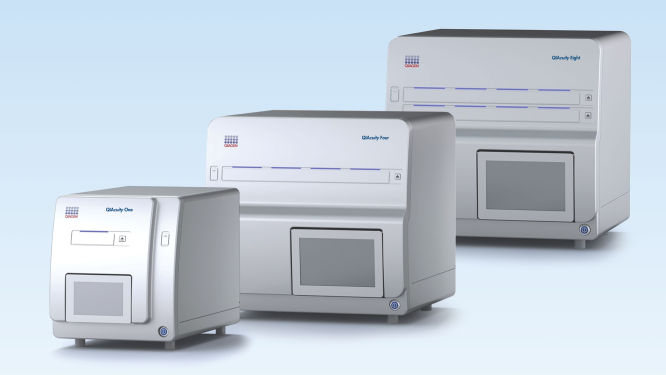
QIAcuity Digital PCR System

Pour les applications de PCR numérique sur nanoplaque

QIAcuity in action
Explore QIAcuity inside and out while learning more about dPCR.

QIAcuity One, 2plex Device

N° de réf. / ID.   911001

Instrument de PCR digitale à une seule plaque permettant la détection de jusqu’à 2 colorants fluorescents, rouleau, clé USB et QIAcuity Software Suite : comprend 1 visite de maintenance préventive. Une garantie de 1 an couvrant pièces, main-d’œuvre et déplacement est également incluse.
Format
One
Four
Eight
Détection multicanal
2 channels (up to 4plex)
8 channels (up to 12plex)
Options de service
Device
System
System FUL-2
Le QIAcuity est destiné aux applications de biologie moléculaire. Ce produit n’est pas conçu pour le diagnostic, la prévention ou le traitement des maladies. Par conséquent, les caractéristiques de performances du produit dans un contexte clinique (diagnostic, pronostic, thérapie ou banque de sang) sont inconnues. Pour les applications diagnostiques de la PCR numérique, veuillez utiliser le QIAcuityDx Digital PCR System.
QIAcuity in action
Explore QIAcuity inside and out while learning more about dPCR.

Caractéristiques

  • Système entièrement intégré
  • Format évolutif (instruments à 1, 4 et 8 plaques)
  • Capacités de multiplexage avancées (jusqu’à 12-plex)
  • Jusqu’à six canaux standard plus deux canaux hybrides pour les colorants LSS
  • Cadence d’analyse flexible
  • Résultats complets en 2 heures environ

Détails produit

Le QIAcuity Digital PCR System est conçu pour produire des résultats précis de quantification multiplex pour la détection des mutations, les variations du nombre de copies (Copy Number Variation, CNV), les études d’expression génique, l’analyse d’édition génique, et bien plus encore. Ce système à base de nanoplaques intègre une méthode de dPCR classique de partitionnement, thermocyclage et imagerie dans une plateforme automatisée et autonome, réduisant au minimum le temps d’intervention.

Ce système s’utilise conjointement avec les nanoplaques, réactifs et dosages QIAcuity.

Explorez la démonstration virtuelle pour en savoir plus sur QIAcuity.

Performances

Le QIAcuity Digital PCR System rend la quantification absolue accessible et abordable pour tous les laboratoires. Permettant un fonctionnement autonome, l’automatisation intègre et simplifie toute la méthode de PCR numérique de partitionnement, thermocyclage et imagerie dans un seul instrument avec un temps d’intervention minimal. Il est également facile d’adapter vos dosages de qPCR actuels au QIAcuity Digital PCR System. La manipulation des plaques ne requiert aucune modification par rapport à la qPCR. La configuration des dosages est donc rapide et les résultats sont obtenus en 2 heures environ.

Instruments QIAcuity – fonctionnalités et caractéristiques

Fonctionnalité QIAcuity One 2plex QIAcuity One 5plex QIAcuity Four QIAcuity Eight
Plaques traitées 1 1 4 8
Canaux de détection 2 81)
(6+2 hybrid2)
81)
(6+2 hybrid2)
81)
(6+2 hybrid2)
Capacité de multiplexage  4 123)1) 123)1) 123)1)
Thermocycleur(s) 1 1 1 2
Délai d’obtention du résultat Environ 2 h

Environ 2 h

Première plaque en 2 h environ

Une plaque supplémentaire toutes les ∼80 min env.

Première plaque en 2 h environ

Une plaque supplémentaire toutes les ∼40 min env.

Débit (échantillons traités au cours d’une journée)

Jusqu’à 384 (96 puits)

Jusqu’à 96 (24 puits)

Jusqu’à 384 (96 puits)

Jusqu’à 96 (24 puits)

Jusqu’à 672 (96 puits)

Jusqu’à 168 (24 puits)

Jusqu’à 1248 (96 puits)

Jusqu’à 312 (24 puits)

1) Nécessite l'utilisation du kit PCR QIAcuity High Multiplex Probe en cas de multiplexage > 5plex 
2) Des canaux hybrides sont utilisés pour les colorants Long Stokes Shift (LSS)
3) La détection de 12 cibles en parallèle peut être réalisée en utilisant le multiplexage d’amplitude dans les six canaux standard. En combinant des canaux hybrides pour les colorants LSS monoplex et le multiplexage d’amplitude, le multiplexage total possible peut être augmenté à 14. Cependant, cette combinaison n’est pas recommandée en raison de la demande d’optimisation pour tous les dosages utilisés dans un mélange réactionnel et de leur compensation de diaphonie correspondante.

Principe

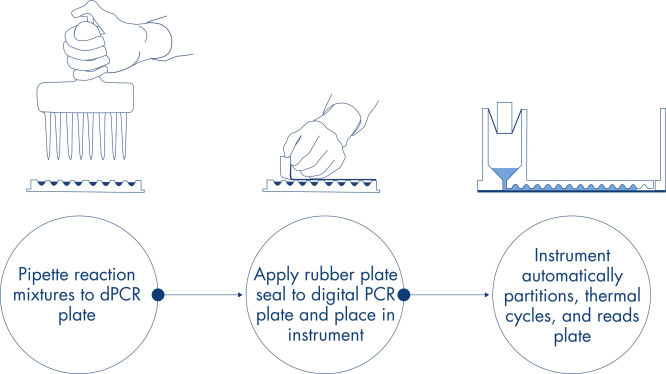
Vous pouvez obtenir, en seulement 3 étapes simples, le résultat de dPCR que vous voulez en 2 heures environ : pipettez et chargez, effectuez l’expérience, puis analysez les résultats.

Vous trouverez ici une description du principe de la réaction de dPCR sur nanoplaque.

Procédure

Comme dans les expériences de qPCR, la préparation des échantillons comprend le transfert du master mix, des sondes et des amorces sur une nanoplaque de 96 ou 24 puits, suivi de l’addition des échantillons. Le système intègre le fractionnement, le thermocyclage et l’imagerie dans un seul instrument entièrement automatisé qui permet aux utilisateurs d’obtenir des résultats en moins de 2 heures. Il est possible d’effectuer l’analyse à l’aide de la suite logicielle, qui donne la concentration de la séquence cible en copies par microlitre et permet le contrôle qualité pour les échantillons positifs ou NTC. Cette analyse peut également être effectuée sur des ordinateurs à distance au sein du même réseau local (Local Area Network, LAN).

Applications

Associés aux QIAcuity Nanoplaques et aux QIAcuity PCR Kits, les instruments QIAcuity facilitent les applications de PCR numérique telles que :

  • La détection des mutations rares
  • L’analyse des variations du nombre de copies
  • L’analyse de l’expression génique
  • La détection des agents pathogènes
  • Le génotypage
  • La recherche sur les miARN
  • La thérapie génique et cellulaire


Logiciel

La QIAcuity Software Suite fournie avec l’instrument et installée sur un ordinateur distinct contrôle un ou plusieurs instruments QIAcuity, soit via une connexion directe, soit via un réseau local (Local Area Network, LAN) existant. À l’aide de la QIAcuity Software Suite, les expériences, échantillons et mélanges réactionnels de PCR numérique peuvent être définis, attribués à des nanoplaques et transférés sur l’instrument QIAcuity. Après le cycle d’exécution, il est possible d’analyser les données, de créer des rapports et d’exporter les données pour une analyse externe. Le logiciel offre de multiples fonctionnalités de modèles pour faciliter la réutilisation de plans de plaque ou de paramètres de cycle d’exécution de plaques, transformant encore davantage votre pratique de la PCR numérique.

Lorsqu’il est intégré à un réseau local, l’ordinateur héberge la fonction QIAcuity Software Suite en tant que serveur accessible via LAN aux ordinateurs clients. Cela permet à plusieurs utilisateurs d’accéder au logiciel depuis d’autres pièces ou bureaux et d’analyser les données dans un navigateur classique, sans devoir installer le logiciel sur plusieurs ordinateurs ni utiliser de connexions internet pour accéder aux données et pour les transmettre.

Services

Protégez votre instrument grâce aux diverses solutions de service QIAGEN. Renseignez-vous sur un contrat de service spécifique pour répondre à vos besoins.

Données et illustrations utiles

Kits & Consumables

​dPCR accessories
Master mixes & reagents
Assays & kits
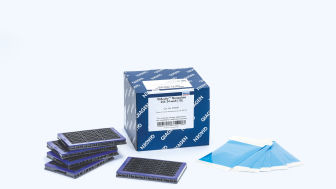
QIAcuity Nanoplate 26k 8-well (10) image
QIAcuity Nanoplate 26k 8-well (10)
Cat. No.: 250031
284,00 €
QIAcuity Nanoplate 26k 8-well (10) image
284,00 €
QIAcuity Nanoplate 26k 8-well (10) image
284,00 €
Total 284,00 €
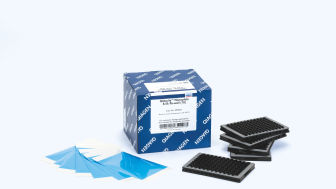
QIAcuity Nanoplate 8.5k 24-well (10) image
QIAcuity Nanoplate 8.5k 24-well (10)
Cat. No.: 250011
382,00 €
QIAcuity Nanoplate 8.5k 24-well (10) image
382,00 €
QIAcuity Nanoplate 8.5k 24-well (10) image
382,00 €
Total 382,00 €
QIAcuity Nanoplate 26k 24-well (10) image
QIAcuity Nanoplate 26k 24-well (10)
Cat. No.: 250001
634,00 €
QIAcuity Nanoplate 26k 24-well (10) image
634,00 €
QIAcuity Nanoplate 26k 24-well (10) image
634,00 €
Total 634,00 €
QIAcuity Nanoplate 8.5k 96-well (10) image
QIAcuity Nanoplate 8.5k 96-well (10)
Cat. No.: 250021
1 528,00 €
QIAcuity Nanoplate 8.5k 96-well (10) image
1 528,00 €
QIAcuity Nanoplate 8.5k 96-well (10) image
1 528,00 €
Total 1 528,00 €
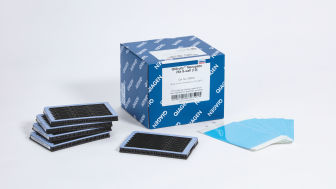
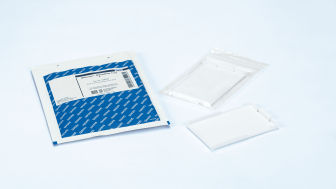
Nanoplate Seals (11) image
Nanoplate Seals (11)
Cat. No.: 250099
41,40 €
Nanoplate Seals (11) image
Nanoplate Seals (11)
Cat. No.: 250099
41,40 €
Nanoplate Seals (11) image
Nanoplate Seals (11)
Cat. No.: 250099
41,40 €
Total 41,40 €
Nanoplate Tray (2) image
Nanoplate Tray (2)
Cat. No.: 250098
31,80 €
Nanoplate Tray (2) image
Nanoplate Tray (2)
Cat. No.: 250098
31,80 €
Nanoplate Tray (2) image
Nanoplate Tray (2)
Cat. No.: 250098
31,80 €
Total 31,80 €
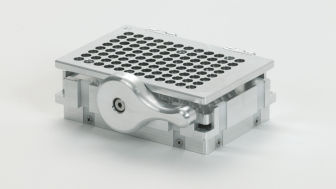
QIAcuity Nanoplate Adapter (1) image
QIAcuity Nanoplate Adapter (1)
Cat. No.: 9027242
2 616,00 €
QIAcuity Nanoplate Adapter (1) image
2 616,00 €
QIAcuity Nanoplate Adapter (1) image
2 616,00 €
Total 2 616,00 €

Plans des services

QIAcuity One 2plex Full Agreement

N° de réf. / ID.   9245362

Une réparation d’instrument QIAcuity One 2plex sur site, comprenant déplacement, pièces et main-d’œuvre pendant un an. Délai de réponse de deux jours ouvrables. Comprend une visite de maintenance préventive pendant la période couverte par le contrat complet.
icon_0153_cc_gen_source_okay-s
Disponible à la demande

QIAcuity One, abonnement de prévention

N° de réf. / ID.   9245355

Une visite de maintenance planifiée (MP) sur site, comprenant déplacement, main-d’œuvre et pièces de MP. Comprend une remise de 10 % sur les prestations de réparation pendant la période d’abonnement de prévention.
icon_0153_cc_gen_source_okay-s
Disponible à la demande

QIAcuity Four, abonnement de prévention

N° de réf. / ID.   9245356

Une visite de maintenance planifiée (MP) sur site, comprenant déplacement, main-d’œuvre et pièces de MP. Comprend une remise de 10 % sur les prestations de réparation pendant la période d’abonnement de prévention.
icon_0153_cc_gen_source_okay-s
Disponible à la demande

QIAcuity Eight, abonnement de prévention

N° de réf. / ID.   9245357

Une visite de maintenance planifiée (MP) sur site, comprenant déplacement, main-d’œuvre et pièces de MP. Comprend une remise de 10 % sur les prestations de réparation pendant la période d’abonnement de prévention.
icon_0153_cc_gen_source_okay-s
Disponible à la demande

QIAcuity One 2plex Core Agreement

N° de réf. / ID.   9245358

Une prestation de réparation sur site et une visite de maintenance préventive sur site, comprenant déplacement, pièces et main-d’œuvre pendant un an. Délai de réponse de cinq jours ouvrables. Comprend une remise de 10 % sur une prestation de réparation supplémentaire en cours de période contractuelle.
icon_0153_cc_gen_source_okay-s
Disponible à la demande

QIAcuity One 5plex Core Agreement

N° de réf. / ID.   9245359

Une prestation de réparation sur site et une visite de maintenance préventive sur site, comprenant déplacement, pièces et main-d’œuvre pendant un an. Délai de réponse de cinq jours ouvrables. Comprend une remise de 10 % sur une prestation de réparation supplémentaire en cours de période contractuelle.
icon_0153_cc_gen_source_okay-s
Disponible à la demande

QIAcuity Four Core Agreement

N° de réf. / ID.   9245360

Une prestation de réparation sur site et une visite de maintenance préventive sur site, comprenant déplacement, pièces et main-d’œuvre pendant un an. Délai de réponse de cinq jours ouvrables. Comprend une remise de 10 % sur une prestation de réparation supplémentaire en cours de période contractuelle.
icon_0153_cc_gen_source_okay-s
Disponible à la demande

QIAcuity Eight Core Agreement

N° de réf. / ID.   9245361

Une prestation de réparation sur site et une visite de maintenance préventive sur site, comprenant déplacement, pièces et main-d’œuvre pendant un an. Délai de réponse de cinq jours ouvrables. Comprend une remise de 10 % sur une prestation de réparation supplémentaire en cours de période contractuelle.
icon_0153_cc_gen_source_okay-s
Disponible à la demande

QIAcuity One 2plex Basic Agreement

N° de réf. / ID.   9245401

Une réparation d’instrument QIAcuity One 2plex sur site, comprenant déplacement, pièces et main-d’œuvre pendant un an. Délai de réponse de cinq jours ouvrables. Comprend une visite de maintenance préventive ou une prestation de contrôle pendant la période couverte par le contrat de base.
icon_0153_cc_gen_source_okay-s
Disponible à la demande

Contrat de base pour QIAcuity One 5plex

N° de réf. / ID.   9245402

Une réparation d’instrument QIAcuity One 5plex sur site, comprenant déplacement, pièces et main-d’œuvre pendant un an. Délai de réponse de cinq jours ouvrables. Comprend une visite de maintenance préventive ou une prestation de contrôle pendant la période couverte par le contrat de base.
icon_0153_cc_gen_source_okay-s
Disponible à la demande

QIAcuity One 5plex Full Agreement

N° de réf. / ID.   9245363

Une réparation d’instrument QIAcuity One 5plex sur site, comprenant déplacement, pièces et main-d’œuvre pendant un an. Délai de réponse de deux jours ouvrables. Comprend une visite de maintenance préventive pendant la période couverte par le contrat complet.
icon_0153_cc_gen_source_okay-s
Disponible à la demande

QIAcuity Four Full Agreement

N° de réf. / ID.   9245364

Une réparation d’instrument QIAcuity Four sur site, comprenant déplacement, pièces et main-d’œuvre pendant un an. Délai de réponse de deux jours ouvrables. Comprend une visite de maintenance préventive pendant la période couverte par le contrat complet.
icon_0153_cc_gen_source_okay-s
Disponible à la demande

QIAcuity Eight Full Agreement

N° de réf. / ID.   9245365

Une réparation d’instrument QIAcuity Eight sur site, comprenant déplacement, pièces et main-d’œuvre pendant un an. Délai de réponse de deux jours ouvrables. Comprend une visite de maintenance préventive pendant la période couverte par le contrat complet.
icon_0153_cc_gen_source_okay-s
Disponible à la demande

QIAcuity One, Installation & Training

N° de réf. / ID.   9245352

Service sur site comprenant la configuration du matériel de l’instrument et du logiciel du système ainsi qu’une formation pratique aux applications pour un maximum de quatre membres du personnel de laboratoire afin d’assurer une intégration fluide dans les flux de travail du laboratoire.
icon_0153_cc_gen_source_okay-s
Disponible à la demande

QIAcuity Four, Installation & Training

N° de réf. / ID.   9245353

Service sur site comprenant la configuration du matériel de l’instrument et du logiciel du système ainsi qu’une formation pratique aux applications pour un maximum de quatre membres du personnel de laboratoire afin d’assurer une intégration fluide dans les flux de travail du laboratoire.
icon_0153_cc_gen_source_okay-s
Disponible à la demande

QIAcuity Eight, Installation & Training

N° de réf. / ID.   9245354

Service sur site comprenant la configuration du matériel de l’instrument et du logiciel du système ainsi qu’une formation pratique aux applications pour un maximum de quatre membres du personnel de laboratoire afin d’assurer une intégration fluide dans les flux de travail du laboratoire.
icon_0153_cc_gen_source_okay-s
Disponible à la demande

Ressources

Notes de version du logiciel (22)
For Version 2

Version 2.1

For Version 1.2
Manuels d’utilisation des instruments (24)
QIAcuity backup and restore scripts for QIAcuity Software Suite versions 2.0, 2.1.7, 2.1.8, and 2.2


Extension to the QIAcuity User Manual for QIAcuity Software version 3.1.1
User manual for QIAcuity instruments and QIAcuity Software 3.0
User manual for QIAcuity instruments and QIAcuity Software 3.2
Updating QIAcuity Software Suite 1.1.3 and Control Software 0.5.2.18 to QIAcuity Software 2.0
For QIAcuity Software Suite version 3.1 or higher
For QIAcuity Software Suite version 3.0
User manual for QIAcuity instruments and QIAcuity Software 2.5
Network connection of QIAcuity instruments
For QIAcuity User Manual – Updated QIAcuity Nanoplate Partition Volumes
User manual for QIAcuity instruments and QIAcuity Software 2.2
User manual for QIAcuity instruments and QIAcuity Software 3.1
User manual for QIAcuity instruments and QIAcuity Software 2.1
User manual for QIAcuity instruments and QIAcuity Software 1.2
Extension to the QIAcuity User Manual for QIAcuity Software version 3.2
For QIAcuity Software Suite 1.2: Updating VPF for archived or exported plates
User manual for QIAcuity instruments and QIAcuity Software 2.1.8
QIAcuity backup and restore scripts for QIAcuity Software Suite version 2.5
User manual for QIAcuity instruments and QIAcuity Software 2.0
Versions antérieures du logiciel (14)

The following QIAcuity Software Suite Volume Precision Factor (VPF) patches have been released to enable compatibility with VPF file version 6.0 or higher for QIAcuity Software Suite versions 2.0.20. As the abovementioned QIAcuity Software Suite versions do not allow loading a VPF zip file including more than 20 different individual VPF files, a patch is needed to allow the software for loading VPF zip files version 6.0 or higher. This technical limitation is solved from QIAcuity Software Suite version 2.1.8.23 onwards.

 If you are using the QIAcuity Software Suite version 2.0.20, please consider updating your Software Suite and the Instrument Control Software (CSW) to the most recent version. After updating to the latest software version, no patching is needed.

 If you are not able to update your QIAcuity Software Suite, please install the QIAcuity Software Suite VPF patch for QIAcuity Software Suite version 2.0.20 before loading VPF file version 6 or higher. Additional information and instructions may be found on the Release Note: QIAcuity Software Suite Volume Precision Factor (VPF) Patches.

Version 10.1

The Volume Precision Factor (VPF) offers a unique feature to secure precision of concentration results obtained from a QIAcuity dPCR run. 

In general, Nanoplates provide partitions of fixed sizes that enable a very precise way of sample concentration calculation. Potential variation of partition sizes in Nanoplate batches, caused by different microstructure molding forms, can be addressed by applying the batch specific VPF. Furthermore, the VPF includes well-specific volume information and therefore further increases precision of concentration calculation in each well of the Nanoplates.


Important note:

The Volume Precision Factor file version 10.1 is compatible with the QIAcuity Software Suite version 2.1.8.23 or higher. All lower versions, namely 1.2.18, 2.0.20, 2.1.7.182, and 2.1.8.20, require a QIAcuity Software Suite patch to be installed prior the upload of VPF version 10.1. Please read the Release Note for QIAcuity Software Suite Volume Precision Factor (VPF) Patches for more information.

If you are using QIAcuity Software Suite versions older than 2.1.8.23, please consider updating your Software Suite and the Instrument Control Software (CSW) to the most recent version prior the upload of VPF version 10.1. After updating to the latest QIAcuity Software Suite software version, no patching is needed. If you are not able to update your QIAcuity Software Suite, please run the patch for your Software Suite version following the instructions provided in the Release Note for QIAcuity Software Suite Volume Precision Factor (VPF) Patches.

After downloading and updating the VPF file within the QIAcuity Software Suite, the VPF is applied automatically to the analysis of a corresponding Nanoplate batch. The VPF file includes information from all available microstructure molding forms and connected Nanoplate batches. It will be stored on the PC where the QIAcuity Software Suite is installed.


Version 2.1.8


The QIAcuity Control Software (CSW) is an integral part of the QIAcuity instrument. It offers a GUI (graphical user interface) for basic functionalities such as plate setup, changing the order of plates to be processed, and monitoring the status of runs in real time. After a run is completed, the data are stored on the instrument’s memory and are sent to the connected QIAcuity Software Suite for analysis.

The new version 2.1.8 of the QIAcuity software (QIAcuity Software Suite version 2.1.8 and QIAcuity CSW version 2.1.8) offers bug fixes for repeated network connection issues and improved error handling. In addition, it fixes issues seen with latest versions of Microsoft Edge and Google Chrome browsers as well as issues seen with read-only plates after a software update.

Detailed information about the QIAcuity Control Software version 2.1.8 is available in the Release Note, which can also be downloaded under section “Software Release Notes”.


Note: The latest CSW version 2.1.8 is only compatible with the latest Software Suite version 2.1.8. If only one software component is updated, no connection between the Software Suite and the CSW can be established.

Important: Please follow the instructions provided in the QIAcuity User Manual for software version 2.1 and in the Release Note. It is strongly recommended to update the QIAcuity Software Suite first before proceeding with the QIAcuity Control Software!


Please contact QIAGEN Technical Services if you are unsure and require technical support.


SHA1 checksum: D3982B419D7C4CF39FBDDDAA4C0D351B39398278

Version 2.2


The QIAcuity Control Software is an integral part of the QIAcuity instrument. It offers a GUI (graphical user interface) for basic functionalities such as plate setup, changing the order of plates to be processed, and monitoring the status of runs in real time. After a run is completed, the data are stored on the instrument’s memory and are sent to the connected QIAcuity Software Suite for analysis.


The new Version 2.2 of the QIAcuity software (QIAcuity Software Suite v 2.2 and QIAcuity CSW v 2.2.) offers improvements for users working under GMP by adding a user ID validation during the report signing and the addition of timezone offset stamp for audit trail entries and for result report data. Furthermore, the addition of a standard deviation and coefficient of variance calculation in percentage of mean concentration calculation for replicates where implemented. In addition, the instrument camera stability was improved and an internal validation method was implemented.


Detailed information about the QIAcuity Control Software version 2.2 is available in the Release Note, which can also be downloaded under section “Software Release Notes”.


Note: The latest CSW version 2.2 is only compatible with the Software Suite version 2.2. If only one software component is updated, no connection between the Software Suite and the CSW can be established.


Important: Please follow the instructions provided in the QIAcuity User Manual for software version 2.2 and in the Release Note.

 It is strongly recommended to update the QIAcuity Software Suite first before proceeding with the QIAcuity Control Software.


Note: After clicking reboot during CSW upgrade or change of Suite connection, login screen may appear for short period. Please ignore it and wait for the QIAcuity instrument to shut down and restart itself.


Please contact QIAGEN Technical Services if you are unsure and require technical support.


SHA1 checksum: 3892D7A434A8F072A15008C76EB088BB78F1C255

The following QIAcuity Software Suite Volume Precision Factor (VPF) patches have been released to enable compatibility with VPF file version 6.0 or higher for QIAcuity Software Suite version 1.2.18. As the abovementioned QIAcuity Software Suite versions do not allow loading a VPF zip file including more than 20 different individual VPF files, a patch is needed to allow the software for loading VPF zip files version 6.0 or higher. This technical limitation is solved from QIAcuity Software Suite version 2.1.8.23 onwards.

 If you are using the QIAcuity Software Suite version 1.2.18, please consider updating your Software Suite and the Instrument Control Software (CSW) to the most recent version. After updating to the latest software version, no patching is needed.

 If you are not able to update your QIAcuity Software Suite, please install the QIAcuity Software Suite VPF patch for QIAcuity Software Suite version 1.2.18 before loading VPF file version 6 or higher. Additional information and instructions may be found on the Release Note: QIAcuity Software Suite Volume Precision Factor (VPF) Patches.

QIAcuity Control Software
SOFTWARE (322MB)

Version 2.5


The QIAcuity Control Software is an integral part of the QIAcuity instrument. It offers a GUI (graphical user interface) for basic functionalities such as plate setup, changing the order of plates to be processed, and monitoring the status of runs in real time. After a run is completed, the data are stored on the instrument’s memory and are sent to the connected QIAcuity Software Suite for analysis.

The new version 2.5 of the QIAcuity CSW offers a configurable auto logoff times which enables users to turn off or define logoff times per instrument. In addition the new version supports assay development by providing an essential temperature gradient functionality.

Furthermore improvements were implemented, for example, for the accuracy of time estimation for various software steps.

Detailed information about the QIAcuity Control Software version 2.5 is available in the Release Note, which can also be downloaded under section Software Release Notes.


Note: The latest CSW version 2.5 is only compatible with the Software Suite version 2.5. If only one software component is updated, no connection between the Software Suite and the CSW can be established.

Important: Please follow the instructions provided in the QIAcuity User Manual for software version 2.5 and in the Release Note.

It is strongly recommended to update the QIAcuity Software Suite first before proceeding with the QIAcuity Control Software!

Note: After clicking reboot during CSW upgrade or change of Suite connection, the login screen may appear for short period. Please ignore it and wait for the QIAcuity instrument to shut down and restart itself.


Please contact QIAGEN Technical Services if you are unsure and require technical support.


The QIAcuity backup and restore scripts are a standalone solution to backup all relevant user data of the QIAGEN Software Suite for disaster recovery and to restore the data on a new or existing QIAGEN Software Suite installation. The backup supports the QIAcuity Software Suite version 3.0 and can be conducted manually or automatically by using of the Windows Task Scheduler.

Note: Windows Admin permission is needed to setup and perform an automated backup and for manual backup and restore.

For backup and restore of Software versions lower than 2.5, please refer to the QIAcuity Software Suite Backup and Restore Scripts for version 2.0, 2.1.7, 2.1.8, and 2.2.

For backup and restore of Software version 2.5, please refer to the QIAcuity Software Suite Backup and Restore Scripts for QIAcuity Software Suite 2.5 version 2

Note: Windows Admin permission is needed to setup and perform an automated backup and for manual backup and restore.

Please read the QIAcuity Software Suite Backup and Restore Scripts document for more information and instructions how to use the scripts.


The QIAcuity backup and restore scripts are a standalone solution to backup all relevant user data of the QIAGEN Software Suite for disaster recovery and restore the data on a new or existing QIAGEN Software Suite installation. The following QIAcuity Software Suite versions are supported: 2.0, 2.1.7, 2.1.8, and 2.2. The backup can be conducted manually or automated by using of the Windows task scheduler.

Note: Windows Admin permission is needed to setup and perform an automated backup and for manual backup and restore.

Please read the QIAcuity Software Suite Backup and Restore Scripts document for more information and instructions how to use the scripts.


Version 2.2


The QIAcuity Software Suite enables the user to set up plates, analyze results, and monitor the status of runs in real time. This software is also used for the configuration of the system and provides access to the QIAcuity user management. The QIAcuity Software Suite is designed to be installed on a Windows PC that is connected to one or more QIAcuity instruments. For this configuration, the QIAcuity instrument needs to be connected to a network through Ethernet. Alternatively, a direct cable connection between the QIAcuity and the notebook where the QIAcuity Software Suite is running needs to be established. When connected to a network, up to 10 users may access the QIAcuity Software Suite via a browser installed on the client PC (Windows or Mac).


The new version 2.2 of the QIAcuity software (QIAcuity Software Suite v 2.2 and QIAcuity CSW v 2.2.) offers improvements for users working under GMP by adding a user ID validation during the report signing and the addition of timezone offset stamp for audit trail entries and for result report data. Furthermore, the addition of a standard deviation and coefficient of variance calculation in percentage of mean concentration calculation for replicates where implemented. In addition, the instrument camera stability was improved and an internal validation method was implemented.


Detailed information about the QIAcuity Software Suite version 2.2 is available in the Release Note, which can also be downloaded under section “Software Release Notes”.

Note: The latest Software Suite version 2.2 is only compatible with the latest Control Software (CSW) version 2.2. If only one software component is updated, no connection between the Software Suite and the CSW can be established.


Important: Please follow the instructions provided in the QIAcuity User Manual for software version 2.2 and in the Release Note.


It is strongly recommended to update the QIAcuity Software Suite first before proceeding with the QIAcuity Control Software. 


Please contact QIAGEN Technical Services if you are unsure and require technical support.


SHA1 checksum: 63A1689F2EB557809F418D159DA438FDC8B327A3


The following QIAcuity Software Suite Volume Precision Factor (VPF) patches have been released to enable compatibility with VPF file version 6.0 or higher for QIAcuity Software Suite version 2.1.7.182. As the abovementioned QIAcuity Software Suite versions do not allow loading a VPF zip file including more than 20 different individual VPF files, a patch is needed to allow the software for loading VPF zip files version 6.0 or higher. This technical limitation is solved from QIAcuity Software Suite version 2.1.8.23 onwards.

 If you are using the QIAcuity Software Suite version 2.1.7.182, please consider updating your Software Suite and the Instrument Control Software (CSW) to the most recent version. After updating to the latest software version, no patching is needed.

 If you are not able to update your QIAcuity Software Suite, please install the QIAcuity Software Suite VPF patch for QIAcuity Software Suite version 2.1.7.182 before loading VPF file version 6 or higher. Additional information and instructions may be found on the Release Note: QIAcuity Software Suite Volume Precision Factor (VPF) Patches.

QIAcuity Software Suite
SOFTWARE (389MB)

Version 1.2

A newer version of the Software Suite is available. Please use this version for the update of older plates if required.


The QIAcuity Software Suite 1.2 is designed to be installed on a Windows PC that is connected to one or more QIAcuity instruments. The QIAcuity Software Suite enables the user to set up plates, analyze results, and monitor the status of runs in real time. For this configuration, the QIAcuity instrument needs to be connected to a network through Ethernet. Alternatively, a direct cable connection between the QIAcuity and the notebook where the QIAcuity Software Suite is running needs to be established. When connected to a network, up to 10 users may access the QIAcuity Software Suite via a browser installed on the client PC (Windows or Mac).

The following browsers are supported in the QIAcuity Software Suite:

-Mozilla Firefox (version 64.0.2 or higher)
-Microsoft Edge (version 44.17763.1.0 or higher)
-Google Chrome (version 71.0.3578.98 or higher)

The new QIAcuity Software Suite 1.2 offers a functionality that enables users of the QIAcuity Software 1.1.3 to upgrade to the new version while keeping the library of previously stored plate runs.

Note: If you have exported plates from QIAcuity Software Suite 1.1.3 that you would like to import and use in QIAcuity Software Suite 1.2, you will need to import the plates before upgrading from version 1.1.3 to version 1.2. You may then export the plates again. Future software version starting from QIAcuity Software Suite 2.0 will facilitate import of plates from previous QIAcuity Software Suite versions.

The new improvements are as follows:

-Support for the Nanoplate 8.5k 24-well
-Hyperwell functionality to combine several wells to one combined well for analysis
-Automated plate archiving functionality
-Functionality to show the number of single/double positives in 2D scatterplots
-VPF (Volume Precision Factor) to further improve concentration calculation (see related resources)
-Additional improvements for stabilization and troubleshooting

Version 2.1.8


The QIAcuity Software Suite enables the user to set up plates, analyze results, and monitor the status of runs in real time. This software is also used for the configuration of the system and provides access to the QIAcuity user management. The QIAcuity Software Suite is designed to be installed on a Windows PC that is connected to one or more QIAcuity instruments.  For this configuration, the QIAcuity instrument needs to be connected to a network through Ethernet. Alternatively, a direct cable connection between the QIAcuity and the notebook where the QIAcuity Software Suite is running needs to be established. When connected to a network, up to 10 users may access the QIAcuity Software Suite via a browser installed on the client PC (Windows or Mac).

The new version 2.1.8 of the QIAcuity software (QIAcuity Software Suite version 2.1.8 and QIAcuity CSW version 2.1.8.) offers bug fixes for repeated network connection issues and improved error handling. In addition, it fixes issues seen with latest versions of Microsoft Edge and Google Chrome browsers as well as issues seen with read-only plates after a software update.

Detailed information about the QIAcuity Software Suite version 2.1.8 is available in the Release Note, which can also be downloaded under section “Software Release Notes”.

Important: Please ensure that updating to QIAcuity Software Suite version 2.1.8 is performed by the same Windows admin user using the same Windows login name that installed the previous QIAcuity Software Suite version. In case you cannot use the same Windows login name or the software update resulted in the browser error message "Can't reach this page" please contact our Technical Services for additional instructions.

Note: The latest Software Suite version 2.1.8 is only compatible with the latest Control Software (CSW) version 2.1.8. If only one software component is updated, no connection between the Software Suite and the CSW can be established.

Important: Please follow the instructions provided in the QIAcuity User Manual for software version 2.1 and in the Release Note. It is strongly recommended to update the QIAcuity Software Suite first before proceeding with the QIAcuity Control Software!

Please contact QIAGEN Technical Services if you are unsure and require technical support.


 SHA1 checksum: DE2416D926BB98D82A332E7B25EF66728F120DDA


The following QIAcuity Software Suite Volume Precision Factor (VPF) patches have been released to enable compatibility with VPF file version 6.0 or higher for QIAcuity Software Suite version 2.1.8.20. As the abovementioned QIAcuity Software Suite versions do not allow loading a VPF zip file including more than 20 different individual VPF files, a patch is needed to allow the software for loading VPF zip files version 6.0 or higher. This technical limitation is solved from QIAcuity Software Suite version 2.1.8.23 onwards.

 If you are using the QIAcuity Software Suite version 2.1.8.20, please consider updating your Software Suite and the Instrument Control Software (CSW) to the most recent version. After updating to the latest software version, no patching is needed.

 If you are not able to update your QIAcuity Software Suite, please install the QIAcuity Software Suite VPF patch for QIAcuity Software Suite version 2.1.8.20 before loading VPF file version 6 or higher. Additional information and instructions may be found on the Release Note: QIAcuity Software Suite Volume Precision Factor (VPF) Patches.

The QIAcuity backup and restore scripts are a standalone solution to backup all relevant user data of the QIAGEN Software Suite for disaster recovery and to restore the data on a new or existing QIAGEN Software Suite installation. The backup supports the QIAcuity Software Suite version 2.5 and can be conducted manually or automatically by using of the Windows Task Scheduler.

Note: Windows Admin permission is needed to setup and perform an automated backup and for manual backup and restore.

For backup and restore of Software versions lower than 2.5, please refer to the QIAcuity Software Suite Backup and Restore Scripts for version 2.0, 2.1.7, 2.1.8, and 2.2. 

Note: Windows Admin permission is needed to setup and perform an automated backup and for manual backup and restore.

Please read the QIAcuity Software Suite Backup and Restore Scripts document for more information and instructions how to use the scripts.


Dernière version du logiciel (9)

Version 3.0


The QIAcuity Software Suite enables the user to set up plates, analyze results, and monitor the status of runs in real time. This software is also used for the configuration of the system and provides access to the QIAcuity user management. The QIAcuity Software Suite is designed to be installed on a Windows PC that is connected to one or more QIAcuity instruments. For this configuration, the QIAcuity instrument needs to be connected to a network through Ethernet. Alternatively, a direct cable connection between the QIAcuity and the notebook where the QIAcuity Software Suite is running needs to be established. When connected to a network, up to 10 users may access the QIAcuity Software Suite via a browser installed on the client PC (Windows or Mac).

The new version 3.0 supports dPCR assays up to a 8-plex by using six optical channels for six standard dyes and the additional use of two channel combinations for LSS (Long Stokes Shift) dyes, which can be selected from five different dye channel combinations. It also offers a new feature to create a custom cross talk matrix to address cross talk between neighboring channels for all multiplex assays. 

In this new version, an overview presenting individual 2D scatterplots of all selected wells is introduced. In addition, a sample-based 2D scatterplot analysis of individual replicates is provided. The new software also provides a reaction mix template functionality for the creation of a master mix including a custom cross talk matrix.

Detailed information about the QIAcuity Software Suite version 3.0 is available in the Release Note, which can also be downloaded under section Software Release Notes.

Note: The latest Software Suite version 3.0 is only compatible with the latest Control Software (CSW) version 3.0. If only one software component is updated, no connection between the Software Suite and the CSW can be established.

Important: Please follow the instructions provided in the QIAcuity User Manual for software version 3.0 and in the Release Note.

It is strongly recommended to update the QIAcuity Software Suite first before proceeding with the QIAcuity Control Software!

Please contact QIAGEN Technical Services if you are unsure and require technical support.

SHA1 checksum: C01F7BEA7D20DA3E22D95916A7046D06F03C523A


Version 3.1.1


The QIAcuity Software Suite enables the user to set up plates, analyze results, and monitor the status of runs in real time. This software is also used for the configuration of the system and provides access to the QIAcuity user management. The QIAcuity Software Suite is designed to be installed on a Windows PC that is connected to one or more QIAcuity instruments. For this configuration, the QIAcuity instrument needs to be connected to a network through Ethernet. Alternatively, a direct cable connection between the QIAcuity and the notebook where the QIAcuity Software Suite is running needs to be established. When connected to a network, up to 10 users may access the QIAcuity Software Suite via a browser installed on the client PC (Windows or Mac).

The new version 3.1.1 supports dPCR assays up to a 12-plex by using amplitude multiplexing. In addition to the six optical channels available, this option enables two amplicons to be detected in the same channel. The option to use two channel combinations for LSS (Long Stokes Shift) dyes introduced with version 3.0 remains. 

This software version also offers an updated feature to create a custom cross talk matrix to address cross talk between neighboring channels for all multiplex assays.

In addition, a new functionality for the integration of a QIAcuity Lab Automation Service was implemented. It allows third-party lab automation software to control robotic devices to interact with the QIAcuity system, run dPCR experiments, and analyze results without any human interaction.

Detailed information about new features, improvements, and bug fixes of the the QIAcuity Software Suite version 3.1.1 is available in the Release Note, which can also be downloaded under section Software Release Notes.

Note: The latest Software Suite version 3.1 is only compatible with the latest Control Software (CSW) version 3.1.1. If only one software component is updated, no connection between the Software Suite and the CSW can be established.

Important: Please follow the instructions provided in the QIAcuity User Manual for software version 3.1.1 and in the Release Note.

It is strongly recommended to update the QIAcuity Software Suite first before proceeding with the QIAcuity Control Software!

Please contact QIAGEN Technical Services if you are unsure and require technical support.

SHA256 checksum: 03A0897A5F8842834DF4B767AD3119A1C1005B723C879D8A91C1A946D1CC0EFC


QIAcuity Control Software
SOFTWARE (321MB)

Version 3.1.3

The QIAcuity Control Software is an integral part of the QIAcuity instrument. It offers a GUI (graphical user interface) for basic functionalities such as plate setup, changing the order of plates to be processed, and monitoring the status of runs in real time. After a run is completed, the data are stored on the instrument’s memory and are sent to the connected QIAcuity Software Suite for analysis.

Version 3.1 supports dPCR assays up to a 12-plex by using amplitude multiplexing. In addition to the six optical channels available, this option enables two amplicons to be detected in the same channel. The option to use two channel combinations for LSS (Long Stokes Shift) dyes introduced with version 3.0 remains.


In addition, as introduced with QIAcuity Control Software 3.0, the run time for all instrument types (QIAcuity One, Four, and Eight) was optimized with introducing a new auto focus algorithm.


Moreover, a new functionality for the integration of a QIAcuity Lab Automation Service was implemented. It allows third-party lab automation software to control robotic devices to interact with the QIAcuity system, run dPCR experiments, and analyze results without any human interaction.

Detailed information about the QIAcuity Control Software 3.1.3 is available in the Release Note, which can also be downloaded under section Software Release Notes.

Note: The latest CSW version 3.1.3 is only compatible with the Software Suite version 3.1.1. If only one software component is updated, no connection between the Software Suite and the CSW can be established.

Important: Please follow the instructions provided in the QIAcuity User Manual for software version 3.1 and in the Release Note.

It is strongly recommended to update the QIAcuity Software Suite first before proceeding with the QIAcuity Control Software!

Note: After clicking reboot during CSW upgrade or change of Suite connection, the login screen may appear for short period. Please ignore it and wait for the QIAcuity instrument to shut down and restart itself.

Please contact QIAGEN Technical Services if you are unsure and require technical support.

SHA256 checksum: 7C6BBCCC89620DA205A545A6DF5CBEA8F2A985B66DD6A7AD020F8522A269101C


Version 3.2

The QIAcuity Control Software is an integral part of the QIAcuity instrument. It offers a GUI (graphical user interface) for basic functionalities such as plate setup, changing the order of plates to be processed, and monitoring the status of runs in real time. After a run is completed, the data are stored on the instrument’s memory and are sent to the connected QIAcuity Software Suite for analysis.

The QIAcuity instrument CSW version 3.2 has been improved with enhanced error handling to prevent subsequent errors. Furthermore, a bug effecting to operate owned plates for users with the role technician or group leader has been fixed.


Detailed information about the QIAcuity Control Software 3.2 is available in the Release Note, which can also be downloaded under section Software Release Notes.

Note: The latest CSW version 3.2 is only compatible with the Software Suite version 3.2. If only one software component is updated, no connection between the Software Suite and the CSW can be established.

Important: Please follow the instructions provided in the QIAcuity User Manual for software version 3.2 and in the Release Note.

It is strongly recommended to update the QIAcuity Software Suite first before proceeding with the QIAcuity Control Software!

Note: After clicking reboot during CSW upgrade or change of Suite connection, the login screen may appear for short period. Please ignore it and wait for the QIAcuity instrument to shut down and restart itself.

Please contact QIAGEN Technical Services if you are unsure and require technical support.

SHA256 checksum: D23713C8F1C0D6D67048A465FECF8825DBB3D4D1C6CB8C1E0B6753EE053E6B81


Version 3.2


The QIAcuity Software Suite enables the user to set up plates, analyze results, and monitor the status of runs in real time. This software is also used for the configuration of the system and provides access to the QIAcuity user management. The QIAcuity Software Suite is designed to be installed on a Windows PC that is connected to one or more QIAcuity instruments. For this configuration, the QIAcuity instrument needs to be connected to a network through Ethernet. Alternatively, a direct cable connection between the QIAcuity and the notebook where the QIAcuity Software Suite is running needs to be established. When connected to a network, up to 10 users may access the QIAcuity Software Suite via a browser installed on the client PC (Windows or Mac).

The QIAcuity Software Suite 3.2 now supports multiple targets of interest for Copy Number Variation as well as for Mutant Detection data analysis at once. In addition, the dilution and conversation function were improved and multiple pair (target/target or channel/channel) selections for 2D scatterplots analysis has been implemented. 

The CSV output file of current results of analysis for absolute quantification now include QC parameters, such as rain, resolution and bandwidth, real cycled volume per partition, the mean RFU values for positives and negative bands, and the lambda value.

Further improvements are related to the QIAcuity Lab Automation Service, the custom cross talk matrix (CXTM), and other features.

Detailed information about new features, improvements, and bug fixes of the the QIAcuity Software Suite version 3.2 is available in the Release Note, which can also be downloaded under section Software Release Notes.

Note: The latest Software Suite version 3.2 is only compatible with the latest Control Software (CSW) version 3.2. If only one software component is updated, no connection between the Software Suite and the CSW can be established.

Important: Please follow the instructions provided in the QIAcuity User Manual for software version 3.2 and in the Release Note.

It is strongly recommended to update the QIAcuity Software Suite first before proceeding with the QIAcuity Control Software!

Please contact QIAGEN Technical Services if you are unsure and require technical support.

SHA256 checksum: BBFBE03F6F90559EBE7A76E37341A32293A4A3689F51C74CA1D3725A43376FA3


Version 11

The Volume Precision Factor (VPF) offers a unique feature to secure precision of concentration results obtained from a QIAcuity dPCR run. 

In general, Nanoplates provide partitions of fixed sizes that enable a very precise way of sample concentration calculation. Potential variation of partition sizes in Nanoplate batches, caused by different microstructure molding forms, can be addressed by applying the batch specific VPF. Furthermore, the VPF includes well-specific volume information and therefore further increases precision of concentration calculation in each well of the Nanoplates.

Version 3.0

The QIAcuity Control Software is an integral part of the QIAcuity instrument. It offers a GUI (graphical user interface) for basic functionalities such as plate setup, changing the order of plates to be processed, and monitoring the status of runs in real time. After a run is completed, the data are stored on the instrument’s memory and are sent to the connected QIAcuity Software Suite for analysis.

The new version 3.0 of the QIAcuity CSW supports dPCR assays up to a 8-plex by using six optical channels for six standard dyes and the additional use of two channel combinations for LSS (Long Stokes Shift) dyes, which can be selected from five different dye channel combinations. In addition, the new version has optimized the run time for all instrument types (QIAcuity One, Four, and Eight) with introducing a new auto focus algorithm.

Detailed information about the QIAcuity Control Software 3.0 is available in the Release Note, which can also be downloaded under section Software Release Notes.

Note: The latest CSW version 3.0 is only compatible with the Software Suite version 3.0. If only one software component is updated, no connection between the Software Suite and the CSW can be established.

Important: Please follow the instructions provided in the QIAcuity User Manual for software version 3.0 and in the Release Note.

It is strongly recommended to update the QIAcuity Software Suite first before proceeding with the QIAcuity Control Software!

Note: After clicking reboot during CSW upgrade or change of Suite connection, the login screen may appear for short period. Please ignore it and wait for the QIAcuity instrument to shut down and restart itself.

Please contact QIAGEN Technical Services if you are unsure and require technical support.

SHA1 checksum: E58C84A95E892EF2F3DAFF4C6927279645A17FBF


The QIAcuity backup and restore scripts are a standalone solution to backup all relevant user data of the QIAGEN Software Suite for disaster recovery and to restore the data on a new or existing QIAGEN Software Suite installation. The backup supports the QIAcuity Software Suite version 3.1 or higher and can be conducted manually or automatically by using of the Windows Task Scheduler.


Note: Windows Admin permission is needed to setup and perform an automated backup and for manual backup and restore.


For backup and restore of Software versions lower than 2.5, please refer to the QIAcuity Software Suite Backup and Restore Scripts for version 2.0, 2.1.7, 2.1.8, and 2.2.


For backup and restore of Software version 2.5, please refer to the QIAcuity Software Suite Backup and Restore Scripts for QIAcuity Software Suite 2.5 version 2.

For backup and restore of Software version 3.0, please refer to the QIAcuity Software Suite Backup and Restore Scripts for version 3.0.


Note: Windows Admin permission is needed to setup and perform an automated backup and for manual backup and restore.

Please read the QIAcuity Software Suite Backup and Restore Scripts document for more information and instructions how to use the scripts.


Version 2.5.0.1


The QIAcuity Software Suite enables the user to set up plates, analyze results, and monitor the status of runs in real time. This software is also used for the configuration of the system and provides access to the QIAcuity user management. The QIAcuity Software Suite is designed to be installed on a Windows PC that is connected to one or more QIAcuity instruments.  For this configuration, the QIAcuity instrument needs to be connected to a network through Ethernet. Alternatively, a direct cable connection between the QIAcuity and the notebook where the QIAcuity Software Suite is running needs to be established. When connected to a network, up to 10 users may access the QIAcuity Software Suite via a browser installed on the client PC (Windows or Mac).

The new version 2.5 of the QIAcuity Software Suite supports assay development by providing an essential temperature gradient functionality. It also offers a new feature that provides calculation of initial concentration of samples by using various dilution factors. In addition, concentration units may be converted into various pre-defined or user-defined units. The new software also offers an integrity value and concentration value per group for up to 5-plex added to the multiple occupancy CSV file export, for example, for the evaluation of AAV (adeno-associated virus) assays and for drop-off assays.

In this new version the initial loading time and the time for recalculation of 1D/2D scatterplot and for signal map image has been reduced, leading to a much faster performance.

Detailed information about the QIAcuity Software Suite version 2.5 is available in the Release Note, which can also be downloaded under section “Software Release Notes”.


Note: The latest Software Suite version 2.5 is only compatible with the latest Control Software (CSW) version 2.5. If only one software component is updated, no connection between the Software Suite and the CSW can be established.

Important: Please follow the instructions provided in the QIAcuity User Manual for software version 2.5 and in the Release Note.

It is strongly recommended to update the QIAcuity Software Suite first before proceeding with the QIAcuity Control Software!

Please contact QIAGEN Technical Services if you are unsure and require technical support.

SHA1 checksum: D1690226299A75E077FA37C420A970FC71D56CBF


Notes d’application (18)
The QIAgility instrument is a liquid handler designed for automating PCR setup. For compatibility with the QIAcuity, we developed an adapter to secure up to two nanoplates onto the deck of the QIAgility. Using the QIAgility software, we have optimized a protocol that works for all nanoplate types and QIAcuity applications. Here we report the performance of a front end automated QIAgility dPCR nanoplate setup procedure for use with the QIAcuity dPCR system.
The QIAcuity digital PCR system combined with the QIAcuity One-Step Viral RT-PCR Kit enables precise detection and quantitation of vector-borne viruses in mosquitoes. The results presented in this comparison study showed that digital PCR is a powerful tool for absolute quantitation of low abundant targets and is a more reliable detection method than qPCR. Multiplexing allows detection and quantitation of multiple targets in a single reaction more efficiently by increasing sample throughput at a reduced cost per target.
Here, we present a workflow that combines two technologies, cellenONE and QIAcuity Digital PCR, which accelerate and streamline high-throughput analyses of target copy numbers in cultured cells. The workflow starts with detecting and sorting defined populations of cells as well as individual cells using cellenONE, followed by multiplexing dPCR on the QIAcuity platform. Copy number variations of target regions are then analyzed using the QIAcuity Software Suite, providing an intuitive and fast interpretation of results.
Q-Solution is an innovative and versatile PCR additive that works in part by lowering the melting temperature of DNA. Adjusting template melting properties can be useful when interrogating DNA with high-GC content or with complex secondary structures, such as adeno-associated virus (AAV) genomes. Q-Solution has additional properties that can be used to mitigate the carryover of various PCR inhibitors. This application note will highlight a few examples of how the Q-Solution Kit can be used in QIAcuity workflows.
The goal of this work was to compare performance of quantitative PCR (qPCR) and digital PCR (dPCR) in the quantification of gene expression and Wolbachia abundances in Nasonia parasitoid wasps.
Here, we present a highly efficient, high-throughput workflow that combines two technologies, cellenONE and QIAcuity Digital PCR, to accurately analyze miRNAs in well-defined individual cells and populations of cells.
This study tested a workflow for quantitation and qualification of AAV samples using a duplex assay on the QIAcuity dPCR instrument targeting both an insert (GFP) and the viral backbone (AAV2-ITR). With very low intra-assay and inter-assay CVs <6.5%, we demonstrate one of the main benefits of dPCR: reproducibility.
Here we report the use of saliva samples in combination with dPCR as a suitable alternative to screen for individuals infected with SARS-CoV-2.
Here we demonstrate how to optimize your assays on a microfluidic nanoplate-based digital PCR system, the QIAcuity, and provide recommendations for a seamless transfer. Moreover, the QIAcuity dPCR workflow is very similar to qPCR.
The QIAcuity dPCR System, complemented by the QIAcuity Software Suite version 2.5 and higher, offers a powerful solution for determining DNA integrity and stability. Analyzing up to 5 targets simultaneously enables accurate and precise integrity assessment. The importance of determining genome integrity becomes particularly evident in analyzing viral vectors such as AAVs, which are known for their susceptibility to packaging errors. Moreover, dPCR is a valuable tool for assessing DNA stability, providing valuable insights into storage and processing impacts.
Here we compared the performance of qPCR and the nanoplate dPCR techniques. The digital PCR method on the QIAcuity significantly improved precision when measuring copy number states and sensitivity of mutation detection through absolute quantification and reduced standard error. This is advantageous in various applications, including copy number variation analysis, small fold-change and rare mutation detection.
With the cellenONE-QIAcuity workflow, we achieved high-throughput absolute quantification of low-abundance targets at the single-cell level. cellenONE’s single-cell isolation platform enabled real-time and 100% accurate single-cell isolation without compromising viability and transcript expression. This allowed us to use the exact number of intact cells for RT-dPCR reactions. Moreover, the elimination of the RNA purification step significantly reduced hands-on time, and QIAcuity’s probe-based chemistry allowed the multiplexing of up to five targets in a one-step RT-dPCR format with no or minimal optimization.
Digital PCR (dPCR) is a powerful technique that detects and quantifies ultra-rare mutations in a high background of wild-type cfDNA down to 0.1% variant allele frequency. Here, we describe end-to-end manual and automated workflows that enable accurate detection and absolute quantification of ultra-rare PIK3CA variants in cfDNA using the QIAcuity Digital PCR System.
Here we provide an integrated rAAV genome titer method using the QIAcuity Digital PCR (dPCR) System with detailed parameters for high assay performance. Using this optimized method for pre-PCR handling of in-process rAAV samples, the results demonstrated that QIAcuity dPCR system generates the same level of accuracy and precision as the current gold standard ddPCR system but with much faster sample-to-result times (2 hours vs 7 hours) and higher overall throughput and scalability.
The QIAcuity dPCR System, complemented by the QIAcuity Software Suite version 2.5 and higher, offers a powerful solution for determining DNA integrity and stability. Analyzing up to 5 targets simultaneously enables accurate and precise integrity assessment. The importance of determining genome integrity becomes particularly evident in analyzing viral vectors such as AAVs, which are known for their susceptibility to packaging errors. Moreover, dPCR is a valuable tool for assessing DNA stability, providing valuable insights into storage and processing impacts.
Informations techniques et remarques importantes (6)
Brochures et guides (5)
Fast. Scalable. Reliable.
A versatile workflow for the detection of low-abundance microbes
Affiches scientifiques (15)
Informations techniques (3)

Compliance with 21 CFR Part 11 involves both technical (i.e., hardware and software) and procedural requirements. This document explains how the QIAcuity system contributes to fulfilling those technical requirements.

A new temperature gradient functionality to determine the optimal primer annealing temperature of a digital PCR assay


Safety Data Sheets (1)
Certificates of Analysis (1)
Technical Information and Important Notes (1)

FAQ

Is it possible to change voltage set-up from 110V to 230V on the QIAcuity instruments?

This is not needed. The QIAcuity is equipped with a flexible power supply technology and operates within a range of 100–240V AC, 50/60 Hz, 1500 VA (max). 

FAQ-3761
Can I see error codes on the instrument touchscreen?

The instrument software GUI shows error codes including a description and information how to resolve the error. The instrument touchscreen shows an alarm icon in the upper right corner that turns red in case of an instrument failure. Accessing the System Status in the Tool tab allows users to clear errors. Rebooting of the instrument is required to complete the removal of the error.  Please do not skip this step. You may always contact QIAGEN Technical Services in case of any question. 

FAQ-3763
What is the scope of a regular maintenance of the QIAcuity?

The user manual contains instructions on how to perform a regular cleaning and decontamination, and how to replace air filters on the QIAcuity instruments. A regular maintenance reduces the dust in the instrument and therefore minimizes the presence of dust particles on the nanoplate, which might interfere with the plate analysis.

FAQ-3765
What is the impact of not applying the latest VPF? Can I reanalyze previously obtained results after installing the latest VPF?

If you had run a nanoplate for which the installed VPF misses the specific factor, the software will notify you. If you then analyze without the specific VPF, the impact depends on the variation of the partition volume of the new Nanoplate batch compared to the latest. Typically this variation is ±6–7% (approx. 5% CV over the entire plate). The analysis may be repeated after updating the VPF file. After installing the latest VPF and re-analysis of the run, a copy of the plate is generated in the QIAcuity Software Suite including the new results. 

FAQ-3769
Can I see on the QIAcuity Software Suite report file if the VPF (Volume Precision Factor) has been used or not?

Yes, the report includes a notification if the matching VPF was missing and, therefore, not applied to the analysis. If the matching VPF was applied there is no notification on the report. 

FAQ-3770
Is it necessary to reanalyze a plate with VPF (Volume Precision Factor) that was already processed using a QIAcuity instrument that was purchased in 2020?

If you had analyzed your nanoplates without VFP, the impact depends on the variation of the partition volume of the new nanoplate batch compared to the latest. The VPF reduces the CV from approximately 5% to 2%. We recommend to reanalyze results in case the data originated from different wells (e.g., copy number variations or gene expression data sets for which the reference sample was measured in a different well). Results obtained across different plates should also be r-analyzed. A reanalysis is not required for assay data that were analyzed within the same well (e.g., mutation rate determination using two channels within the same well).

FAQ-3771
Can I prepare a dPCR reaction directly in QIAcuity Nanoplate?

A standard PCR plate is required to set up dPCR reaction before transferring it to the nanoplate to ensure a proper mixing of the reaction mix before partitioning. 

FAQ-3774
Can I use a custom master mix instead of a QIAGEN master mix?

QIAGEN master mixes are optimized for nanoplate microfluidics and are recommended to be used with our dPCR system. They also include an optimized reference dye required for proper analysis.

FAQ-3777
How to prepare DNA prior to dPCR?

All DNA samples used in reaction mixes should show similar quality and quantity, which can easily be assessed using UV spectrophotometry. DNA samples with an average length of ≥20 kb (e.g., genomic DNA purified via spin column with silica membrane) should be fragmented by restriction digestion before partitioning. Enzymatic fragmentation of larger DNA ensures an even distribution of template throughout the QIAcuity Nanoplate, which in turn leads to an accurate and precise quantification.

FAQ-3778
What are the storage conditions and expiry date of QIAcuity consumables?

The QIAcuity Probe PCR Kit should be stored immediately upon receipt at –30 to –15°C in a constant-temperature freezer and protected from light. The QIAcuity Probe PCR master mix can also be stored protected from light at 2–8°C. Components are stable for 12 months, unless otherwise indicated on the label. 
The QIAcuity EG PCR Kit should be stored immediately upon receipt at –30 to –15°C in a constant-temperature freezer and protected from light. The QIAcuity EG PCR master mix can also be stored protected from light at 2–8°C. Components are stable for 6 months, unless otherwise indicated on the label. 
The QIAcuity Nanoplates does not have expiry date and are stable for at least 1 year when stored at RT. 

FAQ-3780
Can I use the QIAcuity Nanoplate in more than one runs?

The plate is designed for a single use run. For example, even if only 30 samples are loaded into the 96-well plate, a whole plate will be sealed by the roller. It can't be unsealed and used for another run. The QIAcuity Software won’t allow to set up a separate experiment for the same nanoplate to avoid that previously processed plates being not partitioned a second time.

FAQ-3781
Can I optimize a dPCR assay on the QIAcuity using gradient temperature?

An essential temperature gradient functionality was introduced with software version 2.5. When updating older software versions to 2.5, each QIAcuity instrument will offer the temperature gradient and may be used to find the best cycling temperature for new dPCR assays. When running a QIAcuity Four or a QIAcuity Eight, all plates may have their own temperature profile, including the option for a temperature gradient.

FAQ-3783
What is the VPF (Volume Precision Factor)?

The VPF provides a set of well-specific and molding form-specific factors used to specify the exact reaction volume of a nanoplate, thus increasing the concentration calculation of each well. 

FAQ-3784
When and how often do I need a new VPF (Volume Precision Factor)?

 In general, nanoplates provide partitions of fixed sizes that enable a very precise way of sample concentration calculation. If a new molding form is used for nanoplate manufacturing, potential variation of partition sizes can be addressed by applying the molding form-specific VPF. Thus, each time a new molding form is used, a new VPF is created and made available. Currently, the VPF is updated once every 3–6 months.

FAQ-3785
Is a standard curve needed in dPCR?

In dPCR we measure the absolute concentration of targets at endpoint reaction. Concentrations of unknowns can be determined based on dPCR results observed (number of negatives, number of positives, and partition volume analyzed).

FAQ-3786